
Features
- Power Conversion
- Efficient Synchronous Buck Controller
- Auto Compensating PID Filter
- Adaptive Light Load Efficiency Optimization
- 3V to 14V Input Range
- 0.54V to 5.5V Output Range (with margin)
- ±1% Output Voltage Accuracy
- Internal 3A MOSFET Drivers
- Fast Load Transient Response
- Current Sharing and Phase Interleaving
- Snapshot™ Parameter Capture
- Pb-Free (RoHS Compliant)
- Digital Soft-start/stop
- Power-Good/Enable
- Voltage Tracking, Sequencing and Margining
- Voltage, Current and Temperature Monitoring
- I2C/SMBus Interface, PMBus Compatible
- Output Voltage and Current Protection
- Internal Non-volatile Memory (NVM)
Description
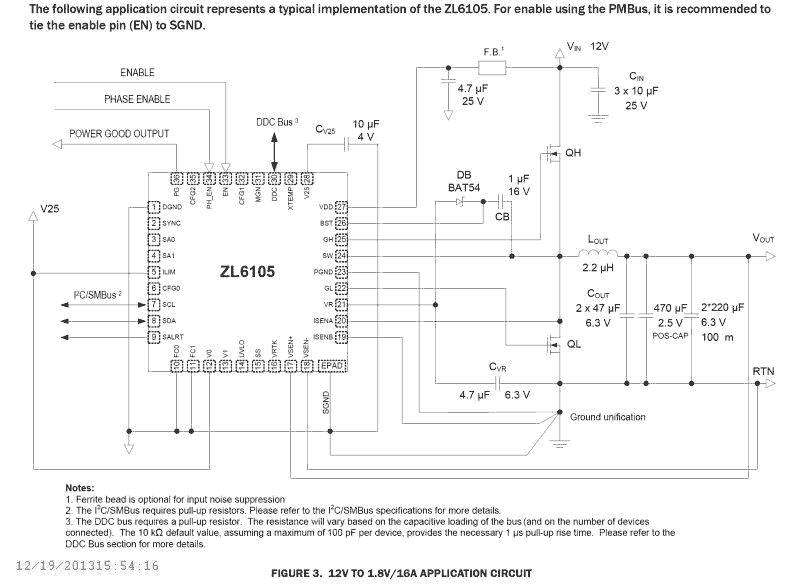
The ZL6105 is a digital power controller with integrated MOSFET drivers. Auto compensation eliminates the need for manual compensation design work. Adaptive performance optimization algorithms improve power conversion efficiency. Zilker Labs Digital-DC™ technology enables a blend of power conversion performance and power management features. The ZL6105 is designed to be a flexible building block for DC power and can be easily adapted to designs ranging from a single-phase power supply operating from a 3. 3V to a multiphase current sharing supply operating from a 12V input. The ZL6105 eliminates the need for complicated power supply managers as well as numerous external discrete components. The ZL6105 uses the I2C/SMBus™ with PMBus™ protocol for communication with a host controller and the Digital-DC bus for communication between Zilker Labs devices. The ZL6105 is pin for pin compatible with the ZL2008. The POLA VOUT table and compensation table have been removed. A new single resistor VOUT table and the Auto Compensation feature have been added.
Applications
- Servers/Storage Equipment
- Telecom/Datacom Equipment
- Power Supply Modules
| Part Number | Status | Samples | Stock | RoHS | Package | Carrier Type | MOQ |
|---|---|---|---|---|---|---|---|
| ZL6105ALAF | Obsolete | N/A | Out of Stock | RoHS:EN | QFN | Tube | 400 |
| ZL6105ALAFT | Obsolete | N/A | In Stock | RoHS:EN | QFN | Reel | 500 |
| ZL6105ALAFTK | Obsolete | N/A | Out of Stock | RoHS:EN | QFN | Reel | 1000 |
Filters
Applied Filters
- Application NotePDF 807 KB an2035 May 09, 2018AI-generated Summary: Compensation involves canceling poles with zeros to simplify system response, balancing bandwidth for transient response and noise sensitivity. A Type 3 PID compensator modifies the error signal with proportional, integral, and derivative feedback to control the PWM generator. Digital PID compensation offers flexibility using G, F, and Q coefficients to match compensator and plant characteristics. Stability depends on phase and gain margins, with typical targets of 45° phase margin and 6 dB gain margin. The CompZL tool aids initial compensation by modeling the plant and adjusting parameters to optimize stability and transient performance.
- Application NotePDF 573 KB an2032 May 08, 2018AI-generated Summary: The document explains the Non-Linear Response (NLR) configuration for DDC products, detailing threshold settings, correction times, and operating modes. Inner and outer thresholds adjust voltage response to load changes, with correction times proportional to switching periods. Three NLR modes—single level, two level, and hysteretic—offer flexibility based on power filter damping. Blanking time prevents rapid switching. Typical application circuits illustrate these concepts.
- Product Change NoticePDF 124 KB PCN16089A Oct 31, 2016
- GuidePDF 714 KB production-config-tool-guide Oct 29, 2016
- Product Change NoticePDF 235 KB PCN15017 Apr 21, 2015
- Product Change NoticePDF 221 KB PCN14010 Mar 03, 2014
- Product AdvisoryPDF 167 KB PA12097 Dec 20, 2012
- Application NotePDF 2.47 MB an1779 Jun 26, 2012AI-generated Summary: The document explains configuring current sharing on ZL6105 and ZL8101 devices, focusing on handling dropped phases and SYNC clock management. It details how the SYNC clock continues from a dropped member if still active, and how the reference phase is reassigned when dropped. The phase offset redistributes automatically among active members. It also covers NLR threshold scaling to adjust ripple thresholds based on active members. Multiple sharing groups using a common SYNC clock are described, with autonomous phase spreading within groups but not between them.
- Product Change NoticePDF 129 KB PCN12024 Mar 30, 2012
- Manual - HardwarePDF 693 KB intersil-zlusb-install-guide May 25, 2010
Recommended Documents (1)
Datasheets (1)
- GuidePDF 714 KB production-config-tool-guide Oct 29, 2016
- Manual - HardwarePDF 693 KB intersil-zlusb-install-guide May 25, 2010
Manuals & Guides (3)
- Application NotePDF 807 KB an2035 May 09, 2018AI-generated Summary: Compensation involves canceling poles with zeros to simplify system response, balancing bandwidth for transient response and noise sensitivity. A Type 3 PID compensator modifies the error signal with proportional, integral, and derivative feedback to control the PWM generator. Digital PID compensation offers flexibility using G, F, and Q coefficients to match compensator and plant characteristics. Stability depends on phase and gain margins, with typical targets of 45° phase margin and 6 dB gain margin. The CompZL tool aids initial compensation by modeling the plant and adjusting parameters to optimize stability and transient performance.
- Application NotePDF 573 KB an2032 May 08, 2018AI-generated Summary: The document explains the Non-Linear Response (NLR) configuration for DDC products, detailing threshold settings, correction times, and operating modes. Inner and outer thresholds adjust voltage response to load changes, with correction times proportional to switching periods. Three NLR modes—single level, two level, and hysteretic—offer flexibility based on power filter damping. Blanking time prevents rapid switching. Typical application circuits illustrate these concepts.
- Application NotePDF 2.47 MB an1779 Jun 26, 2012AI-generated Summary: The document explains configuring current sharing on ZL6105 and ZL8101 devices, focusing on handling dropped phases and SYNC clock management. It details how the SYNC clock continues from a dropped member if still active, and how the reference phase is reassigned when dropped. The phase offset redistributes automatically among active members. It also covers NLR threshold scaling to adjust ripple thresholds based on active members. Multiple sharing groups using a common SYNC clock are described, with autonomous phase spreading within groups but not between them.
- Application NotePDF 1.9 MB an2033 Oct 13, 2008AI-generated Summary: The document details the Intersil PMBus command set for Digital-DC products, covering configuration, status, monitoring, identification, and supervisory commands. It includes guidelines for command usage, emphasizing disabling devices when changing settings except for specific commands. Timing recommendations for command sequences ensure proper device operation. Reference documents and forums for PMBus and SMBus standards are also provided.
- Application NotePDF 1.36 MB an2034 Jan 19, 2004AI-generated Summary: The document explains configuring current sharing on ZL2004 and ZL2006 devices, focusing on phase control in multi-phase converters. It details how to drop and add phases in a 3-phase group, redistributing phase offsets from 120° to 180° and back. It covers automatic phase offset distribution, SYNC clock configuration, and NLR threshold scaling based on active members. The INTERLEAVE command manages phase offsets between multiple sharing groups sharing the same SYNC clock.View More (7)
Application Notes & White Papers (7)
- Product Change NoticePDF 124 KB PCN16089A Oct 31, 2016
- Product Change NoticePDF 235 KB PCN15017 Apr 21, 2015
Product Notices (PCN, EOL, etc) (8)
No Results Found.
Make sure all keywords are spelled correctly.
Try fewer, different, or more general terms to vary your search.
If you have filters applied, consider deselecting some to broaden your results.
- Search our extensive knowledgebase, designed to help customers with their FAQs.
- Get help from our expert Renesas technical staff and community on our support forums.
No Results Found.
Make sure all keywords are spelled correctly.
Try fewer, different, or more general terms to vary your search.
If you have filters applied, consider deselecting some to broaden your results.
- Search our extensive knowledgebase, designed to help customers with their FAQs.
- Get help from our expert Renesas technical staff and community on our support forums.
No Results Found.
Make sure all keywords are spelled correctly.
Try fewer, different, or more general terms to vary your search.
If you have filters applied, consider deselecting some to broaden your results.
- Search our extensive knowledgebase, designed to help customers with their FAQs.
- Get help from our expert Renesas technical staff and community on our support forums.
No Results Found.
Make sure all keywords are spelled correctly.
Try fewer, different, or more general terms to vary your search.
If you have filters applied, consider deselecting some to broaden your results.
- Search our extensive knowledgebase, designed to help customers with their FAQs.
- Get help from our expert Renesas technical staff and community on our support forums.
No Results Found.
Make sure all keywords are spelled correctly.
Try fewer, different, or more general terms to vary your search.
If you have filters applied, consider deselecting some to broaden your results.
- Search our extensive knowledgebase, designed to help customers with their FAQs.
- Get help from our expert Renesas technical staff and community on our support forums.
No Results Found.
Make sure all keywords are spelled correctly.
Try fewer, different, or more general terms to vary your search.
If you have filters applied, consider deselecting some to broaden your results.
- Search our extensive knowledgebase, designed to help customers with their FAQs.
- Get help from our expert Renesas technical staff and community on our support forums.
No Results Found.
Make sure all keywords are spelled correctly.
Try fewer, different, or more general terms to vary your search.
If you have filters applied, consider deselecting some to broaden your results.
- Search our extensive knowledgebase, designed to help customers with their FAQs.
- Get help from our expert Renesas technical staff and community on our support forums.
Other (1)
No Results Found.
Make sure all keywords are spelled correctly.
Try fewer, different, or more general terms to vary your search.
If you have filters applied, consider deselecting some to broaden your results.
- Search our extensive knowledgebase, designed to help customers with their FAQs.
- Get help from our expert Renesas technical staff and community on our support forums.
No Results Found.
Make sure all keywords are spelled correctly.
Try fewer, different, or more general terms to vary your search.
If you have filters applied, consider deselecting some to broaden your results.
- Search our extensive knowledgebase, designed to help customers with their FAQs.
- Get help from our expert Renesas technical staff and community on our support forums.
Filters
Applied Filters
Software & Tools
Filter by Type
Filter by Provider
Sample Code
Filter by Application
Filter by Function
Filter by Compiler
Filter by IDE
Simulation Models
Partner Solutions
- Software & Tools - Other
No Results Found.
Make sure all keywords are spelled correctly.
Try fewer, different, or more general terms to vary your search.
If you have filters applied, consider deselecting some to broaden your results.
- Search our extensive knowledgebase, designed to help customers with their FAQs.
- Get help from our expert Renesas technical staff and community on our support forums.
- Software & Tools - Other
Software & Tools (1)
No Results Found.
Make sure all keywords are spelled correctly.
Try fewer, different, or more general terms to vary your search.
If you have filters applied, consider deselecting some to broaden your results.
- Search our extensive knowledgebase, designed to help customers with their FAQs.
- Get help from our expert Renesas technical staff and community on our support forums.
No Results Found.
Make sure all keywords are spelled correctly.
Try fewer, different, or more general terms to vary your search.
If you have filters applied, consider deselecting some to broaden your results.
- Search our extensive knowledgebase, designed to help customers with their FAQs.
- Get help from our expert Renesas technical staff and community on our support forums.
No Results Found.
Make sure all keywords are spelled correctly.
Try fewer, different, or more general terms to vary your search.
If you have filters applied, consider deselecting some to broaden your results.
- Search our extensive knowledgebase, designed to help customers with their FAQs.
- Get help from our expert Renesas technical staff and community on our support forums.
Support Communities
-
Add ZL6100 device to power navigator (jar file
Hi Exist the chance to add the Jar files for ZL6100 to power navigator, i only have the ZL6105 on the device list Regards
Dec 4, 2024

Support Communities


