Features
- Integrated MOSFET Switches
- 6A Continuous Output Current
- ±1% Output Voltage Accuracy
- Auto Compensation
- Snapshot™ Parametric Capture
- I2C/SMBus Interface, PMBus Compatible
- Internal Non-Volatile Memory (NVM)
Description
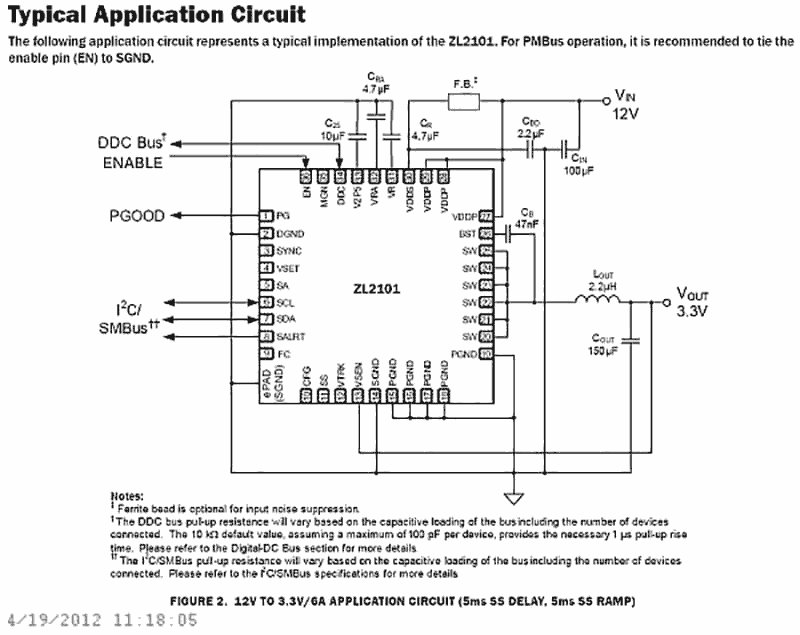
The ZL2101 is a 6A digital converter with auto compensation and integrated power management that combines an integrated synchronous step-down DC/DC converter with key power management functions in a small package, resulting in a flexible and integrated solution. The ZL2101 can provide an output voltage from 0. 54V to 5. 5V (with margin) from an input voltage between 4. 5V and 14V. Internal low rDS(ON) synchronous power MOSFETs enable the ZL2101 to deliver continuous loads up to 6A with high efficiency. An internal Schottky bootstrap diode reduces discrete component count. The ZL2101 also supports phase spreading to reduce system input capacitance. Power management features such as digital soft-start delay and ramp, sequencing, tracking, and margining can be configured by simple pin-strapping or through an on-chip serial port. The ZL2101 uses the PMBus™ protocol for communication with a host controller and the Digital-DC bus for interoperability between other Zilker Labs devices.
Applications
- Telecom, Networking, Storage equipment
- Test and Measurement Equipment
- Industrial Control Equipment
- 5V and 12V Distributed Power Systems
| Part Number | Status | Samples | Stock | RoHS | Package | Lead Count (#) | Carrier Type | Moisture Sensitivity Level (MSL) | Pb (Lead) Free | Pb Free Category | Temp. Range (°C) |
|---|---|---|---|---|---|---|---|---|---|---|---|
| ZL2101ALAF | Obsolete | N/A | In Stock | RoHS:EN | QFN | 36# | Tube | 2 | Yes | Pb-Free 100% Matte Tin Plate w/Anneal-e3 | -40 to +85°C |
| ZL2101ALAFT | Obsolete | N/A | Out of Stock | RoHS:EN | QFN | 36# | Reel | 2 | Yes | Pb-Free 100% Matte Tin Plate w/Anneal-e3 | -40 to +85°C |
| ZL2101ALAFTK | Obsolete | N/A | Out of Stock | RoHS:EN | QFN | 36# | Reel | 2 | Yes | Pb-Free 100% Matte Tin Plate w/Anneal-e3 | -40 to +85°C |
Filters
Applied Filters
- Manual - Development ToolsPDF 257 KB r12uz0043eu-islusbeval1z-user-manual Feb 28, 2019
- Application NotePDF 807 KB an2035 May 09, 2018AI-generated Summary: Compensation involves canceling poles with zeros to simplify system response, balancing bandwidth for transient response and noise sensitivity. A Type 3 PID compensator modifies the error signal with proportional, integral, and derivative feedback to control the PWM generator. Digital PID compensation offers flexibility using G, F, and Q coefficients to match compensator and plant characteristics. Stability depends on phase and gain margins, with typical targets of 45° phase margin and 6 dB gain margin. The CompZL tool aids initial compensation by modeling the plant and adjusting parameters to optimize stability and transient performance.
- Application NotePDF 1.43 MB an2010 May 01, 2018AI-generated Summary: The document details power dissipation characteristics and thermal guidelines for Digital-DC™ controllers with internal and external switches. It explains how power dissipation depends on gate drive current, switching frequency, and FET gate charge. It provides calculations for power dissipation in different scenarios and highlights the importance of managing package temperature via external drivers or reduced operating parameters. The thermal limits for components, including PCB materials and junction temperatures, are also specified.
- Product Change NoticePDF 124 KB PCN16089A Oct 31, 2016
- GuidePDF 714 KB production-config-tool-guide Oct 29, 2016
- Manual - HardwarePDF 693 KB intersil-zlusb-install-guide May 25, 2010
- Application NotePDF 1.9 MB an2033 Oct 13, 2008AI-generated Summary: The document details the Intersil PMBus command set for Digital-DC products, covering configuration, status, monitoring, identification, and supervisory commands. It includes guidelines for command usage, emphasizing disabling devices when changing settings except for specific commands. Timing recommendations for command sequences ensure proper device operation. Reference documents and forums for PMBus and SMBus standards are also provided.
- Application NotePDF 397 KB an1684 Jan 19, 2004AI-generated Summary: The document outlines important legal disclaimers and usage guidelines for semiconductor products. It emphasizes user responsibility for product design and safety, disclaims liability for damages, and clarifies no intellectual property licenses are granted. Products are categorized by quality grades with specific application recommendations. Users must comply with laws, avoid unauthorized modifications, and ensure safe use within specified conditions. Contact details for Renesas Electronics sales offices worldwide are provided.
- Application NotePDF 509 KB an1681 Jan 19, 2004AI-generated Summary: The document explains grounding techniques for PCB layouts using a dual op amp example on a single-layer copper board. It compares three grounding schemes: a center spine ground trace, an outer ground plane, and a split/star ground plane, highlighting the benefits of single-point grounding to minimize noise and antenna effects. It emphasizes following current paths, minimizing loop lengths, and ensuring close forward and return paths to reduce interference. The document also includes disclaimers on product use, quality grades, safety, and legal compliance.
Recommended Documents (1)
Datasheets (1)
- Manual - Development ToolsPDF 257 KB r12uz0043eu-islusbeval1z-user-manual Feb 28, 2019
- GuidePDF 714 KB production-config-tool-guide Oct 29, 2016
- Manual - HardwarePDF 693 KB intersil-zlusb-install-guide May 25, 2010
Manuals & Guides (4)
- Application NotePDF 807 KB an2035 May 09, 2018AI-generated Summary: Compensation involves canceling poles with zeros to simplify system response, balancing bandwidth for transient response and noise sensitivity. A Type 3 PID compensator modifies the error signal with proportional, integral, and derivative feedback to control the PWM generator. Digital PID compensation offers flexibility using G, F, and Q coefficients to match compensator and plant characteristics. Stability depends on phase and gain margins, with typical targets of 45° phase margin and 6 dB gain margin. The CompZL tool aids initial compensation by modeling the plant and adjusting parameters to optimize stability and transient performance.
- Application NotePDF 1.43 MB an2010 May 01, 2018AI-generated Summary: The document details power dissipation characteristics and thermal guidelines for Digital-DC™ controllers with internal and external switches. It explains how power dissipation depends on gate drive current, switching frequency, and FET gate charge. It provides calculations for power dissipation in different scenarios and highlights the importance of managing package temperature via external drivers or reduced operating parameters. The thermal limits for components, including PCB materials and junction temperatures, are also specified.
- Application NotePDF 1.9 MB an2033 Oct 13, 2008AI-generated Summary: The document details the Intersil PMBus command set for Digital-DC products, covering configuration, status, monitoring, identification, and supervisory commands. It includes guidelines for command usage, emphasizing disabling devices when changing settings except for specific commands. Timing recommendations for command sequences ensure proper device operation. Reference documents and forums for PMBus and SMBus standards are also provided.
- Application NotePDF 397 KB an1684 Jan 19, 2004AI-generated Summary: The document outlines important legal disclaimers and usage guidelines for semiconductor products. It emphasizes user responsibility for product design and safety, disclaims liability for damages, and clarifies no intellectual property licenses are granted. Products are categorized by quality grades with specific application recommendations. Users must comply with laws, avoid unauthorized modifications, and ensure safe use within specified conditions. Contact details for Renesas Electronics sales offices worldwide are provided.
- Application NotePDF 509 KB an1681 Jan 19, 2004AI-generated Summary: The document explains grounding techniques for PCB layouts using a dual op amp example on a single-layer copper board. It compares three grounding schemes: a center spine ground trace, an outer ground plane, and a split/star ground plane, highlighting the benefits of single-point grounding to minimize noise and antenna effects. It emphasizes following current paths, minimizing loop lengths, and ensuring close forward and return paths to reduce interference. The document also includes disclaimers on product use, quality grades, safety, and legal compliance.
Application Notes & White Papers (5)
- Product Change NoticePDF 124 KB PCN16089A Oct 31, 2016
Product Notices (PCN, EOL, etc) (4)
No Results Found.
Make sure all keywords are spelled correctly.
Try fewer, different, or more general terms to vary your search.
If you have filters applied, consider deselecting some to broaden your results.
- Search our extensive knowledgebase, designed to help customers with their FAQs.
- Get help from our expert Renesas technical staff and community on our support forums.
No Results Found.
Make sure all keywords are spelled correctly.
Try fewer, different, or more general terms to vary your search.
If you have filters applied, consider deselecting some to broaden your results.
- Search our extensive knowledgebase, designed to help customers with their FAQs.
- Get help from our expert Renesas technical staff and community on our support forums.
No Results Found.
Make sure all keywords are spelled correctly.
Try fewer, different, or more general terms to vary your search.
If you have filters applied, consider deselecting some to broaden your results.
- Search our extensive knowledgebase, designed to help customers with their FAQs.
- Get help from our expert Renesas technical staff and community on our support forums.
No Results Found.
Make sure all keywords are spelled correctly.
Try fewer, different, or more general terms to vary your search.
If you have filters applied, consider deselecting some to broaden your results.
- Search our extensive knowledgebase, designed to help customers with their FAQs.
- Get help from our expert Renesas technical staff and community on our support forums.
No Results Found.
Make sure all keywords are spelled correctly.
Try fewer, different, or more general terms to vary your search.
If you have filters applied, consider deselecting some to broaden your results.
- Search our extensive knowledgebase, designed to help customers with their FAQs.
- Get help from our expert Renesas technical staff and community on our support forums.
No Results Found.
Make sure all keywords are spelled correctly.
Try fewer, different, or more general terms to vary your search.
If you have filters applied, consider deselecting some to broaden your results.
- Search our extensive knowledgebase, designed to help customers with their FAQs.
- Get help from our expert Renesas technical staff and community on our support forums.
No Results Found.
Make sure all keywords are spelled correctly.
Try fewer, different, or more general terms to vary your search.
If you have filters applied, consider deselecting some to broaden your results.
- Search our extensive knowledgebase, designed to help customers with their FAQs.
- Get help from our expert Renesas technical staff and community on our support forums.
Other (1)
No Results Found.
Make sure all keywords are spelled correctly.
Try fewer, different, or more general terms to vary your search.
If you have filters applied, consider deselecting some to broaden your results.
- Search our extensive knowledgebase, designed to help customers with their FAQs.
- Get help from our expert Renesas technical staff and community on our support forums.
Filters
Applied Filters
Software & Tools
Filter by Type
Filter by Provider
Sample Code
Filter by Application
Filter by Function
Filter by Compiler
Filter by IDE
Simulation Models
Partner Solutions
- Software & Tools - Other
- Monitor Debugger/RAM MonitorRenesas' PowerNavigator™ software allows simple configuration and monitoring of multiple Digital-DC devices using a PC with a USB interface.
No Results Found.
Make sure all keywords are spelled correctly.
Try fewer, different, or more general terms to vary your search.
If you have filters applied, consider deselecting some to broaden your results.
- Search our extensive knowledgebase, designed to help customers with their FAQs.
- Get help from our expert Renesas technical staff and community on our support forums.
- Software & Tools - Other
- Monitor Debugger/RAM MonitorRenesas' PowerNavigator™ software allows simple configuration and monitoring of multiple Digital-DC devices using a PC with a USB interface.
Software & Tools (2)
No Results Found.
Make sure all keywords are spelled correctly.
Try fewer, different, or more general terms to vary your search.
If you have filters applied, consider deselecting some to broaden your results.
- Search our extensive knowledgebase, designed to help customers with their FAQs.
- Get help from our expert Renesas technical staff and community on our support forums.
No Results Found.
Make sure all keywords are spelled correctly.
Try fewer, different, or more general terms to vary your search.
If you have filters applied, consider deselecting some to broaden your results.
- Search our extensive knowledgebase, designed to help customers with their FAQs.
- Get help from our expert Renesas technical staff and community on our support forums.
No Results Found.
Make sure all keywords are spelled correctly.
Try fewer, different, or more general terms to vary your search.
If you have filters applied, consider deselecting some to broaden your results.
- Search our extensive knowledgebase, designed to help customers with their FAQs.
- Get help from our expert Renesas technical staff and community on our support forums.