
Features
- Meets Battery Charging Specification BC1.2 for DCP and CDP
- Meets Chinese Telecommunications Industry Standard YD/T 1591-2009
- Supports Non-BC 1.2 charging modes via Automatic selection
- DM/DP Divider Modes 2.7V/2.0V (1A) & 2.0V/2.7V (2A)
- DM/DP 1.2V Mode
- Support Smart-CDP function - Automatic CDP/SDP mode support for Always data Communication
- Compatible with USB 2.0/3.0 power switch requirements
- 73 mΩ (typ) high side MOSFET
- Adjustable Current Limit up to 3.0 A (typ)
- Pb-Free / RoHS Compliant
- Halogen-Free
- TQFN-16 Package
- UL Listed and CB File No. E468659
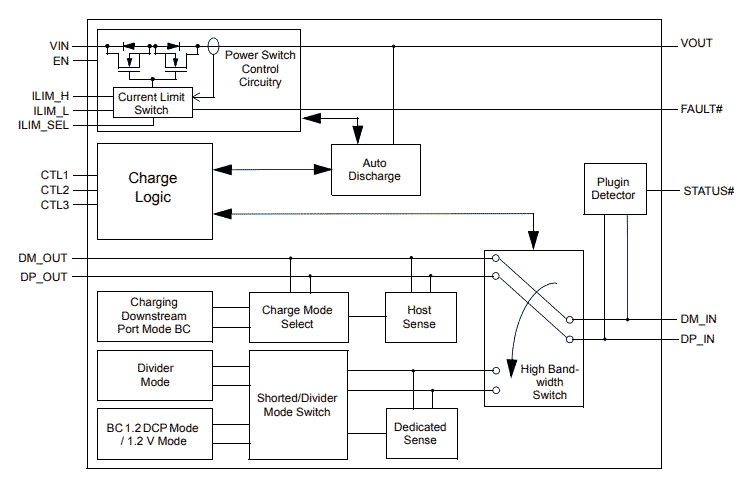
SLGC55546C Block Diagram
Description
The SLGC55546C is a combination of current-limited USB port power switch with a USB 2.0 high-speed data line (D+/D-) switch and USB charging port identification circuit. Applications include notebook PCs and other intelligent USB host devices. The wide bandwidth (2.6 GHz) data-line switch also features low capacitance and low on resistance, allowing signals to pass with minimum edge and phase distortion. The SLGC55546C monitors D+ and D-, providing the correct hand-shaking protocol with compliant client devices.
Applications
- USB Ports/Hubs
- Notebook PCs
- Power bank
- Car charger
- Universal Wall Charging Adapter
| Part Number | Status | Samples | Stock | Package | Budgetary Price (USD) | Lead Count (#) | Carrier Type | Moisture Sensitivity Level (MSL) | Pb (Lead) Free | Temp. Range (°C) | Country of Assembly | Country of Wafer Fabrication |
|---|---|---|---|---|---|---|---|---|---|---|---|---|
| SLGC55546CV | Obsolete | N/A | In Stock | TQFN-16 | 1ku | $0.383 | 16# | Tape & Reel | 1 | Yes | -40 to +85°C | TAIWAN | TAIWAN |
Loading
Filters
Applied Filters
Log in required to subscribe
- Application NotePDF 81 KB Jul 05, 2021AI-generated Summary: The SLG55546 functions as a current limiter by controlling the current to 1.5A, adjustable via a resistor on the ILIM_H pin. When the current exceeds the set limit, the Fault# pin signals a fault by going low. The device integrates current limiting, fault detection, and low power consumption, making it suitable for USB ports, hubs, notebooks, and universal wall chargers. The design simplifies implementation by focusing on current limiting without requiring all USB charging port identification features.
- Application NotePDF 67 KB Jul 05, 2021AI-generated Summary: The SLG55546 manages USB port power by combining current-limited power switching with USB 2.0 high-speed data line switching and charging port identification. It enables multiple USB charging ports to share a single 5V power source without overload by allowing one port to deliver high current while limiting others to lower current. The device monitors data lines and uses a STATUS# pin to toggle charging modes dynamically between ports. This solution supports USB ports, hubs, notebooks, and universal wall chargers with internal protection and low power consumption.
Recommended Documents (1)
Datasheets (1)
No Results Found.
Check Spelling
Make sure all keywords are spelled correctly.
Make sure all keywords are spelled correctly.
Adjust Keywords
Try fewer, different, or more general terms to vary your search.
Try fewer, different, or more general terms to vary your search.
Review Filters
If you have filters applied, consider deselecting some to broaden your results.
If you have filters applied, consider deselecting some to broaden your results.
Need help?
- Search our extensive knowledgebase, designed to help customers with their FAQs.
- Get help from our expert Renesas technical staff and community on our support forums.
- Application NotePDF 81 KB Jul 05, 2021AI-generated Summary: The SLG55546 functions as a current limiter by controlling the current to 1.5A, adjustable via a resistor on the ILIM_H pin. When the current exceeds the set limit, the Fault# pin signals a fault by going low. The device integrates current limiting, fault detection, and low power consumption, making it suitable for USB ports, hubs, notebooks, and universal wall chargers. The design simplifies implementation by focusing on current limiting without requiring all USB charging port identification features.
- Application NotePDF 67 KB Jul 05, 2021AI-generated Summary: The SLG55546 manages USB port power by combining current-limited power switching with USB 2.0 high-speed data line switching and charging port identification. It enables multiple USB charging ports to share a single 5V power source without overload by allowing one port to deliver high current while limiting others to lower current. The device monitors data lines and uses a STATUS# pin to toggle charging modes dynamically between ports. This solution supports USB ports, hubs, notebooks, and universal wall chargers with internal protection and low power consumption.
Application Notes & White Papers (2)
Product Notices (PCN, EOL, etc) (1)
No Results Found.
Check Spelling
Make sure all keywords are spelled correctly.
Make sure all keywords are spelled correctly.
Adjust Keywords
Try fewer, different, or more general terms to vary your search.
Try fewer, different, or more general terms to vary your search.
Review Filters
If you have filters applied, consider deselecting some to broaden your results.
If you have filters applied, consider deselecting some to broaden your results.
Need help?
- Search our extensive knowledgebase, designed to help customers with their FAQs.
- Get help from our expert Renesas technical staff and community on our support forums.
No Results Found.
Check Spelling
Make sure all keywords are spelled correctly.
Make sure all keywords are spelled correctly.
Adjust Keywords
Try fewer, different, or more general terms to vary your search.
Try fewer, different, or more general terms to vary your search.
Review Filters
If you have filters applied, consider deselecting some to broaden your results.
If you have filters applied, consider deselecting some to broaden your results.
Need help?
- Search our extensive knowledgebase, designed to help customers with their FAQs.
- Get help from our expert Renesas technical staff and community on our support forums.
Schematics & Design Files (2)
No Results Found.
Check Spelling
Make sure all keywords are spelled correctly.
Make sure all keywords are spelled correctly.
Adjust Keywords
Try fewer, different, or more general terms to vary your search.
Try fewer, different, or more general terms to vary your search.
Review Filters
If you have filters applied, consider deselecting some to broaden your results.
If you have filters applied, consider deselecting some to broaden your results.
Need help?
- Search our extensive knowledgebase, designed to help customers with their FAQs.
- Get help from our expert Renesas technical staff and community on our support forums.
No Results Found.
Check Spelling
Make sure all keywords are spelled correctly.
Make sure all keywords are spelled correctly.
Adjust Keywords
Try fewer, different, or more general terms to vary your search.
Try fewer, different, or more general terms to vary your search.
Review Filters
If you have filters applied, consider deselecting some to broaden your results.
If you have filters applied, consider deselecting some to broaden your results.
Need help?
- Search our extensive knowledgebase, designed to help customers with their FAQs.
- Get help from our expert Renesas technical staff and community on our support forums.
No Results Found.
Check Spelling
Make sure all keywords are spelled correctly.
Make sure all keywords are spelled correctly.
Adjust Keywords
Try fewer, different, or more general terms to vary your search.
Try fewer, different, or more general terms to vary your search.
Review Filters
If you have filters applied, consider deselecting some to broaden your results.
If you have filters applied, consider deselecting some to broaden your results.
Need help?
- Search our extensive knowledgebase, designed to help customers with their FAQs.
- Get help from our expert Renesas technical staff and community on our support forums.
No Results Found.
Check Spelling
Make sure all keywords are spelled correctly.
Make sure all keywords are spelled correctly.
Adjust Keywords
Try fewer, different, or more general terms to vary your search.
Try fewer, different, or more general terms to vary your search.
Review Filters
If you have filters applied, consider deselecting some to broaden your results.
If you have filters applied, consider deselecting some to broaden your results.
Need help?
- Search our extensive knowledgebase, designed to help customers with their FAQs.
- Get help from our expert Renesas technical staff and community on our support forums.
Other (2)
No Results Found.
Check Spelling
Make sure all keywords are spelled correctly.
Make sure all keywords are spelled correctly.
Adjust Keywords
Try fewer, different, or more general terms to vary your search.
Try fewer, different, or more general terms to vary your search.
Review Filters
If you have filters applied, consider deselecting some to broaden your results.
If you have filters applied, consider deselecting some to broaden your results.
Need help?
- Search our extensive knowledgebase, designed to help customers with their FAQs.
- Get help from our expert Renesas technical staff and community on our support forums.
Loading
Filters
Applied Filters
Software & Tools
Filter by Type
Filter by Provider
Sample Code
Filter by Application
Filter by Function
Filter by Compiler
Filter by IDE
Simulation Models
Partner Solutions
No Results Found.
Check Spelling
Make sure all keywords are spelled correctly.
Make sure all keywords are spelled correctly.
Adjust Keywords
Try fewer, different, or more general terms to vary your search.
Try fewer, different, or more general terms to vary your search.
Review Filters
If you have filters applied, consider deselecting some to broaden your results.
If you have filters applied, consider deselecting some to broaden your results.
Need help?
- Search our extensive knowledgebase, designed to help customers with their FAQs.
- Get help from our expert Renesas technical staff and community on our support forums.
Software & Tools (2)
No Results Found.
Check Spelling
Make sure all keywords are spelled correctly.
Make sure all keywords are spelled correctly.
Adjust Keywords
Try fewer, different, or more general terms to vary your search.
Try fewer, different, or more general terms to vary your search.
Review Filters
If you have filters applied, consider deselecting some to broaden your results.
If you have filters applied, consider deselecting some to broaden your results.
Need help?
- Search our extensive knowledgebase, designed to help customers with their FAQs.
- Get help from our expert Renesas technical staff and community on our support forums.
No Results Found.
Check Spelling
Make sure all keywords are spelled correctly.
Make sure all keywords are spelled correctly.
Adjust Keywords
Try fewer, different, or more general terms to vary your search.
Try fewer, different, or more general terms to vary your search.
Review Filters
If you have filters applied, consider deselecting some to broaden your results.
If you have filters applied, consider deselecting some to broaden your results.
Need help?
- Search our extensive knowledgebase, designed to help customers with their FAQs.
- Get help from our expert Renesas technical staff and community on our support forums.
No Results Found.
Check Spelling
Make sure all keywords are spelled correctly.
Make sure all keywords are spelled correctly.
Adjust Keywords
Try fewer, different, or more general terms to vary your search.
Try fewer, different, or more general terms to vary your search.
Review Filters
If you have filters applied, consider deselecting some to broaden your results.
If you have filters applied, consider deselecting some to broaden your results.
Need help?
- Search our extensive knowledgebase, designed to help customers with their FAQs.
- Get help from our expert Renesas technical staff and community on our support forums.

Support Communities
Get quick technical support online from Renesas Engineering Community technical staff.

Knowledge Base
Browse our knowledge base for helpful articles, FAQs, and other useful resources.

