Features
- 2:4 intelligent switch with VIOM and VIOS LDOs enabled
- Two controller-side (upstream/management) ports
- Up to eight target-side (downstream/subordinate) ports
- On-chip I2C/I3C Target (target) interface
- Controller-side port multiplexer
- Controller switching via in-band I2C/I3C commands or pin selection
- Controller-controller communication and messaging support
- Hot join support
- Support both I2C and I3C Basic 1.0 protocol
- All ports support 1.0 to 1.8V I2C/I3C compatible operation
- All ports support I2C open-drain only operation up to 3.3V
- JEDEC SPD/module management bus context support
- Controller-to-target analog switch mode support
- Hybrid analog switch and re-driving support (patent pending)
- Mixed I2C/I3C bus support
- In-band interrupt (IBI) and IBI optimization support
- Single 3.3V power supply
- Controller-target level shifting support
- On-chip voltage regulators or direct platform connection of IO supplies
- SMBus transaction agent for SMBus compatibility
- SMBus SCL stretching support
- SMBus SCL stretching support in open-drain only operation
- Network partition support
- Mixed transparent and non-transparent bridging (patent pending)
Description
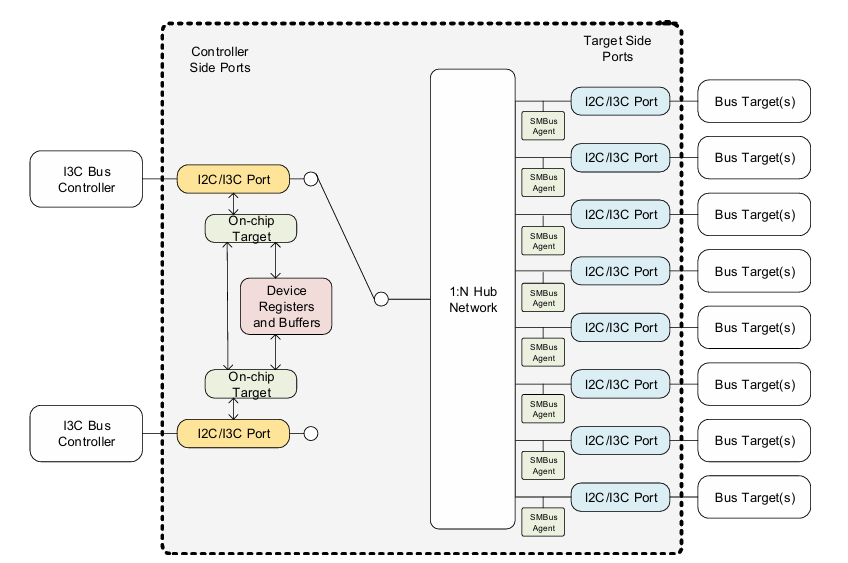
RG3M49B12 is a 2:4 intelligent switch with downstream ports default enabled. The RG3MxxB12B1 is a family of I2C/I3C multiple-port hub devices featuring two I2C/I3C controller-side ports and up to eight I2C/IC target-side ports. An RG3MxxB12B1 device provides connectivity to up to two controllers, and up to eight targets. By cascading and duplicating the RG3MxxB12B1, the user builds an RG3MxxB12B1 hub network to provide connectivity to a number of devices, with extended reach distance, and running with different levels of I2C, I3C, and SMBus protocols.
In an RG3MxxB12B1 device, each controller-side port is associated with an on-chip I2C/I3C target interface. Each I2C/I3C interface accesses on-chip registers. Controller-controller communication is achieved with shared registers and intra-port IBI channels. One of the two controller-side ports is selected to connect to a 1:N hub network, which allows the selected controller to get access to the enabled target-side ports in the hub network. The controller selection multiplexer allows the two controllers to share the downstream I2C/I3C network.
The 1:N I2C/I3C hub network allows the management of the I2C/I3C hierarchy with expansion to up to eight target-side ports. The expanded ports allow the system to reduce the load that the selected controller sees at any moment. The hub network maintains software level transparently. All devices connected to the hub target-side ports are accessed the same way as if all ports were directly connected as if the hub network did not exist. The hub network also allows physical segmentation of the I2C/I3C hierarchy, employing on-the-fly connecting and disconnecting to any of the expanded ports.
Each target-side port is associated with a bus agent. This agent independently receives or transmits legacy SMBus transactions and allows SCL stretching within the SMBus segment behind the target-side port. When the SMBus agent is active, the agent is engaged directly with the target-side port and the hub network to the port is disconnected.
Parameters
| Attributes | Value |
|---|---|
| Function | I3C 2:4 Intelligent Switch |
| Supply Voltage (V) | 3.3 - 3.3 |
| Temp. Range (°C) | -40 to 85°C |
Package Options
| Pkg. Type | Pkg. Dimensions (mm) | Lead Count (#) | Pitch (mm) |
|---|---|---|---|
| VFQFPN | 4.0 x 4.0 x 0.9 | 28 | 0.4 |
Applications
- DIMM I3C Fan-out
- I3C/I2C/SMBus Compatibility
- I3C Port Expansion and Level Adaptation
- I3C Topology Management
- I3C Signal Integrity Management
- Datasheet - Short-FormRG3MxxB12B1 Short-Form DatasheetRECOMMENDEDPDF 199 KB R10DO0004EU0102 Rev.1.02 Dec 14, 2024The RG3M89B12B1 is an I3C 2:8 hub that enables scalable I2C and I3C connectivity by linking up to two controllers with multiple downstream targets across extended networks. It simplifies system design with transparent device access, dynamic port switching, and protocol interoperability. The device enhances signal integrity, manages bus hierarchy, and supports flexible topology expansion for advanced DIMM and platform management.
Recommended Documents (1)
- Datasheet - Short-FormRG3MxxB12B1 Short-Form DatasheetRECOMMENDEDPDF 199 KB R10DO0004EU0102 Rev.1.02 Dec 14, 2024The RG3M89B12B1 is an I3C 2:8 hub that enables scalable I2C and I3C connectivity by linking up to two controllers with multiple downstream targets across extended networks. It simplifies system design with transparent device access, dynamic port switching, and protocol interoperability. The device enhances signal integrity, manages bus hierarchy, and supports flexible topology expansion for advanced DIMM and platform management.
Datasheets (1)
No Results Found.
Make sure all keywords are spelled correctly.
Try fewer, different, or more general terms to vary your search.
If you have filters applied, consider deselecting some to broaden your results.
- Search our extensive knowledgebase, designed to help customers with their FAQs.
- Get help from our expert Renesas technical staff and community on our support forums.
No Results Found.
Make sure all keywords are spelled correctly.
Try fewer, different, or more general terms to vary your search.
If you have filters applied, consider deselecting some to broaden your results.
- Search our extensive knowledgebase, designed to help customers with their FAQs.
- Get help from our expert Renesas technical staff and community on our support forums.
No Results Found.
Make sure all keywords are spelled correctly.
Try fewer, different, or more general terms to vary your search.
If you have filters applied, consider deselecting some to broaden your results.
- Search our extensive knowledgebase, designed to help customers with their FAQs.
- Get help from our expert Renesas technical staff and community on our support forums.
No Results Found.
Make sure all keywords are spelled correctly.
Try fewer, different, or more general terms to vary your search.
If you have filters applied, consider deselecting some to broaden your results.
- Search our extensive knowledgebase, designed to help customers with their FAQs.
- Get help from our expert Renesas technical staff and community on our support forums.
No Results Found.
Make sure all keywords are spelled correctly.
Try fewer, different, or more general terms to vary your search.
If you have filters applied, consider deselecting some to broaden your results.
- Search our extensive knowledgebase, designed to help customers with their FAQs.
- Get help from our expert Renesas technical staff and community on our support forums.
No Results Found.
Make sure all keywords are spelled correctly.
Try fewer, different, or more general terms to vary your search.
If you have filters applied, consider deselecting some to broaden your results.
- Search our extensive knowledgebase, designed to help customers with their FAQs.
- Get help from our expert Renesas technical staff and community on our support forums.
No Results Found.
Make sure all keywords are spelled correctly.
Try fewer, different, or more general terms to vary your search.
If you have filters applied, consider deselecting some to broaden your results.
- Search our extensive knowledgebase, designed to help customers with their FAQs.
- Get help from our expert Renesas technical staff and community on our support forums.
No Results Found.
Make sure all keywords are spelled correctly.
Try fewer, different, or more general terms to vary your search.
If you have filters applied, consider deselecting some to broaden your results.
- Search our extensive knowledgebase, designed to help customers with their FAQs.
- Get help from our expert Renesas technical staff and community on our support forums.
No Results Found.
Make sure all keywords are spelled correctly.
Try fewer, different, or more general terms to vary your search.
If you have filters applied, consider deselecting some to broaden your results.
- Search our extensive knowledgebase, designed to help customers with their FAQs.
- Get help from our expert Renesas technical staff and community on our support forums.
No Results Found.
Make sure all keywords are spelled correctly.
Try fewer, different, or more general terms to vary your search.
If you have filters applied, consider deselecting some to broaden your results.
- Search our extensive knowledgebase, designed to help customers with their FAQs.
- Get help from our expert Renesas technical staff and community on our support forums.
No Results Found.
Make sure all keywords are spelled correctly.
Try fewer, different, or more general terms to vary your search.
If you have filters applied, consider deselecting some to broaden your results.
- Search our extensive knowledgebase, designed to help customers with their FAQs.
- Get help from our expert Renesas technical staff and community on our support forums.
No Results Found.
Make sure all keywords are spelled correctly.
Try fewer, different, or more general terms to vary your search.
If you have filters applied, consider deselecting some to broaden your results.
- Search our extensive knowledgebase, designed to help customers with their FAQs.
- Get help from our expert Renesas technical staff and community on our support forums.