Features
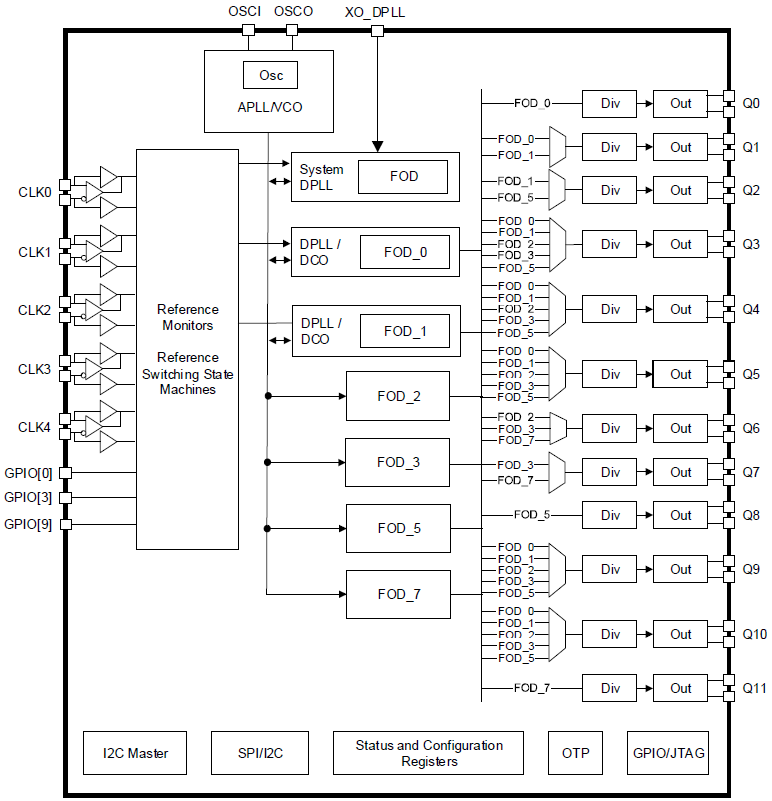
- Two timing channels and six independent frequency domains
- Output jitter below 100fs RMS
- Digital PLLs (DPLLs) lock to any frequency from 0.5kHz to 1GHz
- DPLLs/Digitally Controlled Oscillators (DCOs) generate any frequency from 0.5Hz to 1GHz
- DCO outputs can be aligned in phase and frequency with the outputs of any DPLL or DCO
- Can be used as a jitter attenuator, clock generator, or synchronizer
- Reference monitors qualify/disqualify references depending on LOS, activity, frequency monitoring, and/or LOS input pins
- Automatic reference selection state machines select the active reference for each DPLL based on the reference monitors, priority tables, revertive/non-revertive, and other programmable settings
- Device requires a crystal oscillator or fundamental-mode crystal: 25MHz to 54MHz
- The device can configure itself automatically after reset via:
- Internal customer-programmable one-time programmable (OTP) memory
- Standard external I²C EPROM via separate I²C Master Port
Description
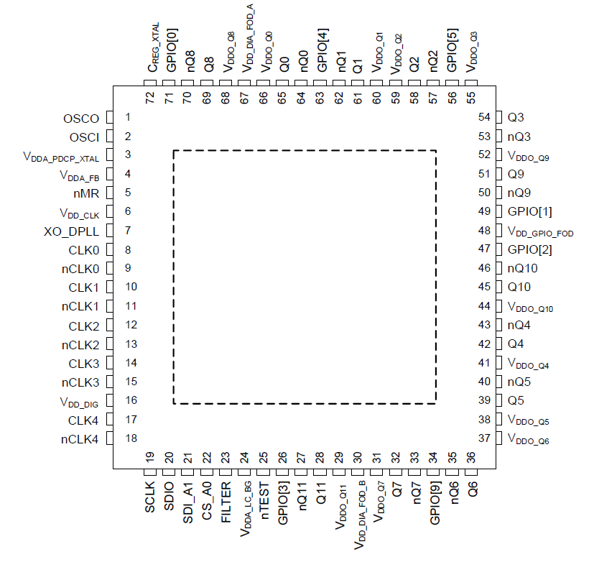
The RC32112A regenerates and distributes ultra-low jitter clock outputs and features up to six independent frequency domains that can be either locked to the external reference clock or locked to a free-run crystal or oscillator. Digital PLLs (DPLLs) support hitless reference switching between references from redundant timing sources. The device supports multiple independent timing channels for IEEE 1588 clock synthesis, SyncE clock generation, jitter attenuation, and radio clock generation including SYSREF generation for converters. Input-to-input, input-to-output, and output-to-output phase skew can all be precisely managed. The device outputs ultra-low jitter clocks that can directly synchronize SerDes running at up to 56Gbps; as well as CPRI/OBSAI, SONET/SDH ADC/DAC. The device is ideal for use in 100G/200G/400G/800G telecom switch line cards, fabric cards, and wireless small cell applications.
Parameters
| Attributes | Value |
|---|---|
| Product Category | Jitter Attenuators |
| Part Number | Status | Samples | Longevity | Stock | Package | Lead Count (#) | Carrier Type | Moisture Sensitivity Level (MSL) | Pb (Lead) Free | Pb Free Category | Temp. Range (°C) |
|---|---|---|---|---|---|---|---|---|---|---|---|
| RC32112A000GN2#BB0 | Active | Available | 2040 Apr | Out of Stock | VFQFPN | 72# | Tray | 3 | Yes | e3 Sn | -40 to 85°C |
| RC32112A000GN2#KB0 | Active | N/A | 2040 Apr | Out of Stock | QFN | 72# | Tape & Reel | Yes | -40 to +85°C |
Filters
Applied Filters
- Application NotePDF 196 KB R31AN0083EU0110 Rev.1.10 Aug 13, 2025
- Application NotePDF 704 KB R31AN0054EU0100 Rev.1.00 Jun 21, 2023AI-generated Summary: The Frequency List Wizard in Timing Commander enables users to generate TCS files by entering input and output frequencies, groups, and signal types. It supports ClockMatrix devices such as RC32012A, RC32112A, RC22112A, 8A34005, and RC38612. Users map clocks to groups, defining which outputs lock to which inputs. The tool automates channel and output assignments, including handling complex configurations with multiple DPLLs and Output TDCs. This feature is available from Timing Commander Personality version 10.9.0 onward, simplifying clock configuration for supported devices.
- Application NoteAI-generated Summary: ClockMatrix devices use frame pulse and sync pulse alignment modes to synchronize input and output clocks in applications like IEEE 1588/PTP and SyncE. Frame pulse mode aligns output low-speed signals to edges of high-speed signals but does not guarantee phase alignment between input and output low-speed signals. Sync pulse mode aligns both high- and low-speed signals precisely, minimizing delay and preserving phase information. The document details configuration procedures, operational behavior, and switching impacts for these modes, emphasizing DPLL settings, fast lock features, and alignment triggers to optimize clock synchronization.
- Application NotePDF 354 KB Nov 04, 2020AI-generated Summary: The document explains methods to change DPLL settings during a reference switch in ClockMatrix devices. It covers using predefined configurations for two references, enabling automatic switching without manual register writes, and manual register write methods for more than two configurations. Key parameters include loop bandwidth, damping factor, phase slope limiting, and lock criteria. The procedure involves placing the DPLL in holdover mode, updating settings, switching references, and re-locking. Examples demonstrate configurations for various input frequencies and standards like GNSS, SyncE, and PTP clocks, emphasizing stable switching without output glitches.
- Application NotePDF 390 KB Jun 01, 2020AI-generated Summary: The document explains the mapping between input clock pins (CLK, nCLK, and GPIO) and internal clock names used by firmware in the ClockMatrix 8A34001 device. It details how multiplexors route clock signals from pins to functional blocks and how clock names vary based on configuration. Each clock input pair can function as differential or single-ended clocks, with GPIO pins serving as alternate inputs. The document includes tables listing clock names, pin assignments, and register controls for clock routing, alongside a signal routing diagram. It also references related datasheets and programming guides for further configuration details.
- Application NotePDF 880 KB May 07, 2020AI-generated Summary: Exact translation of non-integer frequencies is achieved by configuring ClockMatrix devices using M/N fractional ratios, where M is a 48-bit integer and N is a 16-bit integer. Precise frequency settings are critical to avoid errors in applications like 10GB Ethernet FEC and 1588 phase lock. The ClockMatrix GUI supports arithmetic expressions for input and output frequencies, enabling exact frequency configuration including fractional and absolute offsets. Examples demonstrate how complex ratios are simplified and applied to input and output frequency settings, ensuring zero translation errors and high precision.
- Application NoteAI-generated Summary: Internal feedback aligns two DPLLs in frequency and phase with minimal internal delay, while external feedback compensates for trace delays in zero-delay phase locked loop applications. Combining internal feedback and Output TDC enables multi-channel alignment at 1PPS beyond the two combo source limit. Internal feedback configuration disables reference selection per channel and is set via GUI or registers, with specific register fields controlling feedback source and enablement.
Recommended Documents (1)
Datasheets (1)
Manuals & Guides (3)
- Application NotePDF 196 KB R31AN0083EU0110 Rev.1.10 Aug 13, 2025
- Application NotePDF 704 KB R31AN0054EU0100 Rev.1.00 Jun 21, 2023AI-generated Summary: The Frequency List Wizard in Timing Commander enables users to generate TCS files by entering input and output frequencies, groups, and signal types. It supports ClockMatrix devices such as RC32012A, RC32112A, RC22112A, 8A34005, and RC38612. Users map clocks to groups, defining which outputs lock to which inputs. The tool automates channel and output assignments, including handling complex configurations with multiple DPLLs and Output TDCs. This feature is available from Timing Commander Personality version 10.9.0 onward, simplifying clock configuration for supported devices.
- Application NoteAI-generated Summary: ClockMatrix devices use frame pulse and sync pulse alignment modes to synchronize input and output clocks in applications like IEEE 1588/PTP and SyncE. Frame pulse mode aligns output low-speed signals to edges of high-speed signals but does not guarantee phase alignment between input and output low-speed signals. Sync pulse mode aligns both high- and low-speed signals precisely, minimizing delay and preserving phase information. The document details configuration procedures, operational behavior, and switching impacts for these modes, emphasizing DPLL settings, fast lock features, and alignment triggers to optimize clock synchronization.
Application Notes & White Papers (18)
- Product Change NoticePDF 123 KB Jul 08, 2019
Product Notices (PCN, EOL, etc) (3)
No Results Found.
Make sure all keywords are spelled correctly.
Try fewer, different, or more general terms to vary your search.
If you have filters applied, consider deselecting some to broaden your results.
- Search our extensive knowledgebase, designed to help customers with their FAQs.
- Get help from our expert Renesas technical staff and community on our support forums.
No Results Found.
Make sure all keywords are spelled correctly.
Try fewer, different, or more general terms to vary your search.
If you have filters applied, consider deselecting some to broaden your results.
- Search our extensive knowledgebase, designed to help customers with their FAQs.
- Get help from our expert Renesas technical staff and community on our support forums.
No Results Found.
Make sure all keywords are spelled correctly.
Try fewer, different, or more general terms to vary your search.
If you have filters applied, consider deselecting some to broaden your results.
- Search our extensive knowledgebase, designed to help customers with their FAQs.
- Get help from our expert Renesas technical staff and community on our support forums.
No Results Found.
Make sure all keywords are spelled correctly.
Try fewer, different, or more general terms to vary your search.
If you have filters applied, consider deselecting some to broaden your results.
- Search our extensive knowledgebase, designed to help customers with their FAQs.
- Get help from our expert Renesas technical staff and community on our support forums.
No Results Found.
Make sure all keywords are spelled correctly.
Try fewer, different, or more general terms to vary your search.
If you have filters applied, consider deselecting some to broaden your results.
- Search our extensive knowledgebase, designed to help customers with their FAQs.
- Get help from our expert Renesas technical staff and community on our support forums.
No Results Found.
Make sure all keywords are spelled correctly.
Try fewer, different, or more general terms to vary your search.
If you have filters applied, consider deselecting some to broaden your results.
- Search our extensive knowledgebase, designed to help customers with their FAQs.
- Get help from our expert Renesas technical staff and community on our support forums.
Marketing Collateral (1)
No Results Found.
Make sure all keywords are spelled correctly.
Try fewer, different, or more general terms to vary your search.
If you have filters applied, consider deselecting some to broaden your results.
- Search our extensive knowledgebase, designed to help customers with their FAQs.
- Get help from our expert Renesas technical staff and community on our support forums.
No Results Found.
Make sure all keywords are spelled correctly.
Try fewer, different, or more general terms to vary your search.
If you have filters applied, consider deselecting some to broaden your results.
- Search our extensive knowledgebase, designed to help customers with their FAQs.
- Get help from our expert Renesas technical staff and community on our support forums.
No Results Found.
Make sure all keywords are spelled correctly.
Try fewer, different, or more general terms to vary your search.
If you have filters applied, consider deselecting some to broaden your results.
- Search our extensive knowledgebase, designed to help customers with their FAQs.
- Get help from our expert Renesas technical staff and community on our support forums.
Filters
Applied Filters
Software & Tools
Filter by Type
Filter by Provider
Sample Code
Filter by Application
Filter by Function
Filter by Compiler
Filter by IDE
Simulation Models
Partner Solutions
- Software & Tools - OtherTCP 53 MB Jul 10, 2024
- Software & Tools - Other
- Software & Tools - Software
- Code GeneratorTiming Commander™ is an innovative Windows™-based software platform enabling system design engineers to configure, program, and monitor sophisticated timing devices with an intuitive and flexible graphical user interface (GUI).
No Results Found.
Make sure all keywords are spelled correctly.
Try fewer, different, or more general terms to vary your search.
If you have filters applied, consider deselecting some to broaden your results.
- Search our extensive knowledgebase, designed to help customers with their FAQs.
- Get help from our expert Renesas technical staff and community on our support forums.
- Software & Tools - OtherTCP 53 MB Jul 10, 2024
- Software & Tools - Other
- Software & Tools - SoftwareView More (7)
Software & Tools (7)
No Results Found.
Make sure all keywords are spelled correctly.
Try fewer, different, or more general terms to vary your search.
If you have filters applied, consider deselecting some to broaden your results.
- Search our extensive knowledgebase, designed to help customers with their FAQs.
- Get help from our expert Renesas technical staff and community on our support forums.
Simulation Models (3)
No Results Found.
Make sure all keywords are spelled correctly.
Try fewer, different, or more general terms to vary your search.
If you have filters applied, consider deselecting some to broaden your results.
- Search our extensive knowledgebase, designed to help customers with their FAQs.
- Get help from our expert Renesas technical staff and community on our support forums.
Introducing the IDT ClockMatrix™ family of devices - high-performance, precision timing solutions designed to simplify clock designs for applications with up to 100 Gbps interface speeds.
They can be used anywhere in a system to perform critical timing functions, such as clock generation, frequency translation, jitter attenuation and phase alignment. A range of devices in the family support BBU, OTN, SyncE, synthesizer and jitter attenuator applications with several density options for each.
Support Communities
-
TIMING COMANDER ABOUT RC32112A
我们的 clock 需要大致如下, 帮忙看能不能满足, 能不能配置成 timing commander,下图红色是 1 个 clock domain,绿色是第二个 clock domain。DPLL 需要满足 G.8262 ...
Jul 16, 2025