Features
- Provides Regulated Output Voltage in the Range 0.9V to 5.5V
- Operates From an Input Battery Voltage Range of 5V to 28V or From 3.3V/5V System Rail
- Complete DDR1 and DDR2 Memory Power Solution with VTT Tracking VDDQ/2 and a VDDQ/2 Buffered Reference Output
- Flexible PWM or HYS Plus PWM Mode Selection with HYS Diode Emulation at Light Loads for Higher System Efficiency
- rDS(ON) Current Sensing
- Excellent Dynamic Response With Voltage Feed-Forward and Current Mode Control Accommodating Wide Range LC Filter Selections
- Undervoltage Lock-Out on VCC Pin
- Power-Good, Overcurrent, Overvoltage, Undervoltage Protection for Both Channels
- Synchronized 300kHz PWM Operation in PWM Mode
- Pb-Free Available (RoHS compliant)
Description
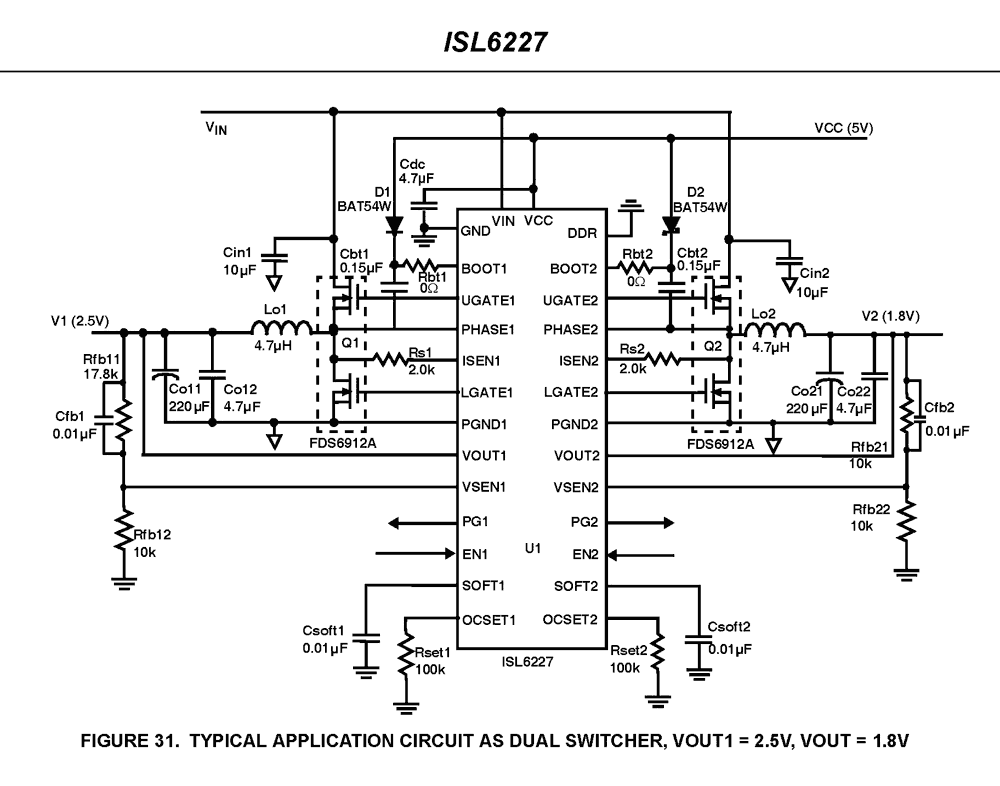
The ISL6227 dual PWM controller delivers high efficiency precision voltage regulation from two synchronous buck DC/DC converters. It was designed especially to provide power regulation for DDR memory, chipsets, graphics and other system electronics in Notebook PCs. The ISL6227's wide input voltage range capability allows for voltage conversion directly from AC/DC adaptor or Li-Ion battery pack. Automatic mode transition of constant-frequency synchronous rectification at heavy load, and hysteretic (HYS) diode-emulation at light load, assure high efficiency over a wide range of conditions. The HYS mode of operation can be disabled separately on each PWM converter if constant-frequency continuous-conduction operation is desired for all load levels. Efficiency is further enhanced by using the lower MOSFET rDS(ON) as the current sense element. Voltage-feed-forward ramp modulation, current mode control, and internal feedback compensation provide fast response to input voltage and load transients. Input current ripple is minimized by channel-to-channel PWM phase shift of 0°, 90° or 180° (determined by input voltage and status of the DDR pin). The ISL6227 can control two independent output voltages adjustable from 0. 9V to 5. 5V, or by activating the DDR pin, transform into a complete DDR memory power supply solution. In DDR mode, CH2 output voltage VTT tracks CH1 output voltage VDDQ. CH2 output can both source and sink current, an essential power supply feature for DDR memory. The reference voltage VREF required by DDR memory is generated as well. In dual power supply applications the ISL6227 monitors the output voltage of both CH1 and CH2. An independent PGOOD (power good) signal is asserted for each channel after the soft-start sequence has completed, and the output voltage is within PGOOD window. In DDR mode CH1 generates the only PGOOD signal. Built-in overvoltage protection prevents the output from going above 115% of the set point by holding the lower MOSFET on and the upper MOSFET off. When the output voltage re-enters regulation, PGOOD will go HIGH and normal operation automatically resumes. Once the soft-start sequence has completed, undervoltage protection latches the offending channel off if the output drops below 75% of its set point value. Adjustable overcurrent protection (OCP) monitors the voltage drop across the rDS(ON) of the lower MOSFET. If more precise current-sensing is required, an external current sense resistor may be used.
Applications
- Notebook PCs and Desknotes
- Tablet PCs/Slates
- Hand-Held Portable Instruments
| Part Number | Status | Samples | Stock | RoHS | Package | Lead Count (#) | Carrier Type | Moisture Sensitivity Level (MSL) | Pitch (mm) | Pkg. Dimensions (mm) | Pb (Lead) Free | Pb Free Category | Temp. Range (°C) |
|---|---|---|---|---|---|---|---|---|---|---|---|---|---|
| ISL6227CAZ | Obsolete | N/A | In Stock | RoHS:EN | QSOP | 28# | Tube | 3 | 0.6mm | 9.9 x 3.9 x 1.55 | Yes | Pb-Free 100% Matte Tin Plate w/Anneal-e3 | 0 to +70°C |
| ISL6227CAZ-T | Obsolete | N/A | In Stock | RoHS:EN | QSOP | 28# | Reel | 3 | 0.6mm | 9.9 x 3.9 x 1.55 | Yes | Pb-Free 100% Matte Tin Plate w/Anneal-e3 | 0 to +70°C |
| ISL6227HRZ | Obsolete | N/A | In Stock | RoHS:EN | QFN | 28# | Tube | 3 | 0.5mm | 5.0 x 5.0 x 0.90 | Yes | Pb-Free 100% Matte Tin Plate w/Anneal-e3 | -10 to +100°C |
| ISL6227HRZ-T | Obsolete | N/A | Out of Stock | RoHS:EN | QFN | 28# | Reel | 3 | 0.5mm | 5.0 x 5.0 x 0.90 | Yes | Pb-Free 100% Matte Tin Plate w/Anneal-e3 | -10 to +100°C |
| ISL6227IAZ | Obsolete | N/A | In Stock | RoHS:EN | QSOP | 28# | Tube | 3 | 0.6mm | 9.9 x 3.9 x 1.55 | Yes | Pb-Free 100% Matte Tin Plate w/Anneal-e3 | -40 to +85°C |
| ISL6227IAZ-T | Obsolete | N/A | In Stock | RoHS:EN | QSOP | 28# | Reel | 3 | 0.6mm | 9.9 x 3.9 x 1.55 | Yes | Pb-Free 100% Matte Tin Plate w/Anneal-e3 | -40 to +85°C |
| ISL6227IRZ | Obsolete | N/A | Out of Stock | RoHS:EN | QFN | 28# | Tube | 3 | 0.5mm | 5.0 x 5.0 x 0.90 | Yes | Pb-Free 100% Matte Tin Plate w/Anneal-e3 | -40 to +85°C |
| ISL6227IRZ-T | Obsolete | N/A | Out of Stock | RoHS:EN | QFN | 28# | Reel | 3 | 0.5mm | 5.0 x 5.0 x 0.90 | Yes | Pb-Free 100% Matte Tin Plate w/Anneal-e3 | -40 to +85°C |
Filters
Applied Filters
- Product Change NoticePDF 326 KB May 21, 2021
- Model - iSim
- Product Change NoticePDF 294 KB PCN14036 Jul 08, 2014
- Product Change NoticePDF 268 KB PCN13037 Jun 11, 2013
- Product Change NoticePDF 248 KB PCN10055 Jun 30, 2010
- Application NotePDF 397 KB an1684 Jan 19, 2004AI-generated Summary: The document outlines important legal disclaimers and usage guidelines for semiconductor products. It emphasizes user responsibility for product design and safety, disclaims liability for damages, and clarifies no intellectual property licenses are granted. Products are categorized by quality grades with specific application recommendations. Users must comply with laws, avoid unauthorized modifications, and ensure safe use within specified conditions. Contact details for Renesas Electronics sales offices worldwide are provided.
- Application NotePDF 509 KB an1681 Jan 19, 2004AI-generated Summary: The document explains grounding techniques for PCB layouts using a dual op amp example on a single-layer copper board. It compares three grounding schemes: a center spine ground trace, an outer ground plane, and a split/star ground plane, highlighting the benefits of single-point grounding to minimize noise and antenna effects. It emphasizes following current paths, minimizing loop lengths, and ensuring close forward and return paths to reduce interference. The document also includes disclaimers on product use, quality grades, safety, and legal compliance.
Recommended Documents (1)
Datasheets (1)
Manuals & Guides (2)
- Application NotePDF 397 KB an1684 Jan 19, 2004AI-generated Summary: The document outlines important legal disclaimers and usage guidelines for semiconductor products. It emphasizes user responsibility for product design and safety, disclaims liability for damages, and clarifies no intellectual property licenses are granted. Products are categorized by quality grades with specific application recommendations. Users must comply with laws, avoid unauthorized modifications, and ensure safe use within specified conditions. Contact details for Renesas Electronics sales offices worldwide are provided.
- Application NotePDF 509 KB an1681 Jan 19, 2004AI-generated Summary: The document explains grounding techniques for PCB layouts using a dual op amp example on a single-layer copper board. It compares three grounding schemes: a center spine ground trace, an outer ground plane, and a split/star ground plane, highlighting the benefits of single-point grounding to minimize noise and antenna effects. It emphasizes following current paths, minimizing loop lengths, and ensuring close forward and return paths to reduce interference. The document also includes disclaimers on product use, quality grades, safety, and legal compliance.
Application Notes & White Papers (2)
- Product Change NoticePDF 326 KB May 21, 2021
- Product Change NoticePDF 294 KB PCN14036 Jul 08, 2014
- Product Change NoticePDF 268 KB PCN13037 Jun 11, 2013
- View More (7)
Product Notices (PCN, EOL, etc) (7)
No Results Found.
Make sure all keywords are spelled correctly.
Try fewer, different, or more general terms to vary your search.
If you have filters applied, consider deselecting some to broaden your results.
- Search our extensive knowledgebase, designed to help customers with their FAQs.
- Get help from our expert Renesas technical staff and community on our support forums.
No Results Found.
Make sure all keywords are spelled correctly.
Try fewer, different, or more general terms to vary your search.
If you have filters applied, consider deselecting some to broaden your results.
- Search our extensive knowledgebase, designed to help customers with their FAQs.
- Get help from our expert Renesas technical staff and community on our support forums.
No Results Found.
Make sure all keywords are spelled correctly.
Try fewer, different, or more general terms to vary your search.
If you have filters applied, consider deselecting some to broaden your results.
- Search our extensive knowledgebase, designed to help customers with their FAQs.
- Get help from our expert Renesas technical staff and community on our support forums.
No Results Found.
Make sure all keywords are spelled correctly.
Try fewer, different, or more general terms to vary your search.
If you have filters applied, consider deselecting some to broaden your results.
- Search our extensive knowledgebase, designed to help customers with their FAQs.
- Get help from our expert Renesas technical staff and community on our support forums.
No Results Found.
Make sure all keywords are spelled correctly.
Try fewer, different, or more general terms to vary your search.
If you have filters applied, consider deselecting some to broaden your results.
- Search our extensive knowledgebase, designed to help customers with their FAQs.
- Get help from our expert Renesas technical staff and community on our support forums.
No Results Found.
Make sure all keywords are spelled correctly.
Try fewer, different, or more general terms to vary your search.
If you have filters applied, consider deselecting some to broaden your results.
- Search our extensive knowledgebase, designed to help customers with their FAQs.
- Get help from our expert Renesas technical staff and community on our support forums.
No Results Found.
Make sure all keywords are spelled correctly.
Try fewer, different, or more general terms to vary your search.
If you have filters applied, consider deselecting some to broaden your results.
- Search our extensive knowledgebase, designed to help customers with their FAQs.
- Get help from our expert Renesas technical staff and community on our support forums.
No Results Found.
Make sure all keywords are spelled correctly.
Try fewer, different, or more general terms to vary your search.
If you have filters applied, consider deselecting some to broaden your results.
- Search our extensive knowledgebase, designed to help customers with their FAQs.
- Get help from our expert Renesas technical staff and community on our support forums.
No Results Found.
Make sure all keywords are spelled correctly.
Try fewer, different, or more general terms to vary your search.
If you have filters applied, consider deselecting some to broaden your results.
- Search our extensive knowledgebase, designed to help customers with their FAQs.
- Get help from our expert Renesas technical staff and community on our support forums.
No Results Found.
Make sure all keywords are spelled correctly.
Try fewer, different, or more general terms to vary your search.
If you have filters applied, consider deselecting some to broaden your results.
- Search our extensive knowledgebase, designed to help customers with their FAQs.
- Get help from our expert Renesas technical staff and community on our support forums.
Filters
Applied Filters
Software & Tools
Filter by Type
Filter by Provider
Sample Code
Filter by Application
Filter by Function
Filter by Compiler
Filter by IDE
Simulation Models
Partner Solutions
- SimulatoriSim Personal Edition (iSim:PE) speeds the design cycle and reduces risk early in any project, identifying parts that can be used in current as well as next-generation designs.
- Model - iSim
No Results Found.
Make sure all keywords are spelled correctly.
Try fewer, different, or more general terms to vary your search.
If you have filters applied, consider deselecting some to broaden your results.
- Search our extensive knowledgebase, designed to help customers with their FAQs.
- Get help from our expert Renesas technical staff and community on our support forums.
- SimulatoriSim Personal Edition (iSim:PE) speeds the design cycle and reduces risk early in any project, identifying parts that can be used in current as well as next-generation designs.
Software & Tools (1)
No Results Found.
Make sure all keywords are spelled correctly.
Try fewer, different, or more general terms to vary your search.
If you have filters applied, consider deselecting some to broaden your results.
- Search our extensive knowledgebase, designed to help customers with their FAQs.
- Get help from our expert Renesas technical staff and community on our support forums.
- Model - iSim
Simulation Models (2)
No Results Found.
Make sure all keywords are spelled correctly.
Try fewer, different, or more general terms to vary your search.
If you have filters applied, consider deselecting some to broaden your results.
- Search our extensive knowledgebase, designed to help customers with their FAQs.
- Get help from our expert Renesas technical staff and community on our support forums.