Features
- Ideal for applications under dark or tinted glass
- Enhanced ambient sunlight rejection to 40k lux
- Programmable proximity sleep time between proximity measurements optimizes power consumption
- Hardware interrupt - no polling required
- Programmable IR compensation to fine tune ALS performance for various glass compositions
- Up to 4000 lux, four selectable ALS ranges
- Programmable IR LED drive current to 250mA
- Operates from 2.25V to 3.63V VDD
- Power-down IDD, typical 0.2µADC
- Tiny 2.1mm x 2.0mm x 0.7mm ODFN package
Description
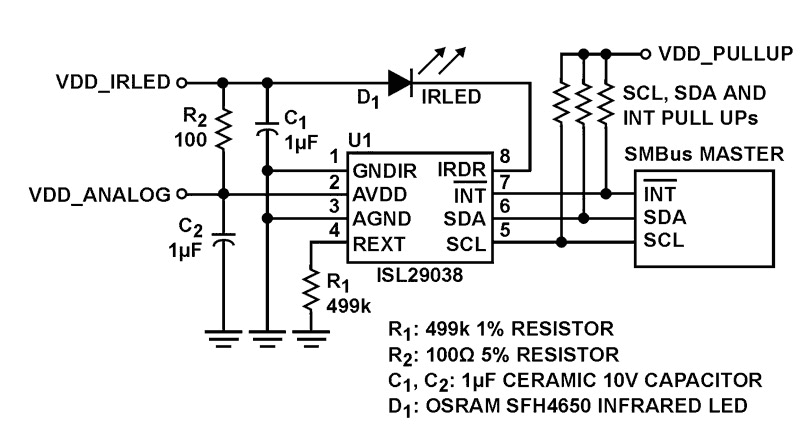
The ISL29038 is a low power ambient light sensor (ALS) and proximity (PROX) sensor. It has a built-in IR-LED driver for proximity function. The ALS function measures the amount of light (in the visible spectrum) incident on the ISL29038. The ALS function has a programmable ambient IR-rejection, which allows fine tuning of light source variations and is ideal for light sensor applications under dark protective glass. The ALS provides a 12-bit measurement. A passive optical filter removes unwanted wavelengths (IR or Ultraviolet) to ensure accurate ALS measurement. The proximity function includes a new offset adjustment to compensate for the IR light reflected off the inside of the protective glass cover and back to the ISL29038 sensor. This offset adjustment allows the sensor to compensate for these internal reflections and preserve the dynamic range of the proximity measurement. The built-in current-driver pulses an external infrared LED at a programmed current for 90µs. The infrared light that is reflected and received by ISL29038 is digitized by an 8-bit ADC. The proximity sensor also has a passive optical filter designed to pass IR and reject visible wavelengths. The ISL29038 provides a hardware pin to indicate an interrupt event. The interrupt pin saves power as the host microcontroller can ‘wake-up’ on an interrupt event and does not need to poll the device for an interrupt event. The interrupt generator is user configurable and provides several options for ALS and PROX trigger configurations. The ISL29038 supports an SMBus compatible I2C interface for configuration and control.
Applications
- Display dimming and adjustment
- Mobile devices: Smartphones, PDAs, GPS
- Computing: Monitors, laptops, notebooks
- Picture frames, tablet-PCs, LCD-TVs
- Object detection
- Touchscreen disabling
- Smart power-saving
| Part Number | Status | Samples | Stock | RoHS | Package | Carrier Type | MOQ |
|---|---|---|---|---|---|---|---|
| ISL29038IROZ-T7 | Obsolete | N/A | In Stock | RoHS:EN | HODFN | Reel | 3000 |
Filters
Applied Filters
- Product Change NoticePDF 138 KB Apr 23, 2021
- Product Change NoticePDF 113 KB PCN17003A Jan 16, 2017
- Product Change NoticePDF 76 KB PCN15010 Dec 08, 2015
- Application NotePDF 712 KB an1737 Jan 19, 2004AI-generated Summary: The document explains eye safety considerations for proximity sensing using infrared LEDs. It details how to calculate total irradiance and retinal thermal hazard exposure limits based on LED specifications, source size, pupil diameter, and wavelength. The retinal hazard depends on exposure time and angular subtense, with specific limits defined by IEC-62471 standards. It introduces an Intersil Eye Safety Calculator that helps designers input LED and sensor data to assess eye safety risks, including corneal and retinal exposure hazards, with clear pass/fail indicators based on exposure duration and distance.
- Application NotePDF 276 KB an1682 Jan 19, 2004AI-generated Summary: The document outlines Renesas Electronics' disclaimers and responsibilities regarding the use of their semiconductor products, circuits, and software. It emphasizes that users bear full responsibility for product design and safety measures, including compliance with laws and regulations. The products are categorized into Standard and High Quality grades, with specific application guidelines. Renesas disclaims liability for damages from improper use, modifications, or use outside specified conditions. Contact information for global sales offices is provided.
Recommended Documents (1)
Datasheets (1)
No Results Found.
Make sure all keywords are spelled correctly.
Try fewer, different, or more general terms to vary your search.
If you have filters applied, consider deselecting some to broaden your results.
- Search our extensive knowledgebase, designed to help customers with their FAQs.
- Get help from our expert Renesas technical staff and community on our support forums.
- Application NotePDF 712 KB an1737 Jan 19, 2004AI-generated Summary: The document explains eye safety considerations for proximity sensing using infrared LEDs. It details how to calculate total irradiance and retinal thermal hazard exposure limits based on LED specifications, source size, pupil diameter, and wavelength. The retinal hazard depends on exposure time and angular subtense, with specific limits defined by IEC-62471 standards. It introduces an Intersil Eye Safety Calculator that helps designers input LED and sensor data to assess eye safety risks, including corneal and retinal exposure hazards, with clear pass/fail indicators based on exposure duration and distance.
- Application NotePDF 276 KB an1682 Jan 19, 2004AI-generated Summary: The document outlines Renesas Electronics' disclaimers and responsibilities regarding the use of their semiconductor products, circuits, and software. It emphasizes that users bear full responsibility for product design and safety measures, including compliance with laws and regulations. The products are categorized into Standard and High Quality grades, with specific application guidelines. Renesas disclaims liability for damages from improper use, modifications, or use outside specified conditions. Contact information for global sales offices is provided.
Application Notes & White Papers (2)
- Product Change NoticePDF 138 KB Apr 23, 2021
- Product Change NoticePDF 113 KB PCN17003A Jan 16, 2017
- Product Change NoticePDF 76 KB PCN15010 Dec 08, 2015
Product Notices (PCN, EOL, etc) (4)
No Results Found.
Make sure all keywords are spelled correctly.
Try fewer, different, or more general terms to vary your search.
If you have filters applied, consider deselecting some to broaden your results.
- Search our extensive knowledgebase, designed to help customers with their FAQs.
- Get help from our expert Renesas technical staff and community on our support forums.
No Results Found.
Make sure all keywords are spelled correctly.
Try fewer, different, or more general terms to vary your search.
If you have filters applied, consider deselecting some to broaden your results.
- Search our extensive knowledgebase, designed to help customers with their FAQs.
- Get help from our expert Renesas technical staff and community on our support forums.
No Results Found.
Make sure all keywords are spelled correctly.
Try fewer, different, or more general terms to vary your search.
If you have filters applied, consider deselecting some to broaden your results.
- Search our extensive knowledgebase, designed to help customers with their FAQs.
- Get help from our expert Renesas technical staff and community on our support forums.
No Results Found.
Make sure all keywords are spelled correctly.
Try fewer, different, or more general terms to vary your search.
If you have filters applied, consider deselecting some to broaden your results.
- Search our extensive knowledgebase, designed to help customers with their FAQs.
- Get help from our expert Renesas technical staff and community on our support forums.
No Results Found.
Make sure all keywords are spelled correctly.
Try fewer, different, or more general terms to vary your search.
If you have filters applied, consider deselecting some to broaden your results.
- Search our extensive knowledgebase, designed to help customers with their FAQs.
- Get help from our expert Renesas technical staff and community on our support forums.
No Results Found.
Make sure all keywords are spelled correctly.
Try fewer, different, or more general terms to vary your search.
If you have filters applied, consider deselecting some to broaden your results.
- Search our extensive knowledgebase, designed to help customers with their FAQs.
- Get help from our expert Renesas technical staff and community on our support forums.
No Results Found.
Make sure all keywords are spelled correctly.
Try fewer, different, or more general terms to vary your search.
If you have filters applied, consider deselecting some to broaden your results.
- Search our extensive knowledgebase, designed to help customers with their FAQs.
- Get help from our expert Renesas technical staff and community on our support forums.
No Results Found.
Make sure all keywords are spelled correctly.
Try fewer, different, or more general terms to vary your search.
If you have filters applied, consider deselecting some to broaden your results.
- Search our extensive knowledgebase, designed to help customers with their FAQs.
- Get help from our expert Renesas technical staff and community on our support forums.
No Results Found.
Make sure all keywords are spelled correctly.
Try fewer, different, or more general terms to vary your search.
If you have filters applied, consider deselecting some to broaden your results.
- Search our extensive knowledgebase, designed to help customers with their FAQs.
- Get help from our expert Renesas technical staff and community on our support forums.
No Results Found.
Make sure all keywords are spelled correctly.
Try fewer, different, or more general terms to vary your search.
If you have filters applied, consider deselecting some to broaden your results.
- Search our extensive knowledgebase, designed to help customers with their FAQs.
- Get help from our expert Renesas technical staff and community on our support forums.