Features
- Works Under All Light Sources Including Sunlight
- Intelligent Interrupt Scheme Simplifies µC Code
- Proximity Sensor with Broad IR Spectrum
- Can Use 850nm and 950nm External IR LEDs
- IR LED Driver with I2C Programmable Sink Currents
- Net 100µs Pulse with 110mA or 220mA Amplitudes
- Periodic Sleep Time up to 800ms Between Pulses
- Ambient IR Noise Cancellation (Including Sunlight)
- Intelligent and Flexible Interrupts
- Proximity Interrupt Thresholds
- Adjustable Interrupt Persistency
- 1/4/8/16 Consecutive Triggers Required Before Interrupt
- Ultra Low Power
- 138µA DC Typical Supply Current for Prox Sensing
- 110µA for Sensors and Internal Circuitry
- 28µA Typical Current for External IR LED (Assuming 220mA for 100µs Every 800ms)
- <1.0µA Supply Current When Powered Down
- Easy to Use
- Set Registers; Wait for Interrupt
- I2C (SMBus Compatible) Output
- Temperature Compensated
- Tiny ODFN8 2.0x2.1x0.7 (mm) Package
- 1.7V to 3.63V Supply for I2C Interface
- 2.25V to 3.63V Sensor Power Supply
- Pb-Free (RoHS Compliant)
- I2C Address Selection Pin
Description
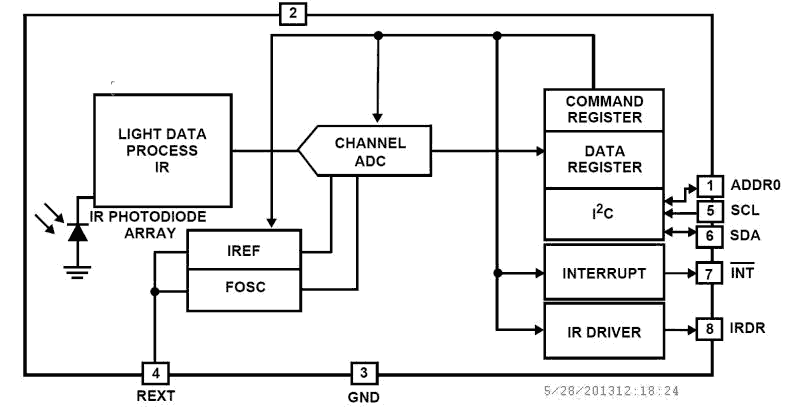
The ISL29027 is an integrated infrared light-to-digital converter with a built-in IR LED driver and I2C Interface (SMBus Compatible). The flexible interrupt scheme is designed for minimal microcontroller utilization. For proximity sensor (Prox) data conversions, the built-in driver turns on an external infrared LED and the proximity sensor ADC converts the reflected IR intensity to digital. This ADC rejects ambient IR noise (such as sunlight) and has a 540µs conversion time. The ISL29027 provides proximity sensing with a typical 138µA normal operation current (110µA for sensors and internal circuitry, ~28µA for external LED) with 220mA current pulses for a net 100µs, repeating every 800ms (or under). The ISL29027 uses both a hardware pin and software bits to indicate an interrupt event has occurred. A proximity interrupt is defined as a measurement over a threshold limit. The user may also require that proximity interrupts occur at once, up to 16 times in a row before activating the interrupt pin. The ISL29027 is designed to operate from 2. 25V to 3. 63V over the -40°C to +85°C ambient temperature range. It is packaged in a clear, lead-free 8 lead ODFN package.
Applications
- Mobile Devices: Smart Phone, PDA, GPS
- Computing Devices: Laptop PC, Netbook
- Consumer Devices: LCD-TV, Digital Picture Frame, Digital Camera
| Part Number | Status | Samples | Stock | RoHS | Package | Lead Count (#) | Carrier Type | Moisture Sensitivity Level (MSL) | Pb (Lead) Free | Pb Free Category | Temp. Range (°C) |
|---|---|---|---|---|---|---|---|---|---|---|---|
| ISL29027IROZ-T7 | Obsolete | N/A | Out of Stock | RoHS:EN | HODFN | 8# | Reel | 3OP | Yes | Nickel/Palladium/Gold-Silver - e4 | -40 to +85°C |
Filters
Applied Filters
- Product Change NoticePDF 155 KB PCN11115 Nov 04, 2011
- Application NotePDF 563 KB an1436 Oct 30, 2008AI-generated Summary: The document explains the mechanical design considerations for proximity sensing systems, focusing on the placement and spacing of IR LEDs, sensors, and barriers to optimize detection sensitivity and minimize crosstalk. It details how distances between components (sensor to LED, sensor to barrier, LED to barrier) affect proximity readout and sensitivity. The importance of barrier height and glass cover transmissivity on sensor performance is discussed. Additionally, it covers the impact of window lens material and dimensions on viewing angle and sensor effectiveness.
Recommended Documents (1)
Datasheets (1)
No Results Found.
Make sure all keywords are spelled correctly.
Try fewer, different, or more general terms to vary your search.
If you have filters applied, consider deselecting some to broaden your results.
- Search our extensive knowledgebase, designed to help customers with their FAQs.
- Get help from our expert Renesas technical staff and community on our support forums.
- Application NotePDF 563 KB an1436 Oct 30, 2008AI-generated Summary: The document explains the mechanical design considerations for proximity sensing systems, focusing on the placement and spacing of IR LEDs, sensors, and barriers to optimize detection sensitivity and minimize crosstalk. It details how distances between components (sensor to LED, sensor to barrier, LED to barrier) affect proximity readout and sensitivity. The importance of barrier height and glass cover transmissivity on sensor performance is discussed. Additionally, it covers the impact of window lens material and dimensions on viewing angle and sensor effectiveness.
Application Notes & White Papers (1)
- Product Change NoticePDF 155 KB PCN11115 Nov 04, 2011
Product Notices (PCN, EOL, etc) (2)
No Results Found.
Make sure all keywords are spelled correctly.
Try fewer, different, or more general terms to vary your search.
If you have filters applied, consider deselecting some to broaden your results.
- Search our extensive knowledgebase, designed to help customers with their FAQs.
- Get help from our expert Renesas technical staff and community on our support forums.
No Results Found.
Make sure all keywords are spelled correctly.
Try fewer, different, or more general terms to vary your search.
If you have filters applied, consider deselecting some to broaden your results.
- Search our extensive knowledgebase, designed to help customers with their FAQs.
- Get help from our expert Renesas technical staff and community on our support forums.
No Results Found.
Make sure all keywords are spelled correctly.
Try fewer, different, or more general terms to vary your search.
If you have filters applied, consider deselecting some to broaden your results.
- Search our extensive knowledgebase, designed to help customers with their FAQs.
- Get help from our expert Renesas technical staff and community on our support forums.
No Results Found.
Make sure all keywords are spelled correctly.
Try fewer, different, or more general terms to vary your search.
If you have filters applied, consider deselecting some to broaden your results.
- Search our extensive knowledgebase, designed to help customers with their FAQs.
- Get help from our expert Renesas technical staff and community on our support forums.
No Results Found.
Make sure all keywords are spelled correctly.
Try fewer, different, or more general terms to vary your search.
If you have filters applied, consider deselecting some to broaden your results.
- Search our extensive knowledgebase, designed to help customers with their FAQs.
- Get help from our expert Renesas technical staff and community on our support forums.
No Results Found.
Make sure all keywords are spelled correctly.
Try fewer, different, or more general terms to vary your search.
If you have filters applied, consider deselecting some to broaden your results.
- Search our extensive knowledgebase, designed to help customers with their FAQs.
- Get help from our expert Renesas technical staff and community on our support forums.
No Results Found.
Make sure all keywords are spelled correctly.
Try fewer, different, or more general terms to vary your search.
If you have filters applied, consider deselecting some to broaden your results.
- Search our extensive knowledgebase, designed to help customers with their FAQs.
- Get help from our expert Renesas technical staff and community on our support forums.
No Results Found.
Make sure all keywords are spelled correctly.
Try fewer, different, or more general terms to vary your search.
If you have filters applied, consider deselecting some to broaden your results.
- Search our extensive knowledgebase, designed to help customers with their FAQs.
- Get help from our expert Renesas technical staff and community on our support forums.
No Results Found.
Make sure all keywords are spelled correctly.
Try fewer, different, or more general terms to vary your search.
If you have filters applied, consider deselecting some to broaden your results.
- Search our extensive knowledgebase, designed to help customers with their FAQs.
- Get help from our expert Renesas technical staff and community on our support forums.