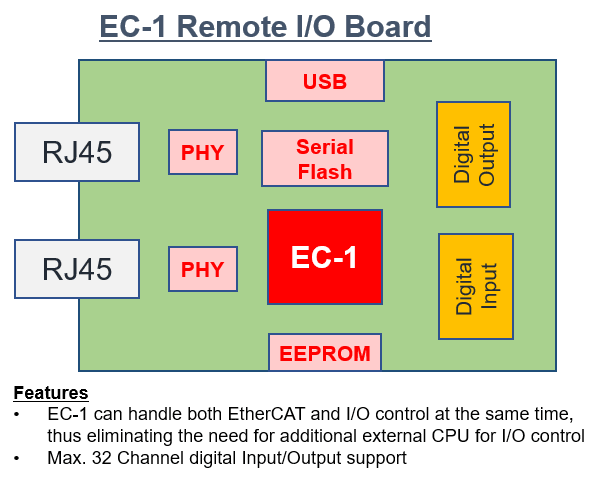
Features
- Solution certified by EtherCAT Test Center (ETC) conformance testing
- The software environment and evaluation board are certified by the official conformance test based on BECKHOFF's EtherCAT slave stack code.
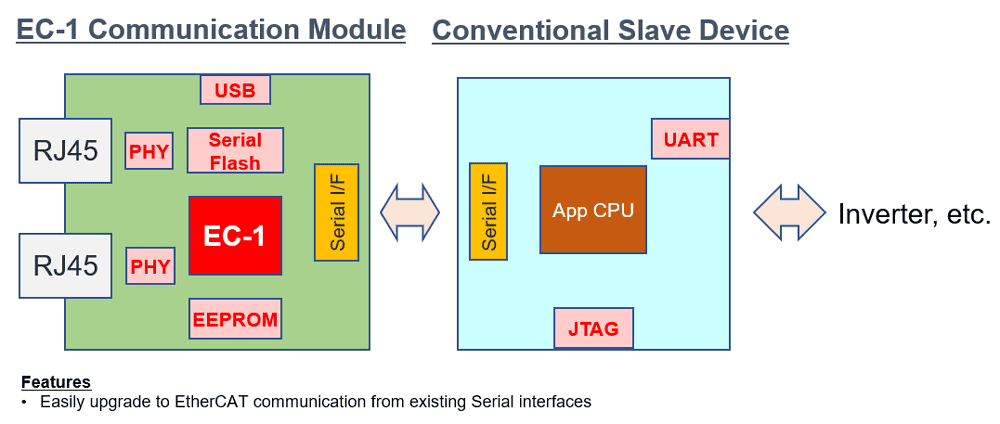
- Easy transition from low-speed serial communication to EtherCAT
- Customers can easily change communication protocol to legacy serial interfaces, allowing users to focus on their end application.
- The sample software is provided that targets various devices with different profiles:
- CiA402 drive profile for motor driving devices.
- ETG.5003 profile for semiconductor manufacturing equipment.
- Optimized for EtherCAT applications. Best suited for designing slave devices with High-Speed connectivity.
- Integrated Arm® Cortex®-R4F Core @ 150MHz with the double and single-precision floating-point unit. The Tightly Coupled Memory (TCM), EtherCAT slave controller is ideal for deterministic high-speed connectivity.
- Compatibility has been verified with master devices from more than ten manufacturers. This is a proven solution and significantly reduces the development time for EtherCAT slave applications.
Description
EC-1 (R9A06G043GBG) is a dedicated device with a built-in EtherCAT slave controller. This is an optimal solution to design high performance EtherCAT protocol in Industrial automation and manufacturing.
Applications
- Remote I/O
- Communication Module
| Part Number | Status | Samples | Stock | Package | Budgetary Price (USD) | Lead Count (#) | Moisture Sensitivity Level (MSL) | Pb (Lead) Free | Temp. Range (°C) |
|---|---|---|---|---|---|---|---|---|---|
| R9A06G043GBG#AC0 | Last Time Buy | N/A | In Stock | LFBGA | 1ku | $9.67 | 196# | 3 | Yes | -40 to +125 |
Filters
Applied Filters
- Application NoteAI-generated Summary: The document explains how to integrate and use IAR Systems compilers within the e² studio development environment for Renesas microcontrollers. It details the installation of IAR Embedded Workbench and IAR Eclipse plugins, project creation, build configuration, and build execution using IAR compilers. The guide focuses on the RA family with the IAR ARM compiler but applies similarly to other Renesas devices. It also recommends using standalone Flexible Software Package configurators for RA and RZ families to enhance development. The environment setup assumes Windows 10 64-bit, e² studio 2024-07, and IAR tools installed.
- Product Change Notice
- Application NoteAI-generated Summary: This guide explains how to create and build CMake projects using e² studio. It covers installing necessary tools such as e² studio, CMake, and GNU Make, creating a new CMake project, and configuring the builder by disabling the default CDT Core Builder and adding CMake and Make commands. The instructions include setting up environment variables and specifying CMake command parameters to generate native build files from platform-independent CMakeLists.txt configurations.
- Application NoteAI-generated Summary: This document explains how to automate CUnit tests in Renesas e² studio using EGit and Jenkins. It covers creating a Git repository, pushing code changes via EGit, and setting up Jenkins to build and run CUnit tests automatically. The process includes configuring Jenkins to poll the repository, build the project, execute tests, and generate reports. It also details modifying the SampleC Unit project to link the CUnit static library and output test results to a file for automation.
Recommended Documents (2)
Datasheets (1)
Manuals & Guides (1)
- Application NoteAI-generated Summary: The document explains how to integrate and use IAR Systems compilers within the e² studio development environment for Renesas microcontrollers. It details the installation of IAR Embedded Workbench and IAR Eclipse plugins, project creation, build configuration, and build execution using IAR compilers. The guide focuses on the RA family with the IAR ARM compiler but applies similarly to other Renesas devices. It also recommends using standalone Flexible Software Package configurators for RA and RZ families to enhance development. The environment setup assumes Windows 10 64-bit, e² studio 2024-07, and IAR tools installed.
Application Notes & White Papers (22)
- Product Change Notice
Product Notices (PCN, EOL, etc) (3)
- Technical Update
- Technical UpdateRelated Files:
- Technical UpdateView More (6)
Errata & Technical Updates (6)
No Results Found.
Make sure all keywords are spelled correctly.
Try fewer, different, or more general terms to vary your search.
If you have filters applied, consider deselecting some to broaden your results.
- Search our extensive knowledgebase, designed to help customers with their FAQs.
- Get help from our expert Renesas technical staff and community on our support forums.
No Results Found.
Make sure all keywords are spelled correctly.
Try fewer, different, or more general terms to vary your search.
If you have filters applied, consider deselecting some to broaden your results.
- Search our extensive knowledgebase, designed to help customers with their FAQs.
- Get help from our expert Renesas technical staff and community on our support forums.
No Results Found.
Make sure all keywords are spelled correctly.
Try fewer, different, or more general terms to vary your search.
If you have filters applied, consider deselecting some to broaden your results.
- Search our extensive knowledgebase, designed to help customers with their FAQs.
- Get help from our expert Renesas technical staff and community on our support forums.
No Results Found.
Make sure all keywords are spelled correctly.
Try fewer, different, or more general terms to vary your search.
If you have filters applied, consider deselecting some to broaden your results.
- Search our extensive knowledgebase, designed to help customers with their FAQs.
- Get help from our expert Renesas technical staff and community on our support forums.
No Results Found.
Make sure all keywords are spelled correctly.
Try fewer, different, or more general terms to vary your search.
If you have filters applied, consider deselecting some to broaden your results.
- Search our extensive knowledgebase, designed to help customers with their FAQs.
- Get help from our expert Renesas technical staff and community on our support forums.
Marketing Collateral (1)
No Results Found.
Make sure all keywords are spelled correctly.
Try fewer, different, or more general terms to vary your search.
If you have filters applied, consider deselecting some to broaden your results.
- Search our extensive knowledgebase, designed to help customers with their FAQs.
- Get help from our expert Renesas technical staff and community on our support forums.
No Results Found.
Make sure all keywords are spelled correctly.
Try fewer, different, or more general terms to vary your search.
If you have filters applied, consider deselecting some to broaden your results.
- Search our extensive knowledgebase, designed to help customers with their FAQs.
- Get help from our expert Renesas technical staff and community on our support forums.
No Results Found.
Make sure all keywords are spelled correctly.
Try fewer, different, or more general terms to vary your search.
If you have filters applied, consider deselecting some to broaden your results.
- Search our extensive knowledgebase, designed to help customers with their FAQs.
- Get help from our expert Renesas technical staff and community on our support forums.
Filters
Applied Filters
Software & Tools
Filter by Type
Filter by Provider
Sample Code
Filter by Application
Filter by Function
Filter by Compiler
Filter by IDE
Simulation Models
Partner Solutions
- Sample CodeRelated Files:
- Model - IBIS
- Sample CodeRelated Files:
No Results Found.
Make sure all keywords are spelled correctly.
Try fewer, different, or more general terms to vary your search.
If you have filters applied, consider deselecting some to broaden your results.
- Search our extensive knowledgebase, designed to help customers with their FAQs.
- Get help from our expert Renesas technical staff and community on our support forums.
Software & Tools (1)
- Sample CodeRelated Files:
- Sample CodeRelated Files:View More (8)
Sample Code (8)
- Model - IBIS
Simulation Models (1)
No Results Found.
Make sure all keywords are spelled correctly.
Try fewer, different, or more general terms to vary your search.
If you have filters applied, consider deselecting some to broaden your results.
- Search our extensive knowledgebase, designed to help customers with their FAQs.
- Get help from our expert Renesas technical staff and community on our support forums.
Support Communities
-
Trouble in EC-1 EtherCAT Conformance Test
The test is followed by R01AN3779EJ0100. There are some failed items. 1.0x1600:1 Write access in preop 'Flase' expected 'True'Where can i modify the code to cancel this error? 2.0x2100 pdomapping flag 'None' expected: 'r'The feature of 0x2100 which specified in ESI file is 'r' (Descriptions ...
Apr 13, 2021 -
Trouble in EC-1 serial boot from external serial SPI flash
Hi, I developed an EtherCAT CiA402 appliction with EC-1. It works well in RamDebug mode, but failed in SerialBoot mode. How can I config the Link information file(.icf) to make my project work? Is there any application note guiding me? Any demos or suggestions are welcome. Regards,
Mar 23, 2021 -
How to download firmware to the EC-1 using a flash programmer?E
Hi I want to download firmware to EC-1. But, i can't find documents related to use flash programmer with EC-1 also, Not even EC-1(Cortex-R4) on the list of MCUs supported by Renesas Flash Programmer V3 How can i use flash programmer with EC-1 ...
Apr 30, 2024
Knowledge Base
-
How to enable SPI0 on Linux for the RZ/G2L
Using VLP/G V3.0.7 as an example, this article describes how to enable spi0.0 in master mode. As described in r01us0481ej0109-rz-g_SPI_UME: Figure 5-2: Pin function setting (RZ/G2L, RZ/G2LC, and RZ/V2L) Figure 5-4: Enable node ...
Sep 11, 2025 -
"Please check Proxy Settings" error is shown at e² studio launch
This message is caused by a network connection failure. Otherwise, the file transfer method is unsupported for downloading the catalog file. If the message is shown even with no network connection failures, please try this workaround procedure.[Workaround]Please add the following line in e2studio.ini, which is at "eclipse ...
Nov 15, 2024 -
RZ Family: Remote update of U-Boot using SFTP/SSH
... if=/mnt/sdboot/fip-smarc-rzg2l_pmic.bin of=/dev/mmcblk0boot0 seek=256 sync 5) Re-enable read-only protection echo 1 > /sys/block/mmcblk0boot0/force_ro 6) Unmount SD card umount /mnt/sdboot 7) Verification Confirm hardware DIP ...
Nov 14, 2025