Features
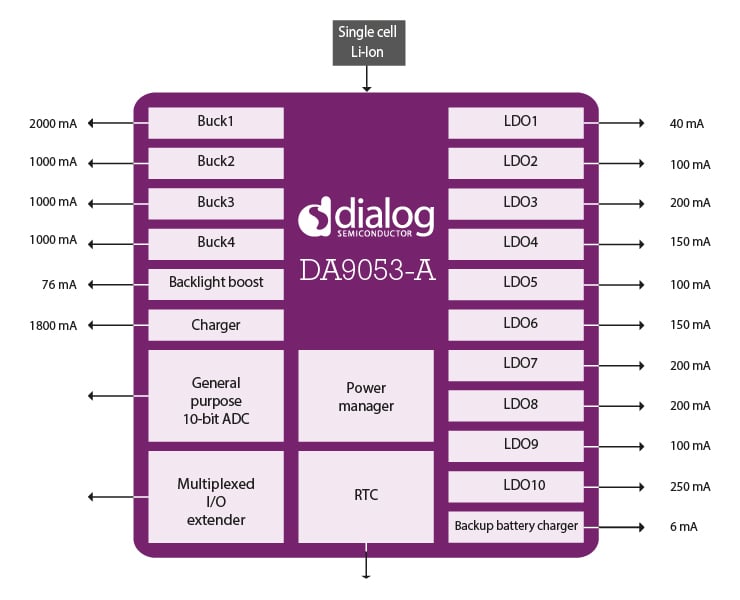
- 4 buck converters (3 with DVS) 0.5V to 2.5V up to 2A
- 10 programmable LDOs, high PSRR, 1% accuracy
- Low power backup charger 1.1V to 3.1V up to 6mA 32kHz RTC oscillator
- 10-channel general-purpose ADC with touch screen interface
- 16-bit GPIO bus for enhanced wake up and peripheral control
- High voltage boost for white LED driver
- 2MHz switching frequency avoiding the AM band
- Switched DC/USB charger with power path management
- Package: VFBGA 11mm x 11mm automotive
Description
The DA9053-A is a quad buck system Power Management IC (PMIC) with supply domain flexibility to support a wide range of multicore application processors including Arm® multicore devices, associated peripherals and user interface functions.
Combined with a switched-mode DC input/USB compatible charger, full power path management and multiple sleep modes, the device offers an energy-optimized solution suitable for automotive infotainment and telematics applications.
Benefits
- Dual serial control interfaces with arbitration
- Flexible autoboot and memory configurations
- Variants to support DDR3 and LPDDR2 memory
- AEC-Q100 Grade 3
Supported SoC PMIC Platforms
- NXP® i.MX Processor Family
- i.MX 6DualLite
- NXP i.MX 6
Applications
- In-vehicle navigation
- In-vehicle infotainment
- Vehicle telematics
| Part Number | Status | Samples | Stock | Package | Lead Count (#) |
|---|---|---|---|---|---|
| DA9053-XXHA1-A | Obsolete | N/A | Out of Stock | VFBGA 169 7 x 7 ㎟, VFBGA 169 11 x 11 ㎟ | 168# |
| DA9053-XXHA2-A | Obsolete | N/A | Out of Stock | VFBGA 169 7 x 7 ㎟, VFBGA 169 11 x 11 ㎟ | 168# |
Filters
Applied Filters
- Application NotePDF 2.48 MB Feb 12, 2021AI-generated Summary: Optimizing PCB layout is essential for reliable and high-performance integrated power management solutions. Key principles include maintaining low ground impedance through thick current-carrying traces, ground planes, and multiple vias. Sensitive signals must be shielded from noise, and power and ground planes should be placed under PMICs to minimize inductance. Specific layout guidelines address buck, boost converters, LDOs, and battery chargers. Examples from Dialog’s reference designs illustrate best practices. Design-in services are available to review schematics and layouts to enhance efficiency and reliability.
- Application NotePDF 374 KB Mar 31, 2020AI-generated Summary: Suspend mode maintains essential power rails active to preserve system configuration, enabling quick wake-up without a full reboot. The system enters suspend via hardware signals or register commands, with specific regulators set to retention voltages. Resume triggers include key presses, hardware signals, charger connection, RTC alarms, or GPIO events. Configuring PMIC registers optimizes suspend and resume sequences, ensuring nRESET does not reset the processor during suspend and that voltage regulators maintain required levels. This approach supports efficient low-power standby states with rapid system recovery.
- Application NotePDF 639 KB Apr 18, 2018AI-generated Summary: The document details the design and operation of a high-efficiency autonomous battery charger featuring fully automatic charging without host intervention. It explains the charger’s architecture, including external MOSFET protection, a buck converter for power efficiency, and a linear charging stage with an active diode. It guides selecting external components based on electrical characteristics and outlines the three-phase charging process: pre-charge, constant current fast charge, and constant voltage top-off. The pre-charge phase safely initiates charging for deeply discharged batteries, with configurable current settings and LED indicators. The document supports designers in optimizing charger parameters for handheld applications.
- Application NotePDF 468 KB Apr 18, 2018AI-generated Summary: Initial I2C communication with the DA9053 2-wire interface can encounter issues such as NAK responses to the first message or the SDA line being held low, causing bus lock. These problems arise because the I2C module does not reset properly during power-up or shutdown, leading to invalid states. A software workaround involves toggling the SCL line nine times and manipulating SDA and SCL lines as GPIOs before enabling I2C control. This ensures the device returns to an idle state ready for communication. The workaround is typically implemented in the bootloader and can be applied to any I2C slave device.
- Application NotePDF 851 KB Apr 18, 2018AI-generated Summary: The DA905x Touch Screen Interface supports 4-wire resistive touch screens with pen pressure measurement capabilities. It offers user-programmable controls such as pre-charging, settling time delay, and configurable sample rates up to 3 kHz, making it suitable for battery-powered devices like PDAs, PMPs, and smartphones. The interface measures X and Y coordinates by applying voltage across conductive ITO layers and detects touch pressure by calculating resistance changes. It includes low power and active reading modes, configurable parameters like TSI_DELAY and TSI_SKIP, and guidelines for PCB layout to minimize noise and resistance effects. The document explains the theory of operation, configuration steps, and application examples.
Recommended Documents (1)
Datasheets (1)
Manuals & Guides (1)
- Application NotePDF 2.48 MB Feb 12, 2021AI-generated Summary: Optimizing PCB layout is essential for reliable and high-performance integrated power management solutions. Key principles include maintaining low ground impedance through thick current-carrying traces, ground planes, and multiple vias. Sensitive signals must be shielded from noise, and power and ground planes should be placed under PMICs to minimize inductance. Specific layout guidelines address buck, boost converters, LDOs, and battery chargers. Examples from Dialog’s reference designs illustrate best practices. Design-in services are available to review schematics and layouts to enhance efficiency and reliability.
- Application NotePDF 374 KB Mar 31, 2020AI-generated Summary: Suspend mode maintains essential power rails active to preserve system configuration, enabling quick wake-up without a full reboot. The system enters suspend via hardware signals or register commands, with specific regulators set to retention voltages. Resume triggers include key presses, hardware signals, charger connection, RTC alarms, or GPIO events. Configuring PMIC registers optimizes suspend and resume sequences, ensuring nRESET does not reset the processor during suspend and that voltage regulators maintain required levels. This approach supports efficient low-power standby states with rapid system recovery.
- Application NotePDF 639 KB Apr 18, 2018AI-generated Summary: The document details the design and operation of a high-efficiency autonomous battery charger featuring fully automatic charging without host intervention. It explains the charger’s architecture, including external MOSFET protection, a buck converter for power efficiency, and a linear charging stage with an active diode. It guides selecting external components based on electrical characteristics and outlines the three-phase charging process: pre-charge, constant current fast charge, and constant voltage top-off. The pre-charge phase safely initiates charging for deeply discharged batteries, with configurable current settings and LED indicators. The document supports designers in optimizing charger parameters for handheld applications.
- Application NotePDF 468 KB Apr 18, 2018AI-generated Summary: Initial I2C communication with the DA9053 2-wire interface can encounter issues such as NAK responses to the first message or the SDA line being held low, causing bus lock. These problems arise because the I2C module does not reset properly during power-up or shutdown, leading to invalid states. A software workaround involves toggling the SCL line nine times and manipulating SDA and SCL lines as GPIOs before enabling I2C control. This ensures the device returns to an idle state ready for communication. The workaround is typically implemented in the bootloader and can be applied to any I2C slave device.View More (6)
Application Notes & White Papers (6)
No Results Found.
Make sure all keywords are spelled correctly.
Try fewer, different, or more general terms to vary your search.
If you have filters applied, consider deselecting some to broaden your results.
- Search our extensive knowledgebase, designed to help customers with their FAQs.
- Get help from our expert Renesas technical staff and community on our support forums.
No Results Found.
Make sure all keywords are spelled correctly.
Try fewer, different, or more general terms to vary your search.
If you have filters applied, consider deselecting some to broaden your results.
- Search our extensive knowledgebase, designed to help customers with their FAQs.
- Get help from our expert Renesas technical staff and community on our support forums.
No Results Found.
Make sure all keywords are spelled correctly.
Try fewer, different, or more general terms to vary your search.
If you have filters applied, consider deselecting some to broaden your results.
- Search our extensive knowledgebase, designed to help customers with their FAQs.
- Get help from our expert Renesas technical staff and community on our support forums.
Schematics & Design Files (1)
No Results Found.
Make sure all keywords are spelled correctly.
Try fewer, different, or more general terms to vary your search.
If you have filters applied, consider deselecting some to broaden your results.
- Search our extensive knowledgebase, designed to help customers with their FAQs.
- Get help from our expert Renesas technical staff and community on our support forums.
No Results Found.
Make sure all keywords are spelled correctly.
Try fewer, different, or more general terms to vary your search.
If you have filters applied, consider deselecting some to broaden your results.
- Search our extensive knowledgebase, designed to help customers with their FAQs.
- Get help from our expert Renesas technical staff and community on our support forums.
No Results Found.
Make sure all keywords are spelled correctly.
Try fewer, different, or more general terms to vary your search.
If you have filters applied, consider deselecting some to broaden your results.
- Search our extensive knowledgebase, designed to help customers with their FAQs.
- Get help from our expert Renesas technical staff and community on our support forums.
Marketing Collateral (1)
Other (1)
No Results Found.
Make sure all keywords are spelled correctly.
Try fewer, different, or more general terms to vary your search.
If you have filters applied, consider deselecting some to broaden your results.
- Search our extensive knowledgebase, designed to help customers with their FAQs.
- Get help from our expert Renesas technical staff and community on our support forums.
Filters
Applied Filters
Software & Tools
Filter by Type
Filter by Provider
Sample Code
Filter by Application
Filter by Function
Filter by Compiler
Filter by IDE
Simulation Models
Partner Solutions
No Results Found.
Make sure all keywords are spelled correctly.
Try fewer, different, or more general terms to vary your search.
If you have filters applied, consider deselecting some to broaden your results.
- Search our extensive knowledgebase, designed to help customers with their FAQs.
- Get help from our expert Renesas technical staff and community on our support forums.
Software & Tools (1)
No Results Found.
Make sure all keywords are spelled correctly.
Try fewer, different, or more general terms to vary your search.
If you have filters applied, consider deselecting some to broaden your results.
- Search our extensive knowledgebase, designed to help customers with their FAQs.
- Get help from our expert Renesas technical staff and community on our support forums.
No Results Found.
Make sure all keywords are spelled correctly.
Try fewer, different, or more general terms to vary your search.
If you have filters applied, consider deselecting some to broaden your results.
- Search our extensive knowledgebase, designed to help customers with their FAQs.
- Get help from our expert Renesas technical staff and community on our support forums.
No Results Found.
Make sure all keywords are spelled correctly.
Try fewer, different, or more general terms to vary your search.
If you have filters applied, consider deselecting some to broaden your results.
- Search our extensive knowledgebase, designed to help customers with their FAQs.
- Get help from our expert Renesas technical staff and community on our support forums.
Support Communities
-
DA9053 Evaluation kit
Hello, I am using the DA9053 to power an imx6SLL from NXP. As the DA9053 is not yet configured to power the iMX6, I need to prgram it before power up the iMX6. How can I program the DA9053? Thanks Regards, Damien
Jun 15, 2019 -
DA9053 USB charging - by alternative 5V source
... least 1A. This 5V source does not have the D+, D- connections and therefore the DA9053 cannot automatically determine the source's capability. Will the DA9053 allow charging from VBUS at arbitrary charging rate if the D+, D- inputs are unconnected ? Or, perhaps, is there a way of tieing these ...
Mar 25, 2020 -
Programming DA9063B with Canvas + board 232-18-A
I programmed OTP1 and OTP2 to the proto board with DA9063B. With canvas I use register CONTROL_F and set SHUTDOWN (board was Act mode)-> After this the status mode is not shown and Red button (start device) appears and asking to load OPT1 -> after push red button the OTP1 ...
Jun 11, 2025