Features
- Integrated terminations provide differential Zo = 100Ω: reduced component count and board space
- 1.8V operation: minimal power consumption
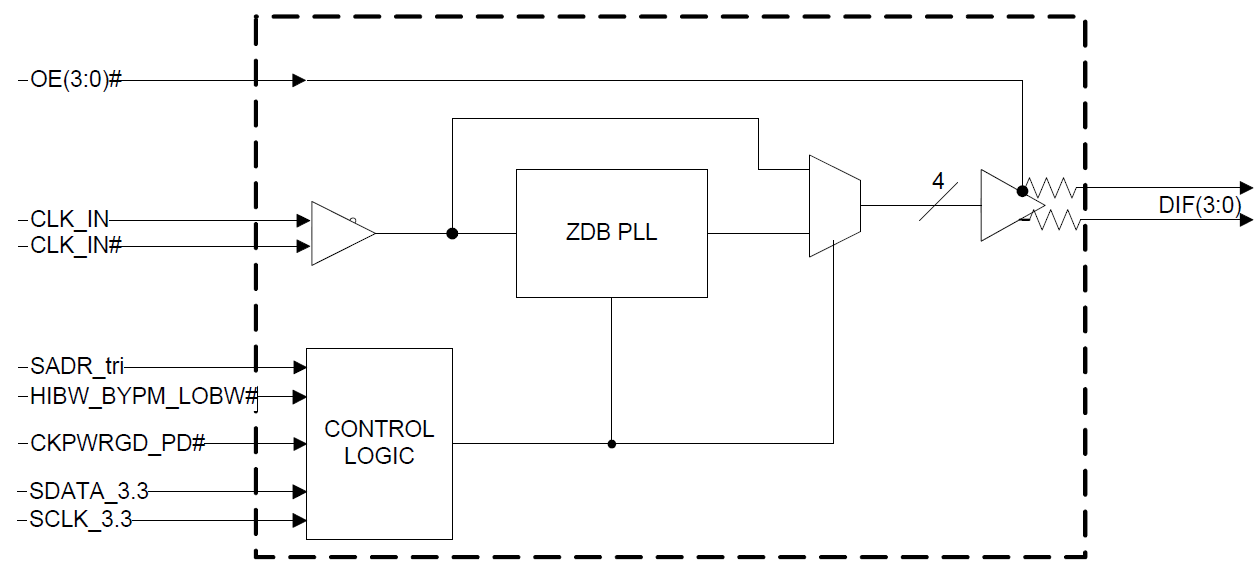
- OE# pins: support DIF power management
- HCSL compatible differential input: can be driven by common clock sources
- LP-HCSL differential clock outputs: reduced power and board space
- Programmable Slew rate for each output: allows tuning for various line lengths
- Programmable output amplitude: allows tuning for various application environments.
- Pin/Software selectable PLL bandwidth and PLL bypass: minimize phase jitter for each application
- Outputs blocked until PLL is locked: clean system start-up
- Software selectable 50MHz or 125MHz PLL operation: useful for Ethernet applications
- Configuration can be accomplished with strapping pins: SMBus interface is not required for device control
- 3.3V tolerant SMBus interface works with legacy controllers
- Space saving 32-pin 5mm x 5mm MLF: minimal board space
- Selectable SMBus addresses: multiple devices can easily share an SMBus segment
Description
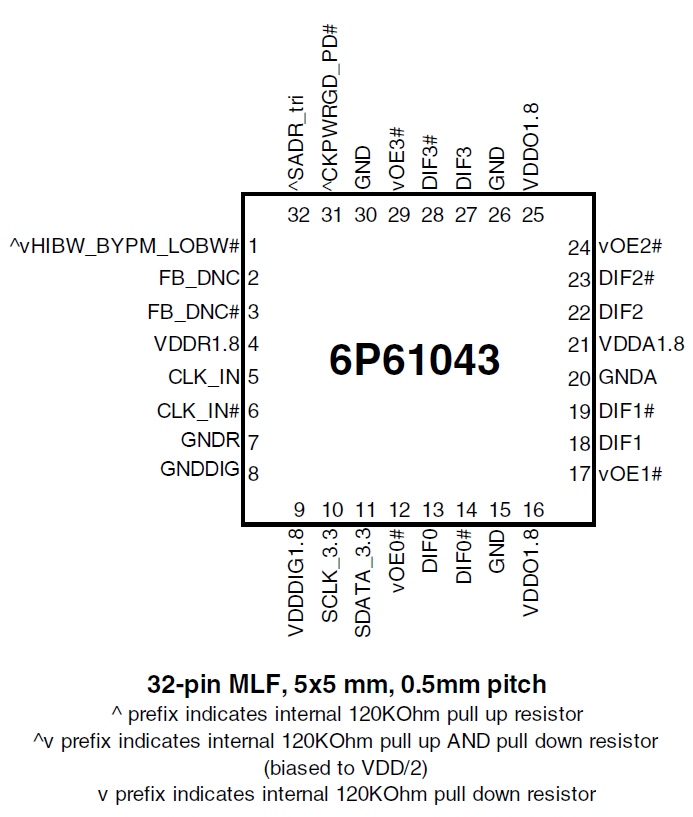
The 6P61043 is a 4-output very-low power buffer for 100MHz PCIe Gen 1, Gen 2, and Gen 3 applications with integrated output terminations providing Zo = 100Ω for Freescale Systems. The device has four output enables for clock management and three selectable SMBus addresses.
| Part Number | Status | Samples | Stock | Package | Lead Count (#) | Carrier Type | Moisture Sensitivity Level (MSL) | Qty. per Reel (#) | Qty. per Carrier (#) | Pb (Lead) Free | Pb Free Category | Temp. Range (°C) |
|---|---|---|---|---|---|---|---|---|---|---|---|---|
| 6P61043NLGI | NRND | N/A | Out of Stock | VFQFPN | 32# | Tray | 3 | 0 | 490# | Yes | e3 Sn | -40 to 85°C |
| 6P61043NLGI8 | NRND | N/A | Out of Stock | VFQFPN | 32# | Reel | 3 | 2500# | 0 | Yes | e3 Sn | -40 to 85°C |
- Application NotePDF 431 KB 7WDXRDKU4E7E-5-59216 Dec 06, 2023
- Application NotePDF 170 KB 7WDXRDKU4E7E-5-57318 May 13, 2014
- Application NotePDF 1.9 MB 7WDXRDKU4E7E-5-57315 May 13, 2014
- Application NotePDF 495 KB 7WDXRDKU4E7E-5-57312 May 12, 2014
- Application NotePDF 442 KB 7WDXRDKU4E7E-5-57298 May 08, 2014
- Application NotePDF 120 KB 7WDXRDKU4E7E-5-57289 May 06, 2014
- Application NotePDF 160 KB 7WDXRDKU4E7E-5-57287 May 06, 2014
- Application NotePDF 1.99 MB 7WDXRDKU4E7E-5-57242 Mar 01, 2022
Recommended Documents (1)
Datasheets (1)
No Results Found.
Make sure all keywords are spelled correctly.
Try fewer, different, or more general terms to vary your search.
If you have filters applied, consider deselecting some to broaden your results.
- Search our extensive knowledgebase, designed to help customers with their FAQs.
- Get help from our expert Renesas technical staff and community on our support forums.
- Application NotePDF 431 KB 7WDXRDKU4E7E-5-59216 Dec 06, 2023
- Application NotePDF 1.99 MB 7WDXRDKU4E7E-5-57242 Mar 01, 2022
- Application NotePDF 170 KB 7WDXRDKU4E7E-5-57318 May 13, 2014View More (11)
Application Notes & White Papers (11)
No Results Found.
Make sure all keywords are spelled correctly.
Try fewer, different, or more general terms to vary your search.
If you have filters applied, consider deselecting some to broaden your results.
- Search our extensive knowledgebase, designed to help customers with their FAQs.
- Get help from our expert Renesas technical staff and community on our support forums.
No Results Found.
Make sure all keywords are spelled correctly.
Try fewer, different, or more general terms to vary your search.
If you have filters applied, consider deselecting some to broaden your results.
- Search our extensive knowledgebase, designed to help customers with their FAQs.
- Get help from our expert Renesas technical staff and community on our support forums.
No Results Found.
Make sure all keywords are spelled correctly.
Try fewer, different, or more general terms to vary your search.
If you have filters applied, consider deselecting some to broaden your results.
- Search our extensive knowledgebase, designed to help customers with their FAQs.
- Get help from our expert Renesas technical staff and community on our support forums.
No Results Found.
Make sure all keywords are spelled correctly.
Try fewer, different, or more general terms to vary your search.
If you have filters applied, consider deselecting some to broaden your results.
- Search our extensive knowledgebase, designed to help customers with their FAQs.
- Get help from our expert Renesas technical staff and community on our support forums.
No Results Found.
Make sure all keywords are spelled correctly.
Try fewer, different, or more general terms to vary your search.
If you have filters applied, consider deselecting some to broaden your results.
- Search our extensive knowledgebase, designed to help customers with their FAQs.
- Get help from our expert Renesas technical staff and community on our support forums.
No Results Found.
Make sure all keywords are spelled correctly.
Try fewer, different, or more general terms to vary your search.
If you have filters applied, consider deselecting some to broaden your results.
- Search our extensive knowledgebase, designed to help customers with their FAQs.
- Get help from our expert Renesas technical staff and community on our support forums.
No Results Found.
Make sure all keywords are spelled correctly.
Try fewer, different, or more general terms to vary your search.
If you have filters applied, consider deselecting some to broaden your results.
- Search our extensive knowledgebase, designed to help customers with their FAQs.
- Get help from our expert Renesas technical staff and community on our support forums.
Marketing Collateral (1)
No Results Found.
Make sure all keywords are spelled correctly.
Try fewer, different, or more general terms to vary your search.
If you have filters applied, consider deselecting some to broaden your results.
- Search our extensive knowledgebase, designed to help customers with their FAQs.
- Get help from our expert Renesas technical staff and community on our support forums.
No Results Found.
Make sure all keywords are spelled correctly.
Try fewer, different, or more general terms to vary your search.
If you have filters applied, consider deselecting some to broaden your results.
- Search our extensive knowledgebase, designed to help customers with their FAQs.
- Get help from our expert Renesas technical staff and community on our support forums.
A detailed overview of IDT's full-featured PCI Express (PCIe) clock and timing solutions. The presentation addresses PCIe Gen 1, Gen 2, Gen 3, and Gen 4 architectures and how IDT's industry-leading solutions provide all the functions, features, and performance required by the application.
Presented by Ron Wade, System Architect at IDT. For more information visit the PCIe clocks page.
This is the first video in our PCIe series. In this video, we define PCIe architectures, focusing on common and separate clock architectures. Watch the rest of the video series below where Ron will cover the impact of different timing architectures.
In this episode, Ron Wade from IDT (acquired by Renesas) explains PCIe common clocking and its impact on timing solutions. Learn about using a single clock source, fan-out buffers, and the considerations for spread spectrum and non-spread spectrum clocking in PCIe systems.
In this video, we explore PCIe with separate reference clocks and the effects of clock selection. Learn how separate reference clocks work and their impact on system performance and stability.
This video provides a high-level overview of Separate Reference Clock with Independent Spread (SRIS) architectures for PCI Express systems, additional performance requirements that this clocking architecture imposes on the reference clocks, and some system implications encountered trying to implement the architecture.