Renesas Electronics Corporation

Description

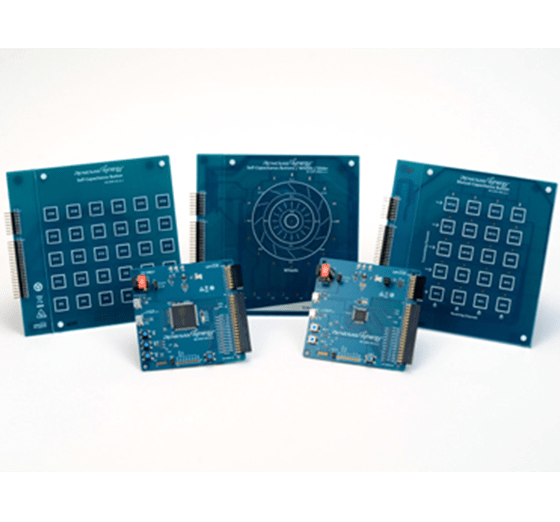
Evaluate capacitive touch technology on the Renesas Synergy™ Platform and develop with the Synergy S124 and S3A7 MCU Groups.

Features

  • Test and develop mutual or self-capacitive touch, button, slider, and wheel functions using the precision-accurate touch sensing boards
  • Build applications using the Capacitive Touch Sensing Unit (CTSU) application framework
  • Graphically design, tune, and optimize buttons and areas using the Capacitive Touch Workbench
  • Customize with software projects, useful tips, and application notes for hardware design
  • Optimize circuit design with schematics, Bill of Materials (BOM), and PCB layout guide
  • Accelerate code development with the tightly integrated and qualified Synergy Software Package (SSP)
  • View, step through, and debug code with e2 studio IDE from Renesas or IAR Embedded Workbench® for Renesas Synergy™
  • Debug and program with J-Link® OB on-board
Applications

Type Title Date
Quick Start Guide PDF 589 KB
Application Note PDF 5.95 MB 日本語
AI-generated Summary: The document explains how to create a custom Board Support Package (BSP) for Renesas Synergy SSP v1.2.0 or later. It details the BSP contents, including pin configuration files, driver sets, and XML specification files linking devices and boards. Two main approaches for creating custom BSPs are described: modifying existing BSPs using built-in tools in e² studio or IAR EW for Synergy, or manually editing files in the SSP installation folder. The process includes creating a new Synergy C project, selecting a board with a similar device, and configuring the toolchain and debugger.
Application Note PDF 1.36 MB 日本語
AI-generated Summary: Capacitive touch sensing integration using Renesas Synergy MCUs involves creating a project with e2 studio and Synergy Smart Configurator, adding required modules, and using QE for Capacitive Touch plug-in for interface creation, tuning, and monitoring. The process includes starting measurements with scanStart() API, checking results, and detecting touches via dataGet() API. Development requires S3A7(CTSU) board, e2 studio IDE, GNU ARM compiler, QE for Capacitive Touch, and SSP drivers. The document guides through project creation, module addition, interface setup, tuning, and performance monitoring.
Application Note PDF 2.27 MB 日本語
Application Note PDF 1016 KB 日本語
AI-generated Summary: The document provides programming guidelines for the Renesas Synergy AE-CAP1 out-of-box demonstration. It details minimum PC requirements, AE-CAP1 kit components, and available demonstration programs with their functionalities. It explains installing USB CDC device drivers for Windows 7 and 10, highlighting automatic enumeration on Windows 10 and manual driver installation on Windows 7. Instructions for reloading the AE-CAP1-BWS demonstration on AE-CAP1-S1 and AE-CAP1-BWS boards are included, specifying jumper settings for proper setup.
Application Note PDF 1.71 MB 日本語
AI-generated Summary: The guide explains how to import and build projects using IAR Embedded Workbench (EW) for Renesas Synergy. It details opening the workspace file from an extracted example project, viewing the project structure, and configuring settings for the Synergy Standalone Configurator (SSC) and Synergy Software Package (SSP). It also covers setting the SSC/SSP path and license file, and launching the Synergy Standalone Configurator within the IDE to generate project files.
Application Note PDF 439 KB
AI-generated Summary: The document explains how to create and migrate custom Board Support Packages (BSPs) for Renesas Synergy SSP versions 1.1.z and 1.2.0. It details the use of the Custom BSP Creator and Custom Pack Creator tools to generate, modify, and package BSPs. Custom BSPs mainly require changes in the board folder, including essential files like bsp.h and bsp_init.c. The process involves creating a base BSP, making a template pack for modifications, editing in e2 studio, and finalizing a standard pack for distribution. An example using the DK-S7G2 board illustrates these steps.
Application Note PDF 593 KB
Manual - Development Tools PDF 1021 KB
PCB Design Files
Log in to Download ZIP 46.88 MB 日本語
10 items

Sample Code

Sample Code

Filters
Type Title Date Date
Sample Code
Log in to Download ZIP 37.11 MB Compiler: GNUARM-NONE IDE: e2 studio, IAR EW for Synergy
Sample Code
Log in to Download ZIP 8.43 MB IDE: e2 studio
2 items
Part NumberStatusStockSampleablePb (Lead) FreeECCN (US)HTS (US)RoHS CompliantChina RoHS Compliant
YSAECAP1S11ObsoleteOut of StockN/ANo3A991.a.28471.50.0150NoNo
Support Communities

Support Communities

Get quick technical support online from Renesas Engineering Community technical staff.
Browse Articles

Knowledge Base

Browse our knowledge base for helpful articles, FAQs, and other useful resources.
Submit a Ticket

Submit a Ticket

Need to ask a technical question or share confidential information?