
Overview
Description
The RA6E2 Fast Prototyping Board comes equipped with an R7FA6E2BB3CFM microcontroller and is an evaluation board specialized for prototype development for a variety of applications. It has a built-in SEGGER J-Link™ emulator circuit so you can write/debug programs without additional tools. In addition, with Arduino Uno and Pmod™ interfaces included standard and through-hole access to all pins of the microcontroller, and so on, it has high expandability.
Sample software is available to demonstrate the functionality of the RA6E2 MCU and for connecting between the RA6E2 Fast Prototyping Board and various wireless modules or various sensor modules.
Please use Bluetooth®, LoRa® and Wi-Fi according to the radio regulations of each country during use.
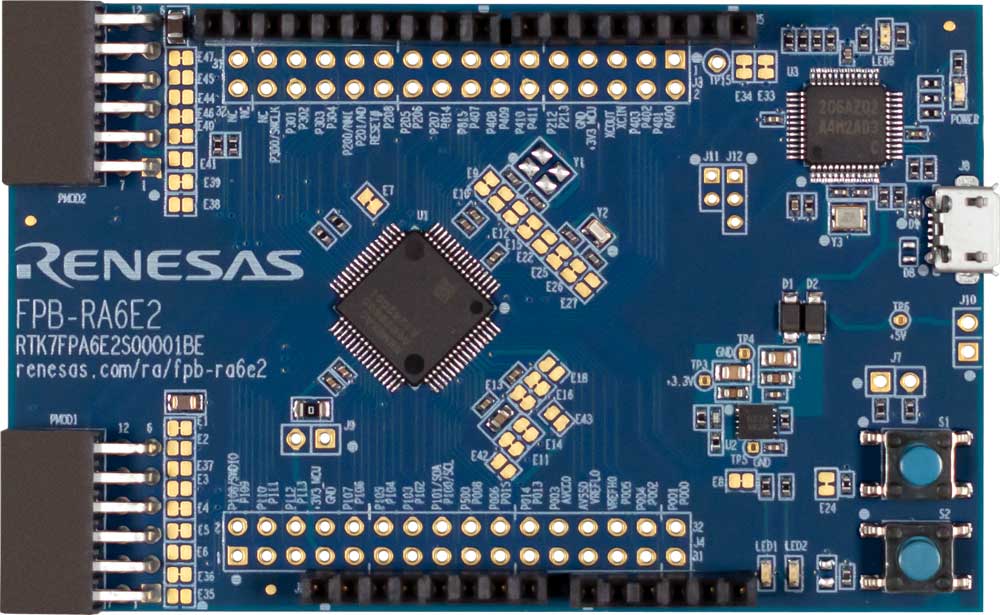
Features
- Equipped with an RA6E2 32-bit microcontroller 64-pin, 10mm x 10mm x 1.70mm, 0.5mm pitch, ROM: 256KB, RAM: 40KB
- No additional tools are required for program debugging/writing with the built-in SEGGER J-Link™ emulator circuit
- Through-holes with access to all of the pins of the microcontroller
- Arduino Uno and Pmod™ interfaces come standard
- Support for various RA6E2 software and tools
Applications
Design & Development
Videos & Training
Additional Videos
News & Blog Posts
Blog Post Jan 28, 2022 |
Blog Post Jan 28, 2022 |
Blog Post Jan 28, 2022 |
Blog Post Nov 18, 2021 |
Blog Post Nov 11, 2021 |
Support
Support Communities
- RA6E2 TRNG
Hello,I am working with the RA6E2 and using the examples from the TinyCrypt documentation. I am able to generate random numbers but I am not sure if this behavior is expected. Calls to tc_ctr_prng_init() would fail (TC_CRYPTO_FAIL) but tc_ctr_prng_generate() still generated ...
Feb 29, 2024 - GPIO speed
Hello, I am testing how fast I can toggle an IO pin on the FPB-RA8E1 board, in order to determine whether I can use GPIO to drive an 8-bit parallel LCD screen at an acceptable frame rate.I tested two operation methods: one using register operations, and the ...
Jan 30, 2026
Knowledge Base
- RA Family: Handling of I²C Pull-Up Resistors on Arduino-Compatible Pins J1 (10/9) of RA Family FPB Boards
... 10/9) on RA Family FPB boards for I²C communication. How should I connect the pull-up resistors? Target boards: FPB-RA4E2 FPB-RA4T1FPB-RA6E2FPB-RA6T3 Answer: For target RA FPB boards, pull-up resistors are pre-installed on the Arduino-compatible pins J1 Pin 10 (SCL ...
Dec 5, 2025

Support Communities

Knowledge Base

