Features
- Diode Emulation Functionality in Deep and Deeper Sleep Modes for Improved Light Load Efficiency
- Single-phase Power Conversion
- "Loss-less" Current Sensing for Improved Efficiency and Reduced Board Area
- Optional Discrete Precision Current Sense Resistor
- Internal Gate-Drive and Boot-Strap Diodes
- Precision CORE Voltage Regulation
- 0.8% System Accuracy Over-Temperature
- 6-Bit Microprocessor Voltage Identification Input
- Programmable "Droop" and CORE Voltage Slew Rate
- Direct Interface with System Logic for Deep and Deeper Sleep Modes of Operation
- Easily Programmable Voltage Setpoints for Initial "Boot", Deep Sleep and Deeper Sleep Modes
- Excellent Dynamic Response
- Combined Voltage Feed-Forward and Average Current Mode Control
- Overvoltage, Undervoltage and Overcurrent Protection
- Power-Good Output with Internal Blanking during VSEL and Mode Changes
- User Programmable Switching Frequency of 250kHz to 500kHz
- Pb-Free (RoHS Compliant)
Description
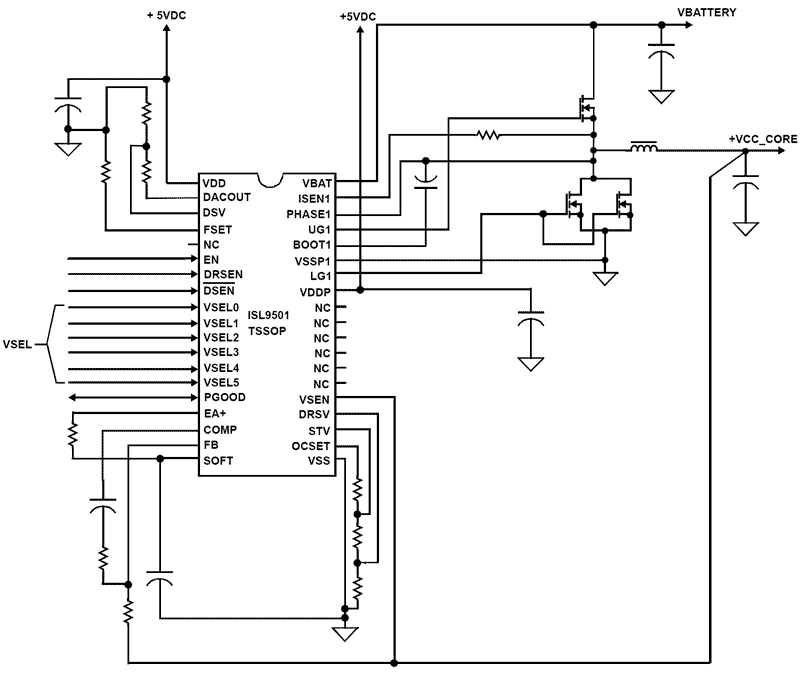
The ISL9501 Single-phase Buck PWM control IC, with integrated half bridge gate drivers, proVSELes a precision voltage regulation system for microprocessors in notebook computers. Single-phase operation proVSELes flexibility in meeting the requirements of the latest microprocessors. This control IC also features both input voltage feed-forward and average current mode control for excellent dynamic response, “Loss-less” current sensing using MOSFET rDS(ON) and user selectable switching frequencies from 250kHz to 500kHz. The ISL9501 includes a 6-bit digital-to-analog converter (DAC) that dynamically adjusts the CORE PWM output voltage. The ISL9501 also has logic inputs to select Active, Deep Sleep and Deeper Sleep modes of operation. A precision reference, remote sensing and proprietary architecture, with integrated, processor-mode, compensated “Droop”, proVSELe excellent static and dynamic CORE voltage regulation. To improve efficiency at light loading, the ISL9501 will operate in diode emulation in Deep and Deeper Sleep modes. Another feature of this IC controller is the PGOOD monitor circuit that is held low until CORE voltage increases (during its soft-start sequence) to within 12% of the “Boot” voltage. This PGOOD signal is masked during VSEL changes. Output overcurrent, overvoltage and undervoltage are monitored and result in the converter latching off and PGOOD signal being held low. The overvoltage and undervoltage thresholds are 112% and 84% of the VSEL, Deep or Deeper Sleep setpoint, respectively. Overcurrent protection features a 32 cycle overcurrent shutdown. PGOOD, overvoltage, undervoltage and overcurrent proVSELe monitoring and protection for the microprocessor and power system. The ISL9501 IC is available in a 38 Ld TSSOP and a 40 Ld QFN.
| Part Number | Status | Samples | Stock | RoHS | Package | Lead Count (#) | Carrier Type | Moisture Sensitivity Level (MSL) | Pkg. Dimensions (mm) | Pb (Lead) Free | Pb Free Category | Temp. Range (°C) |
|---|---|---|---|---|---|---|---|---|---|---|---|---|
| ISL9501CRZ | Obsolete | N/A | Out of Stock | RoHS:EN | QFN | 40# | Tube | 6.0 x 6.0 x 0.90 | No | 0 to +70°C | ||
| ISL9501CRZ-T | Obsolete | N/A | Out of Stock | RoHS:EN | QFN | 40# | Reel | 6.0 x 6.0 x 0.90 | No | 0 to +70°C | ||
| ISL9501CVZ | Obsolete | N/A | In Stock | RoHS:EN | TSSOP | 38# | Tube | 3 | 9.7 x 4.4 x 0.92 | Yes | Pb-Free 100% Matte Tin Plate w/Anneal-e3 | 0 to +70°C |
| ISL9501CVZ-T | Obsolete | N/A | Out of Stock | RoHS:EN | TSSOP | 38# | Reel | 3 | 9.7 x 4.4 x 0.92 | Yes | Pb-Free 100% Matte Tin Plate w/Anneal-e3 | 0 to +70°C |
Filters
Applied Filters
- Product Change NoticePDF 222 KB PCN13025B Oct 25, 2013
- Product Change NoticePDF 121 KB PCN11113A Aug 13, 2012
- Product Change NoticePDF 120 KB PCN11113 Oct 31, 2011
- Product Change NoticePDF 248 KB PCN10055 Jun 30, 2010
- Application NotePDF 397 KB an1684 Jan 19, 2004AI-generated Summary: The document outlines important legal disclaimers and usage guidelines for semiconductor products. It emphasizes user responsibility for product design and safety, disclaims liability for damages, and clarifies no intellectual property licenses are granted. Products are categorized by quality grades with specific application recommendations. Users must comply with laws, avoid unauthorized modifications, and ensure safe use within specified conditions. Contact details for Renesas Electronics sales offices worldwide are provided.
- Application NotePDF 509 KB an1681 Jan 19, 2004AI-generated Summary: The document explains grounding techniques for PCB layouts using a dual op amp example on a single-layer copper board. It compares three grounding schemes: a center spine ground trace, an outer ground plane, and a split/star ground plane, highlighting the benefits of single-point grounding to minimize noise and antenna effects. It emphasizes following current paths, minimizing loop lengths, and ensuring close forward and return paths to reduce interference. The document also includes disclaimers on product use, quality grades, safety, and legal compliance.
Recommended Documents (2)
Datasheets (2)
No Results Found.
Make sure all keywords are spelled correctly.
Try fewer, different, or more general terms to vary your search.
If you have filters applied, consider deselecting some to broaden your results.
- Search our extensive knowledgebase, designed to help customers with their FAQs.
- Get help from our expert Renesas technical staff and community on our support forums.
- Application NotePDF 397 KB an1684 Jan 19, 2004AI-generated Summary: The document outlines important legal disclaimers and usage guidelines for semiconductor products. It emphasizes user responsibility for product design and safety, disclaims liability for damages, and clarifies no intellectual property licenses are granted. Products are categorized by quality grades with specific application recommendations. Users must comply with laws, avoid unauthorized modifications, and ensure safe use within specified conditions. Contact details for Renesas Electronics sales offices worldwide are provided.
- Application NotePDF 509 KB an1681 Jan 19, 2004AI-generated Summary: The document explains grounding techniques for PCB layouts using a dual op amp example on a single-layer copper board. It compares three grounding schemes: a center spine ground trace, an outer ground plane, and a split/star ground plane, highlighting the benefits of single-point grounding to minimize noise and antenna effects. It emphasizes following current paths, minimizing loop lengths, and ensuring close forward and return paths to reduce interference. The document also includes disclaimers on product use, quality grades, safety, and legal compliance.
Application Notes & White Papers (2)
- Product Change NoticePDF 222 KB PCN13025B Oct 25, 2013
- View More (8)
Product Notices (PCN, EOL, etc) (8)
No Results Found.
Make sure all keywords are spelled correctly.
Try fewer, different, or more general terms to vary your search.
If you have filters applied, consider deselecting some to broaden your results.
- Search our extensive knowledgebase, designed to help customers with their FAQs.
- Get help from our expert Renesas technical staff and community on our support forums.
No Results Found.
Make sure all keywords are spelled correctly.
Try fewer, different, or more general terms to vary your search.
If you have filters applied, consider deselecting some to broaden your results.
- Search our extensive knowledgebase, designed to help customers with their FAQs.
- Get help from our expert Renesas technical staff and community on our support forums.
No Results Found.
Make sure all keywords are spelled correctly.
Try fewer, different, or more general terms to vary your search.
If you have filters applied, consider deselecting some to broaden your results.
- Search our extensive knowledgebase, designed to help customers with their FAQs.
- Get help from our expert Renesas technical staff and community on our support forums.
No Results Found.
Make sure all keywords are spelled correctly.
Try fewer, different, or more general terms to vary your search.
If you have filters applied, consider deselecting some to broaden your results.
- Search our extensive knowledgebase, designed to help customers with their FAQs.
- Get help from our expert Renesas technical staff and community on our support forums.
No Results Found.
Make sure all keywords are spelled correctly.
Try fewer, different, or more general terms to vary your search.
If you have filters applied, consider deselecting some to broaden your results.
- Search our extensive knowledgebase, designed to help customers with their FAQs.
- Get help from our expert Renesas technical staff and community on our support forums.
No Results Found.
Make sure all keywords are spelled correctly.
Try fewer, different, or more general terms to vary your search.
If you have filters applied, consider deselecting some to broaden your results.
- Search our extensive knowledgebase, designed to help customers with their FAQs.
- Get help from our expert Renesas technical staff and community on our support forums.
No Results Found.
Make sure all keywords are spelled correctly.
Try fewer, different, or more general terms to vary your search.
If you have filters applied, consider deselecting some to broaden your results.
- Search our extensive knowledgebase, designed to help customers with their FAQs.
- Get help from our expert Renesas technical staff and community on our support forums.
No Results Found.
Make sure all keywords are spelled correctly.
Try fewer, different, or more general terms to vary your search.
If you have filters applied, consider deselecting some to broaden your results.
- Search our extensive knowledgebase, designed to help customers with their FAQs.
- Get help from our expert Renesas technical staff and community on our support forums.
No Results Found.
Make sure all keywords are spelled correctly.
Try fewer, different, or more general terms to vary your search.
If you have filters applied, consider deselecting some to broaden your results.
- Search our extensive knowledgebase, designed to help customers with their FAQs.
- Get help from our expert Renesas technical staff and community on our support forums.
No Results Found.
Make sure all keywords are spelled correctly.
Try fewer, different, or more general terms to vary your search.
If you have filters applied, consider deselecting some to broaden your results.
- Search our extensive knowledgebase, designed to help customers with their FAQs.
- Get help from our expert Renesas technical staff and community on our support forums.