
Overview
Description
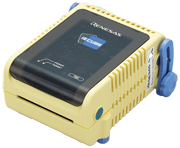
The IECUBE for 78K0R is a high-Performance full-spec emulator for 78K MCUs. It provides high-performance debugging functions such as time measurement, coverage, and trace. In addition, a self-testing function detects faults in the IECUBE and performs maintenance.
Features
- Functions [Learn More]
- Specifications [Learn More]
- Components [Learn More]
- Optional Products (Sold Separately) [Learn More]
- Learn More
Release Information
Integrated Development Environment CS+ (CS+ for CA, CX)
Details of CS+ upgrade (See Tool News)
*The following tool produced by partner is also available.
- IAR Embedded Workbench (Contact IAR Systems.)
Target Devices
Additional Details
Functions
See related documents. (user's manual, release note, etc.)
Specifications
See related documents. (user's manual, release note, etc.)
Components
See related documents. (user's manual, release note, etc.)
Optional Products (Sold Separately)
- Emulation Probe
- Exchange Adapter
- Space Adapter
- YQ Connector
- Target Connector
- Mount Adapter
Optional product list of IECUBE for 78K0R (PDF | English, 日本語) - Check pin adapter Drawings of QB-144-CA-01 (PDF)
* Usable in common with RL78, 78K0R, 78K0, 78K0S, V850.
The pin header cover corresponded to the pin arrangement of the MCU is required. You can get the pin header cover package from the following package list. Please print the package and cut out the pin header cover for using.
Package list of pin header cover (PDF | English, 日本語)
Usage of Pin Header Cover - Power Supply Adapter
Specifications of the power supply adapter, QB-COMMON-PW-xx, vary depending on the region. Be sure to use an adapter designed for your region.
Support
Knowledge Base
- Using the E1 or E20 emulator, is it possible to use the AZ78V4 performance analyzer to obtain a trace display for an application which is using the RI78V4 operating system? (E2, E2 Lite, E1, E20)
No, it is not possible. This is because the AZ78V4 uses a record of data access to obtain a trace display. To use the AZ78V4 in tracing, you need to• use IECUBE, or• use a simulator.
Mar 8, 2021

Support Communities

