
Overview
Description
Wi-Fi implementation is made simple and fast by adding a comprehensive suite of AT-Commands to our wireless family (DA16200 Wi-Fi and DA16600 Wi-Fi/Bluetooth® Low Energy combo).
You can access the industry-leading low power features of the DA16200/DA16600 family simply, quickly and without having to develop any complex software on the Wi-Fi side.
- A full end-to-end solution
- Fast prototyping, fast implementation, fast to market
- Ready to use examples for drag and drop
Benefits
- Fast and easy development
- Limited software development
- No Wi-Fi stack knowledge needed
- Fully certified DA16200 module
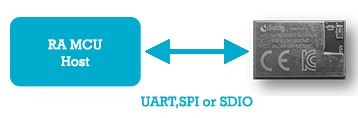
Features
- Wi-Fi provisioning
- MQTT commands
- Sleep commands
- Firmware update Over-the-Air commands (OTA)
- GPIO configuration commands
- Custom AT
Target Devices
Design & Development
Videos & Training
How to Get Started
- Libraries for AT Command parser
- Examples using UART and SPI – Available
- Ready premade examples for host MCU
- Third-party boards: MikroE LP WiFi Click Board, Qwiic WiFi Shield and SparkFun MicroMod WiFi Function Board
- DA16200 DA16600 Provisioning Mobile App (PDF)
Support
Support Communities
- Disable clean session when connecting to MQTT broker using AT command (DA16200)
... to MQTT broker via AT command in DA16200? Is the clean session flag automatically disabled when we use QoS 1? some context: I am using DA16200 as a wifi module and communicate with it via AT command. I found a problem when I try to have a persistent session with ...
Feb 4, 2022 - Reproducing the official "WiFi AT Command Set" firmware image
Hello, I wonder how to reproduce the official AT-CMD firmware image, using the DA16200 FreeRTOS SDK.More specifically, DA16200_FBOOT-GEN01-01-922f1e27d_W25Q32JW.img DA16200_FRTOS-GEN01-01-56c232799-004158.img from this link. Which configuration header files are relevant?Which compilation flags need to be enabled/ ...
Jul 4, 2023 - DA16200 MQTT DPM
... is in DPM mode and the device wakes up with "+INIT:WAKEUP,UC " message and then the device goes to sleep suddenly and thereafter no AT commands working. I've followed the instruction on the AT command reference manual "DA16200 AT Command UM-WI-003" "Procedure to Process MQTT Messages".
Feb 8, 2022
Knowledge Base
- There are already so many smart home protocols these days. Why should I consider adding Matter?
... applications communicate with each other and with the underlying hardware and operating system. Other protocols that are commonly used in smart home systems, such as Wi-Fi, Bluetooth, Zigbee, and Z-Wave, operate at lower layers of the stack and are responsible for managing the physical connection between devices. Matter ...

Support Communities

