
Features
- Integrated MOSFET switches
- 6A continuous output current
- ±1% output voltage accuracy
- Snapshot™ parametric capture
- I2C/SMBus interface, PMBus compatible
- Internal non-volatile memory (NVM)
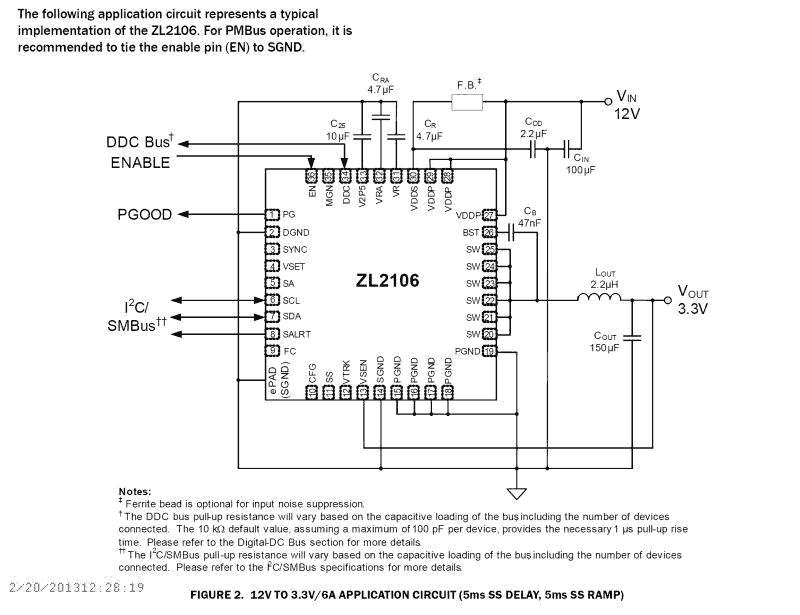
Description
The ZL2106 is a digital power conversion and management IC that combines an integrated synchronous step-down DC/DC converter with key power management functions in a small package, resulting in a flexible and integrated solution. The ZL2106 can provide an output voltage from 0. 54V to 5. 5V (with margin) from an input voltage between 4. 5V and 14V. Internal low rDS(ON) synchronous power MOSFETs enable the ZL2106 to deliver continuous loads up to 6A with high efficiency. An internal Schottky bootstrap diode reduces discrete component count. The ZL2106 also supports phase spreading to reduce system input capacitance. Power management features such as digital soft-start delay and ramp, sequencing, tracking, and margining can be configured by simple pin-strapping or through an on-chip serial port. The ZL2106 uses the PMBus™ protocol for communication with a host controller and the Digital-DC bus for interoperability between other Zilker Labs devices.
Applications
- Telecom, Networking, Storage equipment
- Test and Measurement equipment
- Industrial control equipment
- 5V and 12V distributed power systems
| Part Number | Status | Samples | Stock | RoHS | Package | Lead Count (#) | Carrier Type | Moisture Sensitivity Level (MSL) | Pb (Lead) Free | Pb Free Category | Temp. Range (°C) |
|---|---|---|---|---|---|---|---|---|---|---|---|
| ZL2106ALCF | Obsolete | N/A | Out of Stock | RoHS:EN | QFN | 36# | Tube | 2 | Yes | Pb-Free 100% Matte Tin Plate w/Anneal-e3 | -40 to +85°C |
| ZL2106ALCFT | Obsolete | N/A | Out of Stock | RoHS:EN | QFN | 36# | Reel | 2 | Yes | Pb-Free 100% Matte Tin Plate w/Anneal-e3 | -40 to +85°C |
| ZL2106ALCFTK | Obsolete | N/A | Out of Stock | RoHS:EN | QFN | 36# | Reel | 2 | Yes | Pb-Free 100% Matte Tin Plate w/Anneal-e3 | -40 to +85°C |
Filters
Applied Filters
- Application NotePDF 805 KB an2018 May 15, 2018AI-generated Summary: The ZL_PMBus API provides functions to interact with Zilker Labs PMBus devices, including retrieving the DLL version, firmware version, and scanning connected devices. The ZL_DLLVersion function returns the API DLL version, while ZL_FWVersion obtains the firmware version from a device handle. ZLDeviceScan lists all connected PMBus interfaces by their serial numbers, requiring memory allocation based on the number of devices found. Proper error handling and usage conditions are described for each function.
- Application NotePDF 214 KB an2037 May 09, 2018AI-generated Summary: The checklist covers schematic design, PCB layout, and PMBus configuration for Zilker Labs power devices. It emphasizes verifying device pin-straps, SMBus addressing, pull-up resistors, and synchronization of switching clocks. It recommends proper decoupling, temperature compensation, and component selection for efficiency and thermal performance. PMBus configuration includes sequence settings, fault responses, calibration, temperature measurement, and command protection with specific password lengths. Proper documentation and adherence to design guidelines ensure reliable system performance.
- Application NotePDF 807 KB an2035 May 09, 2018AI-generated Summary: Compensation involves canceling poles with zeros to simplify system response, balancing bandwidth for transient response and noise sensitivity. A Type 3 PID compensator modifies the error signal with proportional, integral, and derivative feedback to control the PWM generator. Digital PID compensation offers flexibility using G, F, and Q coefficients to match compensator and plant characteristics. Stability depends on phase and gain margins, with typical targets of 45° phase margin and 6 dB gain margin. The CompZL tool aids initial compensation by modeling the plant and adjusting parameters to optimize stability and transient performance.
- Application NotePDF 573 KB an2032 May 08, 2018AI-generated Summary: The document explains the Non-Linear Response (NLR) configuration for DDC products, detailing threshold settings, correction times, and operating modes. Inner and outer thresholds adjust voltage response to load changes, with correction times proportional to switching periods. Three NLR modes—single level, two level, and hysteretic—offer flexibility based on power filter damping. Blanking time prevents rapid switching. Typical application circuits illustrate these concepts.
- Application NotePDF 528 KB an2028 May 04, 2018AI-generated Summary: Configuration files consist of PMBus commands to set device parameters, starting with restoring factory settings and ending with storing configurations in non-volatile memory. Devices read pin-strap settings on power-up and update configurations accordingly. Examples of configuration files are provided in both text and hex formats. PowerNavigator software offers a graphical interface for controlling and configuring devices via SMBus/PC, enabling engineers to generate configuration files and monitor device status and parameters.
- Application NotePDF 1.43 MB an2010 May 01, 2018AI-generated Summary: The document details power dissipation characteristics and thermal guidelines for Digital-DC™ controllers with internal and external switches. It explains how power dissipation depends on gate drive current, switching frequency, and FET gate charge. It provides calculations for power dissipation in different scenarios and highlights the importance of managing package temperature via external drivers or reduced operating parameters. The thermal limits for components, including PCB materials and junction temperatures, are also specified.
- Product Change NoticePDF 124 KB PCN16089A Oct 31, 2016
- Application NotePDF 686 KB an2030 Mar 31, 2016AI-generated Summary: The document details configuring a device via the SMBus using configuration files in text and hex formats. It explains the production programming flowchart, including device ID verification, serial number insertion, and error checking. Examples of configuration files for the ZL2005 device show commands for restoring factory settings, setting voltages, timing delays, and security passwords. The process ensures proper device setup and security during production programming.
- Application NotePDF 1.08 MB an2026 May 08, 2014AI-generated Summary: The GROUP MONITOR screen in PowerNavigator displays real-time monitoring and basic configuration for up to three voltage rails simultaneously. It shows device descriptions, address selection, enable status, and margin settings. Key parameters like input/output voltage, current, duty cycle, switching frequency, and temperature are continuously updated via SMBus. The status region highlights operational faults such as power good and voltage/current deviations, allowing users to monitor and clear faults efficiently.
- Product Change NoticePDF 221 KB PCN14010 Mar 03, 2014
- Application NotePDF 1.01 MB an2031 Jun 16, 2011AI-generated Summary: The document explains how to write and modify configuration files for Intersil digital power devices using PowerNavigator software. It details the syntax for commands, storing settings in Default and User Stores, and the process of saving and editing configuration files. It also covers adding password protection to commands using PRIVATE_PASSWORD, PUBLIC_PASSWORD, and UNPROTECT commands to secure device settings.
- Product AdvisoryPDF 43 KB PA11055 Jun 01, 2011
Recommended Documents (1)
Datasheets (1)
- Manual - HardwarePDF 693 KB intersil-zlusb-install-guide May 25, 2010
Manuals & Guides (3)
- Application NotePDF 805 KB an2018 May 15, 2018AI-generated Summary: The ZL_PMBus API provides functions to interact with Zilker Labs PMBus devices, including retrieving the DLL version, firmware version, and scanning connected devices. The ZL_DLLVersion function returns the API DLL version, while ZL_FWVersion obtains the firmware version from a device handle. ZLDeviceScan lists all connected PMBus interfaces by their serial numbers, requiring memory allocation based on the number of devices found. Proper error handling and usage conditions are described for each function.
- Application NotePDF 214 KB an2037 May 09, 2018AI-generated Summary: The checklist covers schematic design, PCB layout, and PMBus configuration for Zilker Labs power devices. It emphasizes verifying device pin-straps, SMBus addressing, pull-up resistors, and synchronization of switching clocks. It recommends proper decoupling, temperature compensation, and component selection for efficiency and thermal performance. PMBus configuration includes sequence settings, fault responses, calibration, temperature measurement, and command protection with specific password lengths. Proper documentation and adherence to design guidelines ensure reliable system performance.
- Application NotePDF 807 KB an2035 May 09, 2018AI-generated Summary: Compensation involves canceling poles with zeros to simplify system response, balancing bandwidth for transient response and noise sensitivity. A Type 3 PID compensator modifies the error signal with proportional, integral, and derivative feedback to control the PWM generator. Digital PID compensation offers flexibility using G, F, and Q coefficients to match compensator and plant characteristics. Stability depends on phase and gain margins, with typical targets of 45° phase margin and 6 dB gain margin. The CompZL tool aids initial compensation by modeling the plant and adjusting parameters to optimize stability and transient performance.
- Application NotePDF 573 KB an2032 May 08, 2018AI-generated Summary: The document explains the Non-Linear Response (NLR) configuration for DDC products, detailing threshold settings, correction times, and operating modes. Inner and outer thresholds adjust voltage response to load changes, with correction times proportional to switching periods. Three NLR modes—single level, two level, and hysteretic—offer flexibility based on power filter damping. Blanking time prevents rapid switching. Typical application circuits illustrate these concepts.
- Application NotePDF 528 KB an2028 May 04, 2018AI-generated Summary: Configuration files consist of PMBus commands to set device parameters, starting with restoring factory settings and ending with storing configurations in non-volatile memory. Devices read pin-strap settings on power-up and update configurations accordingly. Examples of configuration files are provided in both text and hex formats. PowerNavigator software offers a graphical interface for controlling and configuring devices via SMBus/PC, enabling engineers to generate configuration files and monitor device status and parameters.View More (16)
Application Notes & White Papers (16)
- Product Change NoticePDF 124 KB PCN16089A Oct 31, 2016
- Product Change NoticePDF 221 KB PCN14010 Mar 03, 2014View More (6)
Product Notices (PCN, EOL, etc) (6)
No Results Found.
Make sure all keywords are spelled correctly.
Try fewer, different, or more general terms to vary your search.
If you have filters applied, consider deselecting some to broaden your results.
- Search our extensive knowledgebase, designed to help customers with their FAQs.
- Get help from our expert Renesas technical staff and community on our support forums.
No Results Found.
Make sure all keywords are spelled correctly.
Try fewer, different, or more general terms to vary your search.
If you have filters applied, consider deselecting some to broaden your results.
- Search our extensive knowledgebase, designed to help customers with their FAQs.
- Get help from our expert Renesas technical staff and community on our support forums.
No Results Found.
Make sure all keywords are spelled correctly.
Try fewer, different, or more general terms to vary your search.
If you have filters applied, consider deselecting some to broaden your results.
- Search our extensive knowledgebase, designed to help customers with their FAQs.
- Get help from our expert Renesas technical staff and community on our support forums.
No Results Found.
Make sure all keywords are spelled correctly.
Try fewer, different, or more general terms to vary your search.
If you have filters applied, consider deselecting some to broaden your results.
- Search our extensive knowledgebase, designed to help customers with their FAQs.
- Get help from our expert Renesas technical staff and community on our support forums.
No Results Found.
Make sure all keywords are spelled correctly.
Try fewer, different, or more general terms to vary your search.
If you have filters applied, consider deselecting some to broaden your results.
- Search our extensive knowledgebase, designed to help customers with their FAQs.
- Get help from our expert Renesas technical staff and community on our support forums.
No Results Found.
Make sure all keywords are spelled correctly.
Try fewer, different, or more general terms to vary your search.
If you have filters applied, consider deselecting some to broaden your results.
- Search our extensive knowledgebase, designed to help customers with their FAQs.
- Get help from our expert Renesas technical staff and community on our support forums.
No Results Found.
Make sure all keywords are spelled correctly.
Try fewer, different, or more general terms to vary your search.
If you have filters applied, consider deselecting some to broaden your results.
- Search our extensive knowledgebase, designed to help customers with their FAQs.
- Get help from our expert Renesas technical staff and community on our support forums.
Other (1)
No Results Found.
Make sure all keywords are spelled correctly.
Try fewer, different, or more general terms to vary your search.
If you have filters applied, consider deselecting some to broaden your results.
- Search our extensive knowledgebase, designed to help customers with their FAQs.
- Get help from our expert Renesas technical staff and community on our support forums.
No Results Found.
Make sure all keywords are spelled correctly.
Try fewer, different, or more general terms to vary your search.
If you have filters applied, consider deselecting some to broaden your results.
- Search our extensive knowledgebase, designed to help customers with their FAQs.
- Get help from our expert Renesas technical staff and community on our support forums.

Support Communities


