Features
- Serial Data Bus
- Dual Outputs:
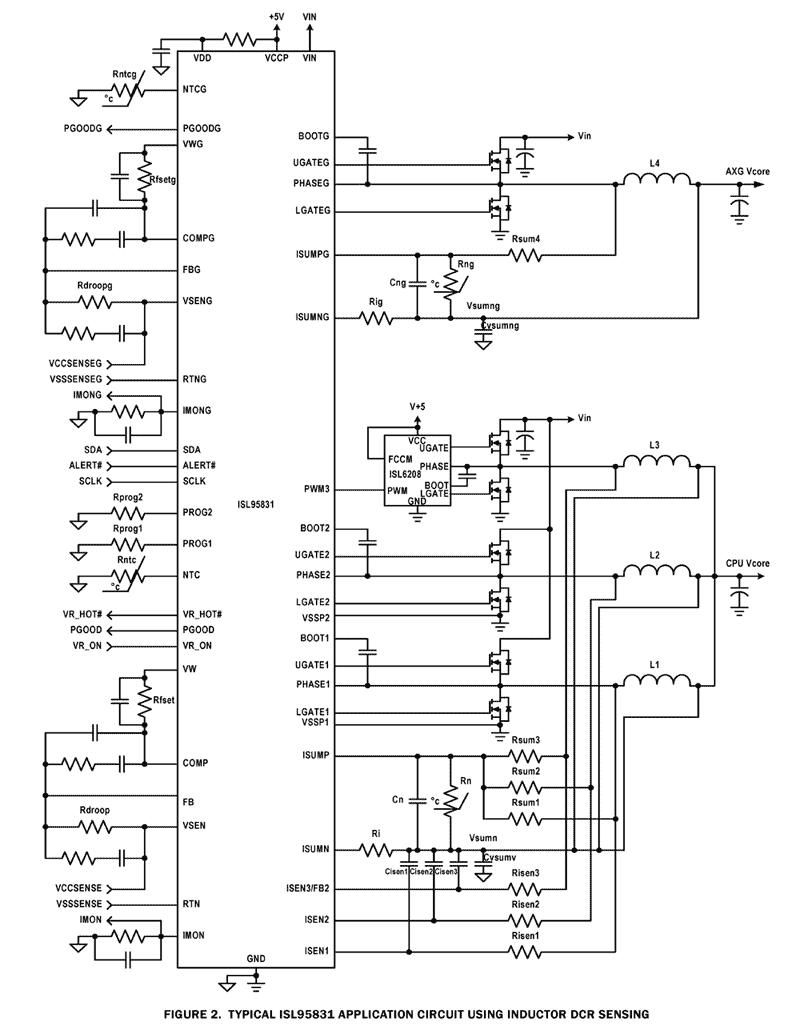
- Configurable 3-, 2- or 1-phase for the 1st Output using 2 integrated Gate Drivers
- 1-phase for the 2nd Output using an Integrated Gate Driver
- 0.5% System Accuracy Over-Temperature
- Supports Multiple Current Sensing Methods
- Lossless Inductor DCR Current Sensing
- Precision Resistor Current Sensing
- Differential Remote Voltage Sensing
- Programmable VBOOT Voltage at Start-up
- Resistor Programmable IMAX, TMAX for Both Outputs
- Adaptive Body Diode Conduction Time Reduction
Description
Compliant with IMVP-7/VR12™, the ISL95831 provides a complete solution for microprocessor and graphic processor core power supply. It provides two Voltage Regulators (VRs) with three integrated gate drivers. The first VR can be configured as 3-, 2- or 1-phase VR while the second output is 1-phase VR, providing maximum flexibility. The two VRs share the serial control bus to communicate with the CPU and achieve lower cost and smaller board area compared with the two-chip approach. Based on Intersil's Robust Ripple Regulator (R3) technology™, the PWM modulator compared to traditional modulators, has faster transient settling time, variable switching frequency during load transients and has improved light load efficiency with It's ability to automatically change switching frequency. The ISL95831 has several other key features. Both outputs support DCR current sensing with single NTC thermistor for DCR temperature compensation or accurate resistor current sensing. Both outputs come with remote voltage sense, programmable VBOOT voltage, programmable IMAX, TMAX, adjustable switching frequency, OC protection and separate Power-Good.
Applications
- IMVP-7/VR12 Compliant Computers
| Part Number | Status | Samples | Stock | RoHS | Package | Lead Count (#) | Carrier Type | Moisture Sensitivity Level (MSL) | Pb (Lead) Free | Pb Free Category | Temp. Range (°C) |
|---|---|---|---|---|---|---|---|---|---|---|---|
| ISL95831HRTZ | Obsolete | N/A | In Stock | RoHS:EN | TQFN | 48# | Tube | 3 | Yes | Pb-Free 100% Matte Tin Plate w/Anneal-e3 | -10 to +100°C |
| ISL95831HRTZ-T | Obsolete | N/A | In Stock | RoHS:EN | TQFN | 48# | Reel | 3 | Yes | Pb-Free 100% Matte Tin Plate w/Anneal-e3 | -10 to +100°C |
| ISL95831IRTZ | Obsolete | N/A | In Stock | RoHS:EN | TQFN | 48# | Tube | 3 | Yes | Pb-Free 100% Matte Tin Plate w/Anneal-e3 | -40 to +85°C |
| ISL95831IRTZ-T | Obsolete | N/A | Out of Stock | RoHS:EN | TQFN | 48# | Reel | 3 | Yes | Pb-Free 100% Matte Tin Plate w/Anneal-e3 | -40 to +85°C |
Filters
Applied Filters
- Product Change NoticePDF 294 KB PCN14036 Jul 08, 2014
- Product Change NoticePDF 97 KB PCN11136 Dec 20, 2011
- Product Change NoticePDF 140 KB PCN11091 Sep 01, 2011
- Application NotePDF 397 KB an1684 Jan 19, 2004AI-generated Summary: The document outlines important legal disclaimers and usage guidelines for semiconductor products. It emphasizes user responsibility for product design and safety, disclaims liability for damages, and clarifies no intellectual property licenses are granted. Products are categorized by quality grades with specific application recommendations. Users must comply with laws, avoid unauthorized modifications, and ensure safe use within specified conditions. Contact details for Renesas Electronics sales offices worldwide are provided.
- Application NotePDF 509 KB an1681 Jan 19, 2004AI-generated Summary: The document explains grounding techniques for PCB layouts using a dual op amp example on a single-layer copper board. It compares three grounding schemes: a center spine ground trace, an outer ground plane, and a split/star ground plane, highlighting the benefits of single-point grounding to minimize noise and antenna effects. It emphasizes following current paths, minimizing loop lengths, and ensuring close forward and return paths to reduce interference. The document also includes disclaimers on product use, quality grades, safety, and legal compliance.
Recommended Documents (2)
Datasheets (2)
No Results Found.
Make sure all keywords are spelled correctly.
Try fewer, different, or more general terms to vary your search.
If you have filters applied, consider deselecting some to broaden your results.
- Search our extensive knowledgebase, designed to help customers with their FAQs.
- Get help from our expert Renesas technical staff and community on our support forums.
- Application NotePDF 397 KB an1684 Jan 19, 2004AI-generated Summary: The document outlines important legal disclaimers and usage guidelines for semiconductor products. It emphasizes user responsibility for product design and safety, disclaims liability for damages, and clarifies no intellectual property licenses are granted. Products are categorized by quality grades with specific application recommendations. Users must comply with laws, avoid unauthorized modifications, and ensure safe use within specified conditions. Contact details for Renesas Electronics sales offices worldwide are provided.
- Application NotePDF 509 KB an1681 Jan 19, 2004AI-generated Summary: The document explains grounding techniques for PCB layouts using a dual op amp example on a single-layer copper board. It compares three grounding schemes: a center spine ground trace, an outer ground plane, and a split/star ground plane, highlighting the benefits of single-point grounding to minimize noise and antenna effects. It emphasizes following current paths, minimizing loop lengths, and ensuring close forward and return paths to reduce interference. The document also includes disclaimers on product use, quality grades, safety, and legal compliance.
Application Notes & White Papers (2)
- Product Change NoticePDF 294 KB PCN14036 Jul 08, 2014
- Product Change NoticePDF 97 KB PCN11136 Dec 20, 2011
- Product Change NoticePDF 140 KB PCN11091 Sep 01, 2011
Product Notices (PCN, EOL, etc) (3)
No Results Found.
Make sure all keywords are spelled correctly.
Try fewer, different, or more general terms to vary your search.
If you have filters applied, consider deselecting some to broaden your results.
- Search our extensive knowledgebase, designed to help customers with their FAQs.
- Get help from our expert Renesas technical staff and community on our support forums.
No Results Found.
Make sure all keywords are spelled correctly.
Try fewer, different, or more general terms to vary your search.
If you have filters applied, consider deselecting some to broaden your results.
- Search our extensive knowledgebase, designed to help customers with their FAQs.
- Get help from our expert Renesas technical staff and community on our support forums.
No Results Found.
Make sure all keywords are spelled correctly.
Try fewer, different, or more general terms to vary your search.
If you have filters applied, consider deselecting some to broaden your results.
- Search our extensive knowledgebase, designed to help customers with their FAQs.
- Get help from our expert Renesas technical staff and community on our support forums.
No Results Found.
Make sure all keywords are spelled correctly.
Try fewer, different, or more general terms to vary your search.
If you have filters applied, consider deselecting some to broaden your results.
- Search our extensive knowledgebase, designed to help customers with their FAQs.
- Get help from our expert Renesas technical staff and community on our support forums.
No Results Found.
Make sure all keywords are spelled correctly.
Try fewer, different, or more general terms to vary your search.
If you have filters applied, consider deselecting some to broaden your results.
- Search our extensive knowledgebase, designed to help customers with their FAQs.
- Get help from our expert Renesas technical staff and community on our support forums.
No Results Found.
Make sure all keywords are spelled correctly.
Try fewer, different, or more general terms to vary your search.
If you have filters applied, consider deselecting some to broaden your results.
- Search our extensive knowledgebase, designed to help customers with their FAQs.
- Get help from our expert Renesas technical staff and community on our support forums.
No Results Found.
Make sure all keywords are spelled correctly.
Try fewer, different, or more general terms to vary your search.
If you have filters applied, consider deselecting some to broaden your results.
- Search our extensive knowledgebase, designed to help customers with their FAQs.
- Get help from our expert Renesas technical staff and community on our support forums.
No Results Found.
Make sure all keywords are spelled correctly.
Try fewer, different, or more general terms to vary your search.
If you have filters applied, consider deselecting some to broaden your results.
- Search our extensive knowledgebase, designed to help customers with their FAQs.
- Get help from our expert Renesas technical staff and community on our support forums.
No Results Found.
Make sure all keywords are spelled correctly.
Try fewer, different, or more general terms to vary your search.
If you have filters applied, consider deselecting some to broaden your results.
- Search our extensive knowledgebase, designed to help customers with their FAQs.
- Get help from our expert Renesas technical staff and community on our support forums.
No Results Found.
Make sure all keywords are spelled correctly.
Try fewer, different, or more general terms to vary your search.
If you have filters applied, consider deselecting some to broaden your results.
- Search our extensive knowledgebase, designed to help customers with their FAQs.
- Get help from our expert Renesas technical staff and community on our support forums.
Filters
Applied Filters
Software & Tools
Filter by Type
Filter by Provider
Sample Code
Filter by Application
Filter by Function
Filter by Compiler
Filter by IDE
Simulation Models
Partner Solutions
- SimulatoriSim Personal Edition (iSim:PE) speeds the design cycle and reduces risk early in any project, identifying parts that can be used in current as well as next-generation designs.
No Results Found.
Make sure all keywords are spelled correctly.
Try fewer, different, or more general terms to vary your search.
If you have filters applied, consider deselecting some to broaden your results.
- Search our extensive knowledgebase, designed to help customers with their FAQs.
- Get help from our expert Renesas technical staff and community on our support forums.
- SimulatoriSim Personal Edition (iSim:PE) speeds the design cycle and reduces risk early in any project, identifying parts that can be used in current as well as next-generation designs.
Software & Tools (1)
No Results Found.
Make sure all keywords are spelled correctly.
Try fewer, different, or more general terms to vary your search.
If you have filters applied, consider deselecting some to broaden your results.
- Search our extensive knowledgebase, designed to help customers with their FAQs.
- Get help from our expert Renesas technical staff and community on our support forums.
Simulation Models (2)
No Results Found.
Make sure all keywords are spelled correctly.
Try fewer, different, or more general terms to vary your search.
If you have filters applied, consider deselecting some to broaden your results.
- Search our extensive knowledgebase, designed to help customers with their FAQs.
- Get help from our expert Renesas technical staff and community on our support forums.
Support Communities
-
ISL95831 Spreadsheet
Hi I read the ISL95831 datasheet and see "Please go to www.intersil.com/design/ to request spreadsheet.Figure 26 shows a screenshot of the spreadsheet." in page 27, but the link is invlid, it dispalys 404 error. so can you supply the spreadsheet of ISL95831 to me ...
Jan 18, 2023 -
power navigator can't find ISL95831
Hi When use the latest version:5.4.139 for power navigator ,I can't find this :ISL95831 to debug .Pls help how to solve?
Nov 1, 2023 -
Does USB to PMBus Adapter - ISLUSBEVAL1Z support command prompt ?
Hi, I would like integrate the USB to PMBus Adapter into ICT (in circuit testing) test program. Can I program / verify the VR firmware by execute command prompt only without launch Production Config Tool or Power Navigator ?
Oct 26, 2023