Features
- Triple Voltage Monitor and Reset Assertion
- Low VDD Detection and Reset Assertion
- Adjustable Reset Threshold Voltages
- 0.6V ±6mV Over -40°C to +85°C
- Reset Signal Valid to VDD = 1V
- 140ms Minimum Reset Pulse Delay that is Customizable Using an External Capacitor
- Both RST and RST Outputs Available
- Undervoltage/Overvoltage Monitoring Capability
- Low 20µA Consumption
- Small 8 Ld MSOP Package
- Pb-Free Plus Anneal Available (RoHS Compliant)
Description
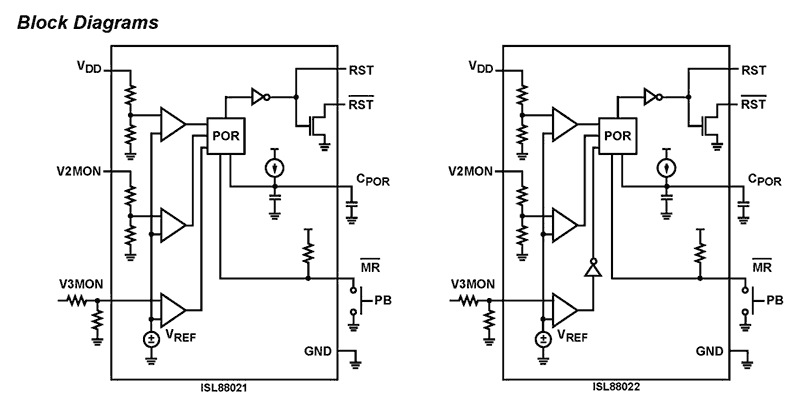
The ISL88021 and ISL88022 family of devices are customizable triple voltage-monitoring supervisors that assert a reset if any of the monitored voltages becomes non-compliant. They offer popular functions such as Power-On-Reset timing control with both RESET and RESET outputs, Supply Voltage Supervision, both under or overvoltage detection, and Manual Reset assertion. By offering these features in a small 8 Ld MSOP package, the ISL88021 and ISL88022 can lower system cost, reduce board space requirements and increase the reliability of systems. Applying a voltage to VDD activates the Power-On-Reset circuit which holds RESET low for an adjustable period of time. This allows the power supply and system oscillator to stabilize before the processor can execute code. Low VDD detection circuitry protects the user's system from low voltage conditions, resetting the system when VDD falls below its minimum preset voltage threshold VTH1. Reset remains asserted until VDD returns to its proper operating level and stabilizes. Two additional voltage monitoring inputs, V2MON (preset) and V3MON (adjustable), monitor other supplies to provide reliable system operation. The ISL88021 V3MON input monitors for undervoltage (UV) conditions whereas the ISL88022 V3MON input allows monitoring for overvoltage (OV) conditions. The monitored voltage on V3MON on either device is compared via a resistor divider to a 600mV internal reference. Hence, any voltage more or less positive than this reference can be accurately monitored to meet specific system level requirements or to fine-tune the threshold for applications requiring higher precision. These devices also let users increase the Power-On-Reset time-out delay by connecting a capacitor between CPOR and ground. This lengthens the period of an internal clock counter thereby increasing the time between voltage compliance and reset outputs signaling. A manual reset input provides debounce circuitry for minimum reset component count.
Applications
- Process Control Systems
- Intelligent Instruments
- Embedded Control Systems
- Computer Systems
- Portable/Battery-Powered Equipment
- Multi-Voltage Systems
| Part Number | Status | Samples | Stock | RoHS | Package | Lead Count (#) | Carrier Type | Moisture Sensitivity Level (MSL) | Pb (Lead) Free | Pb Free Category | Temp. Range (°C) |
|---|---|---|---|---|---|---|---|---|---|---|---|
| ISL88021IU8FAZ | Obsolete | N/A | Out of Stock | RoHS:EN | MSOP | 8# | Tube | 2 | Yes | Pb-Free 100% Matte Tin Plate w/Anneal-e3 | -40 to +85°C |
| ISL88021IU8FAZ-TK | Obsolete | N/A | Out of Stock | RoHS:EN | MSOP | 8# | Reel | 2 | Yes | Pb-Free 100% Matte Tin Plate w/Anneal-e3 | -40 to +85°C |
| ISL88021IU8FCZ | Obsolete | N/A | Out of Stock | RoHS:EN | MSOP | 8# | Tube | No | -40 to +85°C | ||
| ISL88021IU8FCZ-TK | Obsolete | N/A | In Stock | RoHS:EN | MSOP | 8# | Reel | 2 | Yes | Pb-Free 100% Matte Tin Plate w/Anneal-e3 | -40 to +85°C |
| ISL88021IU8HEZ | Obsolete | N/A | Out of Stock | RoHS:EN | MSOP | 8# | Tube | 2 | Yes | Pb-Free 100% Matte Tin Plate w/Anneal-e3 | -40 to +85°C |
| ISL88021IU8HEZ-TK | Obsolete | N/A | Out of Stock | RoHS:EN | MSOP | 8# | Reel | 2 | Yes | Pb-Free 100% Matte Tin Plate w/Anneal-e3 | -40 to +85°C |
| ISL88021IU8HFZ | Obsolete | N/A | Out of Stock | RoHS:EN | MSOP | 8# | Tube | 2 | Yes | Pb-Free 100% Matte Tin Plate w/Anneal-e3 | -40 to +85°C |
| ISL88021IU8HFZ-TK | Obsolete | N/A | In Stock | RoHS:EN | MSOP | 8# | Reel | 2 | Yes | Pb-Free 100% Matte Tin Plate w/Anneal-e3 | -40 to +85°C |
Filters
Applied Filters
- Application NotePDF 397 KB an1684 Jan 19, 2004AI-generated Summary: The document outlines important legal disclaimers and usage guidelines for semiconductor products. It emphasizes user responsibility for product design and safety, disclaims liability for damages, and clarifies no intellectual property licenses are granted. Products are categorized by quality grades with specific application recommendations. Users must comply with laws, avoid unauthorized modifications, and ensure safe use within specified conditions. Contact details for Renesas Electronics sales offices worldwide are provided.
- Application NotePDF 509 KB an1681 Jan 19, 2004AI-generated Summary: The document explains grounding techniques for PCB layouts using a dual op amp example on a single-layer copper board. It compares three grounding schemes: a center spine ground trace, an outer ground plane, and a split/star ground plane, highlighting the benefits of single-point grounding to minimize noise and antenna effects. It emphasizes following current paths, minimizing loop lengths, and ensuring close forward and return paths to reduce interference. The document also includes disclaimers on product use, quality grades, safety, and legal compliance.
Recommended Documents (1)
Datasheets (1)
No Results Found.
Make sure all keywords are spelled correctly.
Try fewer, different, or more general terms to vary your search.
If you have filters applied, consider deselecting some to broaden your results.
- Search our extensive knowledgebase, designed to help customers with their FAQs.
- Get help from our expert Renesas technical staff and community on our support forums.
- Application NotePDF 397 KB an1684 Jan 19, 2004AI-generated Summary: The document outlines important legal disclaimers and usage guidelines for semiconductor products. It emphasizes user responsibility for product design and safety, disclaims liability for damages, and clarifies no intellectual property licenses are granted. Products are categorized by quality grades with specific application recommendations. Users must comply with laws, avoid unauthorized modifications, and ensure safe use within specified conditions. Contact details for Renesas Electronics sales offices worldwide are provided.
- Application NotePDF 509 KB an1681 Jan 19, 2004AI-generated Summary: The document explains grounding techniques for PCB layouts using a dual op amp example on a single-layer copper board. It compares three grounding schemes: a center spine ground trace, an outer ground plane, and a split/star ground plane, highlighting the benefits of single-point grounding to minimize noise and antenna effects. It emphasizes following current paths, minimizing loop lengths, and ensuring close forward and return paths to reduce interference. The document also includes disclaimers on product use, quality grades, safety, and legal compliance.
Application Notes & White Papers (2)
Product Notices (PCN, EOL, etc) (3)
No Results Found.
Make sure all keywords are spelled correctly.
Try fewer, different, or more general terms to vary your search.
If you have filters applied, consider deselecting some to broaden your results.
- Search our extensive knowledgebase, designed to help customers with their FAQs.
- Get help from our expert Renesas technical staff and community on our support forums.
No Results Found.
Make sure all keywords are spelled correctly.
Try fewer, different, or more general terms to vary your search.
If you have filters applied, consider deselecting some to broaden your results.
- Search our extensive knowledgebase, designed to help customers with their FAQs.
- Get help from our expert Renesas technical staff and community on our support forums.
No Results Found.
Make sure all keywords are spelled correctly.
Try fewer, different, or more general terms to vary your search.
If you have filters applied, consider deselecting some to broaden your results.
- Search our extensive knowledgebase, designed to help customers with their FAQs.
- Get help from our expert Renesas technical staff and community on our support forums.
No Results Found.
Make sure all keywords are spelled correctly.
Try fewer, different, or more general terms to vary your search.
If you have filters applied, consider deselecting some to broaden your results.
- Search our extensive knowledgebase, designed to help customers with their FAQs.
- Get help from our expert Renesas technical staff and community on our support forums.
No Results Found.
Make sure all keywords are spelled correctly.
Try fewer, different, or more general terms to vary your search.
If you have filters applied, consider deselecting some to broaden your results.
- Search our extensive knowledgebase, designed to help customers with their FAQs.
- Get help from our expert Renesas technical staff and community on our support forums.
No Results Found.
Make sure all keywords are spelled correctly.
Try fewer, different, or more general terms to vary your search.
If you have filters applied, consider deselecting some to broaden your results.
- Search our extensive knowledgebase, designed to help customers with their FAQs.
- Get help from our expert Renesas technical staff and community on our support forums.
No Results Found.
Make sure all keywords are spelled correctly.
Try fewer, different, or more general terms to vary your search.
If you have filters applied, consider deselecting some to broaden your results.
- Search our extensive knowledgebase, designed to help customers with their FAQs.
- Get help from our expert Renesas technical staff and community on our support forums.
No Results Found.
Make sure all keywords are spelled correctly.
Try fewer, different, or more general terms to vary your search.
If you have filters applied, consider deselecting some to broaden your results.
- Search our extensive knowledgebase, designed to help customers with their FAQs.
- Get help from our expert Renesas technical staff and community on our support forums.
No Results Found.
Make sure all keywords are spelled correctly.
Try fewer, different, or more general terms to vary your search.
If you have filters applied, consider deselecting some to broaden your results.
- Search our extensive knowledgebase, designed to help customers with their FAQs.
- Get help from our expert Renesas technical staff and community on our support forums.
No Results Found.
Make sure all keywords are spelled correctly.
Try fewer, different, or more general terms to vary your search.
If you have filters applied, consider deselecting some to broaden your results.
- Search our extensive knowledgebase, designed to help customers with their FAQs.
- Get help from our expert Renesas technical staff and community on our support forums.