Features
- Supports AMD SVI 1.0 serial data bus interface
- Dual output controller with integrated drivers
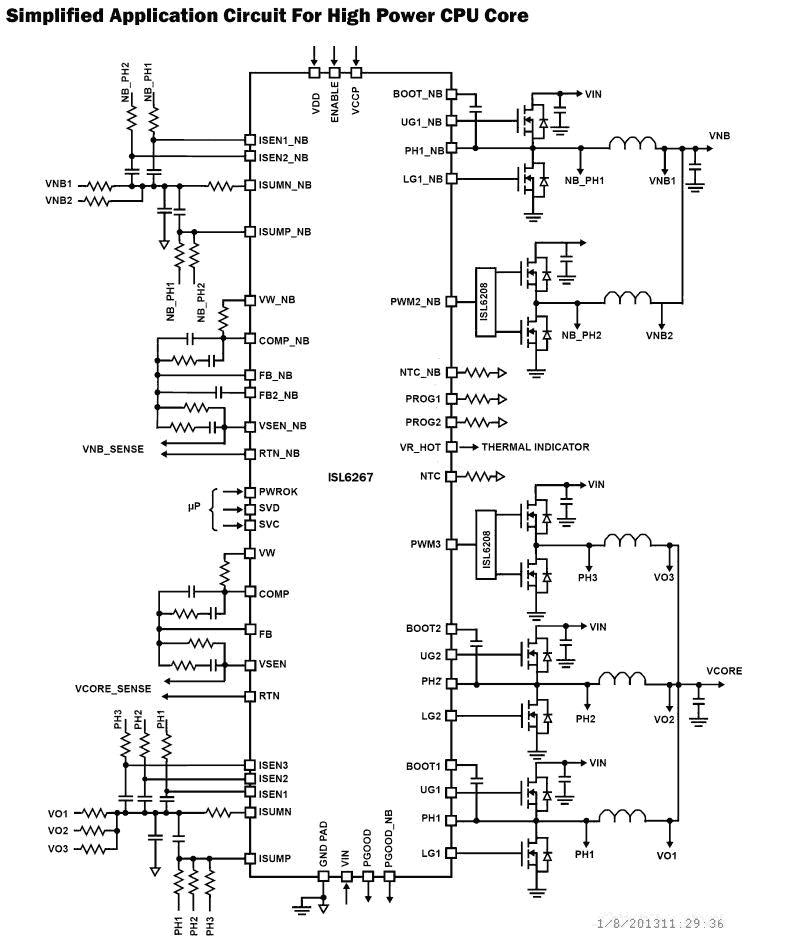
- Core VR configurable 3-, 2-, 1-phase with two integrated drivers
- Northbridge VR configurable 2- or 1-phase with one integrated driver
- Precision voltage regulation
- 0.5% system accuracy over-temperature
- 0V to 1.55V in 12.5mV steps
- Enhanced load line accuracy
- Supports multiple current sensing methods
- Lossless inductor DCR current sensing
- Precision resistor current sensing
- Programmable 1-, 2- or 3-phase for the core output and 1- or 2-phase for the northbridge output
- Adaptive body diode conduction time reduction
- Superior noise immunity and transient response
- Output current monitor and thermal monitor
- Differential remote voltage sensing
- High efficiency across entire load range
- Programmable +VID offset for both core and NB
- Programmable switching frequency for both outputs
- Excellent dynamic current balance between phases
- OCP/WOC, OVP, PGOOD, and thermal monitor
- Small footprint 48 Ld 6x6 QFN package
- Pb-free (RoHS compliant)
Description
The ISL6267 is designed to be completely compliant with AMD Fusion™ specifications. The ISL6267 controls two Voltage Regulators (VRs), with three integrated gate drivers. The first VR can be configured as 3-, 2-, or 1-phase VR, while the second output can be configured as 2- or 1-phase VR, providing maximum flexibility. The two VRs share the serial control bus to communicate with the CPU and achieve lower cost and smaller board area compared with two-chip solutions. The PWM modulator of the ISL6267 is based on Intersil’s R3 (Robust Ripple Regulator) Technology™. Compared with the traditional multi-phase buck regulator, the R3 modulator commands variable switching frequency during load transients, achieving faster transient response. With the same modulator, it naturally goes into pulse frequency modulation in light load conditions, which achieves higher light load efficiency and extends battery life. The ISL6267 has several other key features. Both outputs support DCR current sensing with a single NTC thermostat for DCR temperature compensation or accurate resistor current sensing. Both of the outputs utilize remote voltage sense, adjustable switching frequency, current monitor, OC protection, independent power-good indicators, temperature monitors, and a common thermal alert.
Applications
- AMD fusion CPU/GPU core power
- Notebook computer
| Part Number | Status | Samples | Stock | RoHS | Package | Lead Count (#) | Carrier Type | Moisture Sensitivity Level (MSL) | Pb (Lead) Free | Pb Free Category | Temp. Range (°C) |
|---|---|---|---|---|---|---|---|---|---|---|---|
| ISL6267HRZ | Obsolete | N/A | Out of Stock | RoHS:EN | QFN | 48# | Tube | 3 | Yes | Pb-Free 100% Matte Tin Plate w/Anneal-e3 | -10 to +100°C |
| ISL6267HRZ-T | Obsolete | N/A | Out of Stock | RoHS:EN | QFN | 48# | Reel | 3 | Yes | Pb-Free 100% Matte Tin Plate w/Anneal-e3 | -10 to +100°C |
Filters
Applied Filters
- Product Change NoticePDF 223 KB PCN13060 Oct 30, 2013
- Product Change NoticePDF 97 KB PCN11136 Dec 20, 2011
- Application NotePDF 397 KB an1684 Jan 19, 2004AI-generated Summary: The document outlines important legal disclaimers and usage guidelines for semiconductor products. It emphasizes user responsibility for product design and safety, disclaims liability for damages, and clarifies no intellectual property licenses are granted. Products are categorized by quality grades with specific application recommendations. Users must comply with laws, avoid unauthorized modifications, and ensure safe use within specified conditions. Contact details for Renesas Electronics sales offices worldwide are provided.
- Application NotePDF 509 KB an1681 Jan 19, 2004AI-generated Summary: The document explains grounding techniques for PCB layouts using a dual op amp example on a single-layer copper board. It compares three grounding schemes: a center spine ground trace, an outer ground plane, and a split/star ground plane, highlighting the benefits of single-point grounding to minimize noise and antenna effects. It emphasizes following current paths, minimizing loop lengths, and ensuring close forward and return paths to reduce interference. The document also includes disclaimers on product use, quality grades, safety, and legal compliance.
Recommended Documents (1)
Datasheets (1)
No Results Found.
Make sure all keywords are spelled correctly.
Try fewer, different, or more general terms to vary your search.
If you have filters applied, consider deselecting some to broaden your results.
- Search our extensive knowledgebase, designed to help customers with their FAQs.
- Get help from our expert Renesas technical staff and community on our support forums.
- Application NotePDF 397 KB an1684 Jan 19, 2004AI-generated Summary: The document outlines important legal disclaimers and usage guidelines for semiconductor products. It emphasizes user responsibility for product design and safety, disclaims liability for damages, and clarifies no intellectual property licenses are granted. Products are categorized by quality grades with specific application recommendations. Users must comply with laws, avoid unauthorized modifications, and ensure safe use within specified conditions. Contact details for Renesas Electronics sales offices worldwide are provided.
- Application NotePDF 509 KB an1681 Jan 19, 2004AI-generated Summary: The document explains grounding techniques for PCB layouts using a dual op amp example on a single-layer copper board. It compares three grounding schemes: a center spine ground trace, an outer ground plane, and a split/star ground plane, highlighting the benefits of single-point grounding to minimize noise and antenna effects. It emphasizes following current paths, minimizing loop lengths, and ensuring close forward and return paths to reduce interference. The document also includes disclaimers on product use, quality grades, safety, and legal compliance.
Application Notes & White Papers (2)
- Product Change NoticePDF 223 KB PCN13060 Oct 30, 2013
- Product Change NoticePDF 97 KB PCN11136 Dec 20, 2011
Product Notices (PCN, EOL, etc) (2)
No Results Found.
Make sure all keywords are spelled correctly.
Try fewer, different, or more general terms to vary your search.
If you have filters applied, consider deselecting some to broaden your results.
- Search our extensive knowledgebase, designed to help customers with their FAQs.
- Get help from our expert Renesas technical staff and community on our support forums.
No Results Found.
Make sure all keywords are spelled correctly.
Try fewer, different, or more general terms to vary your search.
If you have filters applied, consider deselecting some to broaden your results.
- Search our extensive knowledgebase, designed to help customers with their FAQs.
- Get help from our expert Renesas technical staff and community on our support forums.
No Results Found.
Make sure all keywords are spelled correctly.
Try fewer, different, or more general terms to vary your search.
If you have filters applied, consider deselecting some to broaden your results.
- Search our extensive knowledgebase, designed to help customers with their FAQs.
- Get help from our expert Renesas technical staff and community on our support forums.
No Results Found.
Make sure all keywords are spelled correctly.
Try fewer, different, or more general terms to vary your search.
If you have filters applied, consider deselecting some to broaden your results.
- Search our extensive knowledgebase, designed to help customers with their FAQs.
- Get help from our expert Renesas technical staff and community on our support forums.
No Results Found.
Make sure all keywords are spelled correctly.
Try fewer, different, or more general terms to vary your search.
If you have filters applied, consider deselecting some to broaden your results.
- Search our extensive knowledgebase, designed to help customers with their FAQs.
- Get help from our expert Renesas technical staff and community on our support forums.
No Results Found.
Make sure all keywords are spelled correctly.
Try fewer, different, or more general terms to vary your search.
If you have filters applied, consider deselecting some to broaden your results.
- Search our extensive knowledgebase, designed to help customers with their FAQs.
- Get help from our expert Renesas technical staff and community on our support forums.
No Results Found.
Make sure all keywords are spelled correctly.
Try fewer, different, or more general terms to vary your search.
If you have filters applied, consider deselecting some to broaden your results.
- Search our extensive knowledgebase, designed to help customers with their FAQs.
- Get help from our expert Renesas technical staff and community on our support forums.
No Results Found.
Make sure all keywords are spelled correctly.
Try fewer, different, or more general terms to vary your search.
If you have filters applied, consider deselecting some to broaden your results.
- Search our extensive knowledgebase, designed to help customers with their FAQs.
- Get help from our expert Renesas technical staff and community on our support forums.
No Results Found.
Make sure all keywords are spelled correctly.
Try fewer, different, or more general terms to vary your search.
If you have filters applied, consider deselecting some to broaden your results.
- Search our extensive knowledgebase, designed to help customers with their FAQs.
- Get help from our expert Renesas technical staff and community on our support forums.
No Results Found.
Make sure all keywords are spelled correctly.
Try fewer, different, or more general terms to vary your search.
If you have filters applied, consider deselecting some to broaden your results.
- Search our extensive knowledgebase, designed to help customers with their FAQs.
- Get help from our expert Renesas technical staff and community on our support forums.