Features
- Precision Two/One-phase CORE Voltage Regulator
- 0.5% System Accuracy Over-Temperature
- Enhanced Load Line Accuracy
- Internal Gate Driver with 2A Driving Capability
- Dynamic Phase Adding/Dropping
- Microprocessor Voltage Identification Input
- 7-Bit VID Input
- 0.300V to 1.500V in 12.5mV Steps
- Support VID Change On-the-Fly
- Multiple Current Sensing Schemes Supported
- Lossless Inductor DCR Current Sensing
- Precision Resistive Current Sensing
- CPU Power Monitor
- Thermal Monitor
- User Programmable Switching Frequency
- Differential Remote CPU Die Voltage Sensing
- Static and Dynamic Current Sharing
- Overvoltage, Undervoltage, and Overcurrent Protection
- Pb-Free (RoHS Compliant)
Description
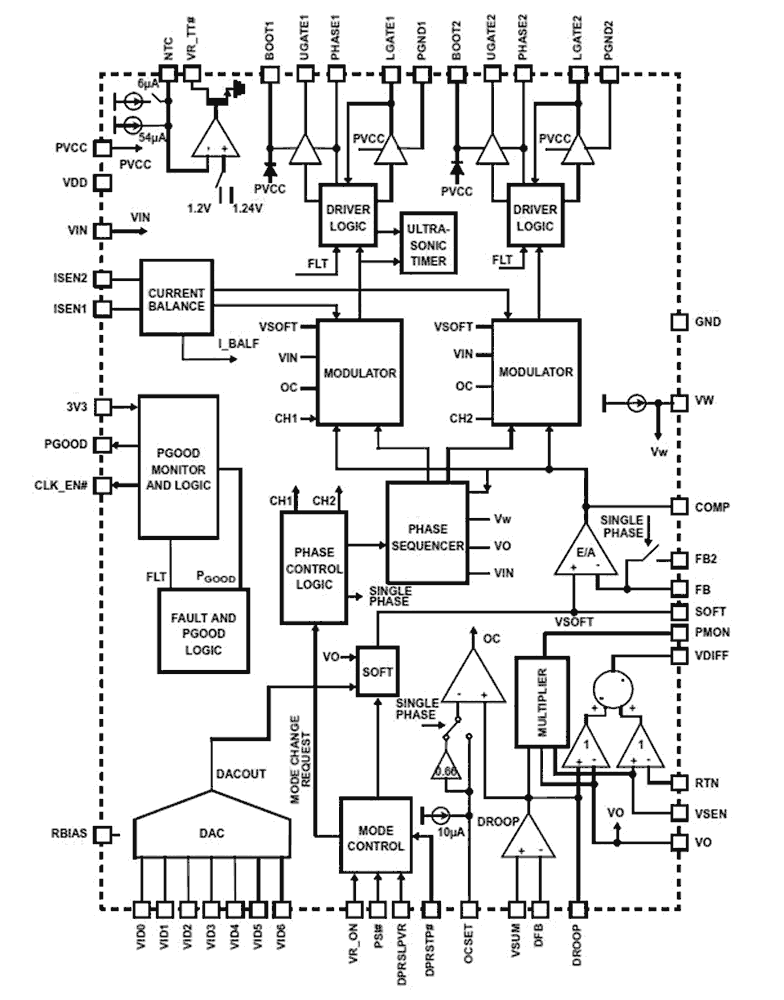
The ISL6262A is a two-phase buck converter regulator implementing Intel® IMVP-6+ protocol with embedded gate drivers. The two-phase buck converter uses two interleaved channels to effectively double the output voltage ripple frequency, and thereby reduce output voltage ripple amplitude with fewer components; lower component cost; reduced power dissipation; and smaller real estate area. The heart of the ISL6262A is the patented R3 Technology™, Intersil's Robust Ripple Regulator modulator. Compared with the traditional multiphase buck regulator, the R3 Technology™ has the fastest transient response. This is due to the R3 modulator commanding variable switching frequency during a load transient. Intel® Mobile Voltage Positioning (IMVP) is a smart voltage regulation technology, which effectively reduces power dissipation in Intel® Pentium processors. To boost battery life, the ISL6262A supports DPRSLPVR (deeper sleep), DPRSTP# and PSI# functions, and maximizes the efficiency via automatically enabling different phase operation modes. At heavy load operation of the active mode, the regulator commands the two phase continuous conduction mode (CCM) operation. While the PSI# is asserted with medium load in active mode, the ISL6262A smoothly disables one phase and operates in one-phase CCM. When the CPU enters deeper sleep mode, the ISL6262A enables diode emulation to maximize the efficiency at light load. For better system power management of the portable computer, the ISL6262A also provides a CPU power monitor output. The analog output at the power monitor pin can be fed into an A/D converter to report instantaneous or average CPU power. A 7-bit digital-to-analog converter (DAC) allows dynamic adjustment of the core output voltage from 0. 300V to 1. 500V. A 0. 5% system accuracy of the core output voltage over-temperature is achieved by the ISL6262A. A unity-gain differential amplifier is provided for remote CPU die sensing. This allows the voltage on the CPU die to be accurately measured and regulated per Intel® IMVP-6+ specifications. Current sensing can be realized using either lossless inductor DCR sensing, or precision resistor sensing. A single NTC thermistor network thermally compensates the gain and the time constant of the DCR variations.
| Part Number | Status | Samples | Stock | RoHS | Package | Lead Count (#) | Carrier Type | Moisture Sensitivity Level (MSL) | Pb (Lead) Free | Pb Free Category | Temp. Range (°C) |
|---|---|---|---|---|---|---|---|---|---|---|---|
| ISL6262ACRZ | Obsolete | N/A | In Stock | RoHS:EN | QFN | 48# | Tube | 3 | Yes | Pb-Free 100% Matte Tin Plate w/Anneal-e3 | 0 to +70°C |
| ISL6262ACRZ-T | Obsolete | N/A | Out of Stock | RoHS:EN | QFN | 48# | Reel | 3 | Yes | Pb-Free 100% Matte Tin Plate w/Anneal-e3 | 0 to +70°C |
| ISL6262AIRZ | Obsolete | N/A | In Stock | RoHS:EN | QFN | 48# | Tube | 2 | Yes | Pb-Free 100% Matte Tin Plate w/Anneal-e3 | -40 to +85°C |
| ISL6262AIRZ-T | Obsolete | N/A | Out of Stock | RoHS:EN | QFN | 48# | Reel | 2 | Yes | Pb-Free 100% Matte Tin Plate w/Anneal-e3 | -40 to +85°C |
Filters
Applied Filters
- Product Change NoticePDF 326 KB May 21, 2021
- Product Change NoticePDF 398 KB PCN15046 Jan 07, 2016
- Product Change NoticePDF 145 KB PCN13063 Nov 20, 2013
- Product Change NoticePDF 223 KB PCN13060 Oct 30, 2013
- Product Change NoticePDF 243 KB PCN13024B Oct 25, 2013
- Product Change NoticePDF 183 KB PCN13024 Mar 07, 2013
- Product Change NoticePDF 138 KB PCN12006 Jan 17, 2012
- Product Change NoticePDF 79 KB PCN10083 Aug 24, 2010
- Product Change NoticePDF 248 KB PCN10055 Jun 30, 2010
- Application NotePDF 397 KB an1684 Jan 19, 2004AI-generated Summary: The document outlines important legal disclaimers and usage guidelines for semiconductor products. It emphasizes user responsibility for product design and safety, disclaims liability for damages, and clarifies no intellectual property licenses are granted. Products are categorized by quality grades with specific application recommendations. Users must comply with laws, avoid unauthorized modifications, and ensure safe use within specified conditions. Contact details for Renesas Electronics sales offices worldwide are provided.
- Application NotePDF 509 KB an1681 Jan 19, 2004AI-generated Summary: The document explains grounding techniques for PCB layouts using a dual op amp example on a single-layer copper board. It compares three grounding schemes: a center spine ground trace, an outer ground plane, and a split/star ground plane, highlighting the benefits of single-point grounding to minimize noise and antenna effects. It emphasizes following current paths, minimizing loop lengths, and ensuring close forward and return paths to reduce interference. The document also includes disclaimers on product use, quality grades, safety, and legal compliance.
Recommended Documents (1)
Datasheets (1)
No Results Found.
Make sure all keywords are spelled correctly.
Try fewer, different, or more general terms to vary your search.
If you have filters applied, consider deselecting some to broaden your results.
- Search our extensive knowledgebase, designed to help customers with their FAQs.
- Get help from our expert Renesas technical staff and community on our support forums.
- Application NotePDF 397 KB an1684 Jan 19, 2004AI-generated Summary: The document outlines important legal disclaimers and usage guidelines for semiconductor products. It emphasizes user responsibility for product design and safety, disclaims liability for damages, and clarifies no intellectual property licenses are granted. Products are categorized by quality grades with specific application recommendations. Users must comply with laws, avoid unauthorized modifications, and ensure safe use within specified conditions. Contact details for Renesas Electronics sales offices worldwide are provided.
- Application NotePDF 509 KB an1681 Jan 19, 2004AI-generated Summary: The document explains grounding techniques for PCB layouts using a dual op amp example on a single-layer copper board. It compares three grounding schemes: a center spine ground trace, an outer ground plane, and a split/star ground plane, highlighting the benefits of single-point grounding to minimize noise and antenna effects. It emphasizes following current paths, minimizing loop lengths, and ensuring close forward and return paths to reduce interference. The document also includes disclaimers on product use, quality grades, safety, and legal compliance.
Application Notes & White Papers (2)
- Product Change NoticePDF 326 KB May 21, 2021
- Product Change NoticePDF 398 KB PCN15046 Jan 07, 2016
- Product Change NoticePDF 145 KB PCN13063 Nov 20, 2013
- Product Change NoticePDF 223 KB PCN13060 Oct 30, 2013
- Product Change NoticePDF 243 KB PCN13024B Oct 25, 2013View More (11)
Product Notices (PCN, EOL, etc) (11)
No Results Found.
Make sure all keywords are spelled correctly.
Try fewer, different, or more general terms to vary your search.
If you have filters applied, consider deselecting some to broaden your results.
- Search our extensive knowledgebase, designed to help customers with their FAQs.
- Get help from our expert Renesas technical staff and community on our support forums.
No Results Found.
Make sure all keywords are spelled correctly.
Try fewer, different, or more general terms to vary your search.
If you have filters applied, consider deselecting some to broaden your results.
- Search our extensive knowledgebase, designed to help customers with their FAQs.
- Get help from our expert Renesas technical staff and community on our support forums.
No Results Found.
Make sure all keywords are spelled correctly.
Try fewer, different, or more general terms to vary your search.
If you have filters applied, consider deselecting some to broaden your results.
- Search our extensive knowledgebase, designed to help customers with their FAQs.
- Get help from our expert Renesas technical staff and community on our support forums.
No Results Found.
Make sure all keywords are spelled correctly.
Try fewer, different, or more general terms to vary your search.
If you have filters applied, consider deselecting some to broaden your results.
- Search our extensive knowledgebase, designed to help customers with their FAQs.
- Get help from our expert Renesas technical staff and community on our support forums.
No Results Found.
Make sure all keywords are spelled correctly.
Try fewer, different, or more general terms to vary your search.
If you have filters applied, consider deselecting some to broaden your results.
- Search our extensive knowledgebase, designed to help customers with their FAQs.
- Get help from our expert Renesas technical staff and community on our support forums.
No Results Found.
Make sure all keywords are spelled correctly.
Try fewer, different, or more general terms to vary your search.
If you have filters applied, consider deselecting some to broaden your results.
- Search our extensive knowledgebase, designed to help customers with their FAQs.
- Get help from our expert Renesas technical staff and community on our support forums.
No Results Found.
Make sure all keywords are spelled correctly.
Try fewer, different, or more general terms to vary your search.
If you have filters applied, consider deselecting some to broaden your results.
- Search our extensive knowledgebase, designed to help customers with their FAQs.
- Get help from our expert Renesas technical staff and community on our support forums.
No Results Found.
Make sure all keywords are spelled correctly.
Try fewer, different, or more general terms to vary your search.
If you have filters applied, consider deselecting some to broaden your results.
- Search our extensive knowledgebase, designed to help customers with their FAQs.
- Get help from our expert Renesas technical staff and community on our support forums.
No Results Found.
Make sure all keywords are spelled correctly.
Try fewer, different, or more general terms to vary your search.
If you have filters applied, consider deselecting some to broaden your results.
- Search our extensive knowledgebase, designed to help customers with their FAQs.
- Get help from our expert Renesas technical staff and community on our support forums.