
Features
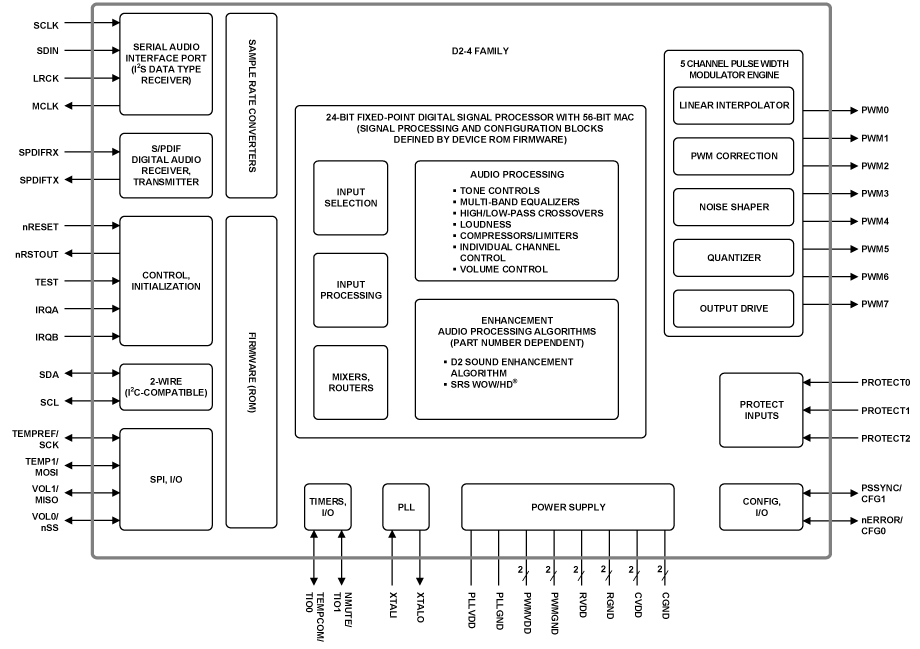
- All digital class-D amplifier controller with integrated Digital Signal Processing (DSP)
- Fully programmable audio signal path parameters
- Up to 5 channels of Digital Signal Processing (DSP)
- Includes equalizers, filters, mixers, and other common audio processing blocks
- Audio enhancement algorithms included
- I2S and S/PDIF™ digital audio stereo inputs
- I2C host control port
- Asynchronous sample rate converters, sample rates from 32kHz up to 192kHz
- Supports 2.0, 2.1, or bi-amp amplifier outputs with discrete or integrated power stages
Description
The D2-4 Family (D2-41051 and D2-41151 (D2-41x51-QR)) devices are complete System-on-Chip (SoC) Audio Processor and Class-D Amplifier Controllers that offer a powerful yet very cost effective audio solution for high volume consumer products, including digital TV systems, PC multimedia speakers, and portable device docking stations. This 4th generation Digital Audio Processor (D2-4 family) device combines extensive integrated DSP processing and configurable audio processing algorithms for complete audio system control. The D2-4 family devices offer the optimum balance of functionality and lowest system material cost, especially in an SoC system architecture with I2S audio output. All audio processing and amplifier control is handled by the D2-4 family, and its ease of integration to the existing system processor handles all system control functions.
Applications
- PC/Multimedia Speakers
- Digital TV Audio Systems
- Portable Device Docking Stations
- Powered Speaker Systems
| Part Number | Status | Samples | Stock | RoHS | Package | Lead Count (#) | Carrier Type | Moisture Sensitivity Level (MSL) | Pb (Lead) Free | Pb Free Category | Temp. Range (°C) |
|---|---|---|---|---|---|---|---|---|---|---|---|
| D2-41051-QR | Obsolete | N/A | Out of Stock | RoHS:EN | QFN | 48# | Tray | 3 | Yes | Pb-Free 100% Matte Tin Plate w/Anneal-e3 | 0 to +70°C |
| D2-41051-QR-TK | Obsolete | N/A | Out of Stock | RoHS:EN | QFN | 48# | Reel | 3 | Yes | Pb-Free 100% Matte Tin Plate w/Anneal-e3 | 0 to +70°C |
- Application NotePDF 184 KB r32an0007eu0100-d2-audio-dsp-output-filter-design May 20, 2019AI-generated Summary: The document explains the design and selection of output filters for D2 Audio DSP half-bridge and full-bridge configurations. It details the half-bridge output stage, filter network, and bias network that provides a DC offset and AC ground reference. It covers filter operation principles, emphasizing the second-order LC low-pass filter to attenuate high-frequency PWM signals. Loudspeaker impedance impacts filter damping and response. Recommended component values for inductors, capacitors, and bias networks are provided for various load impedances and power ratings.
- Application NotePDF 147 KB r32an0006eu-d2-audio-eeprom-spi May 15, 2019AI-generated Summary: The document explains procedures for writing firmware and parameter data to EEPROM or SPI Flash memories in D2 Audio DSP systems using an external microcontroller. It details booting methods, control pin configurations, and communication protocols for different D2 Audio device families (D2-1, D2-3, D2-4, D2-6). The process involves loading bootloader or boot code hex files, writing settings to memory, and rebooting to run from the updated non-volatile memory. Specific I2C addresses and pin states are critical for successful operations.
- Application NotePDF 506 KB r32an0004eu-d2-4-d2-4p May 15, 2019AI-generated Summary: The document details the D2-4/D2-4P API register specifications for audio DSP sound enhancement. Registers are accessed via an I2C interface with 24-bit hexadecimal addresses and data. It explains register read/write sequences, default parameter settings, and EEPROM storage for parameter retention. The register address map defines specific functions like volume control, mixers, equalizers, filters, and compressors. Audio processing is managed by internal firmware and DSP, with programmable parameters controlling signal flow and processing blocks.
- Application NotePDF 297 KB r32an0002eu-d2-audio-dsp May 13, 2019AI-generated Summary: The D2 Audio Customization GUI v3 offers a comprehensive set of audio processing blocks including Excursion Control, Delay, Compressor, Expander, Envelope VCA, Reverb, Chime Generator, RMS Level Meter, Fade-Pan, Mono Mixer, Dither Generator, Harmonics Generator, and Compound Blocks. It supports real-time interactive control with graphical displays for magnitude and phase, enabling precise parameter adjustments. The software allows flexible signal flow editing with dynamic register addressing and integration of third-party virtualization algorithms. Each audio block has dedicated registers, and the system generates updated header files for seamless controller integration.
Recommended Documents (1)
Datasheets (1)
No Results Found.
Make sure all keywords are spelled correctly.
Try fewer, different, or more general terms to vary your search.
If you have filters applied, consider deselecting some to broaden your results.
- Search our extensive knowledgebase, designed to help customers with their FAQs.
- Get help from our expert Renesas technical staff and community on our support forums.
- Application NotePDF 184 KB r32an0007eu0100-d2-audio-dsp-output-filter-design May 20, 2019AI-generated Summary: The document explains the design and selection of output filters for D2 Audio DSP half-bridge and full-bridge configurations. It details the half-bridge output stage, filter network, and bias network that provides a DC offset and AC ground reference. It covers filter operation principles, emphasizing the second-order LC low-pass filter to attenuate high-frequency PWM signals. Loudspeaker impedance impacts filter damping and response. Recommended component values for inductors, capacitors, and bias networks are provided for various load impedances and power ratings.
- Application NotePDF 147 KB r32an0006eu-d2-audio-eeprom-spi May 15, 2019AI-generated Summary: The document explains procedures for writing firmware and parameter data to EEPROM or SPI Flash memories in D2 Audio DSP systems using an external microcontroller. It details booting methods, control pin configurations, and communication protocols for different D2 Audio device families (D2-1, D2-3, D2-4, D2-6). The process involves loading bootloader or boot code hex files, writing settings to memory, and rebooting to run from the updated non-volatile memory. Specific I2C addresses and pin states are critical for successful operations.
- Application NotePDF 506 KB r32an0004eu-d2-4-d2-4p May 15, 2019AI-generated Summary: The document details the D2-4/D2-4P API register specifications for audio DSP sound enhancement. Registers are accessed via an I2C interface with 24-bit hexadecimal addresses and data. It explains register read/write sequences, default parameter settings, and EEPROM storage for parameter retention. The register address map defines specific functions like volume control, mixers, equalizers, filters, and compressors. Audio processing is managed by internal firmware and DSP, with programmable parameters controlling signal flow and processing blocks.
- Application NotePDF 297 KB r32an0002eu-d2-audio-dsp May 13, 2019AI-generated Summary: The D2 Audio Customization GUI v3 offers a comprehensive set of audio processing blocks including Excursion Control, Delay, Compressor, Expander, Envelope VCA, Reverb, Chime Generator, RMS Level Meter, Fade-Pan, Mono Mixer, Dither Generator, Harmonics Generator, and Compound Blocks. It supports real-time interactive control with graphical displays for magnitude and phase, enabling precise parameter adjustments. The software allows flexible signal flow editing with dynamic register addressing and integration of third-party virtualization algorithms. Each audio block has dedicated registers, and the system generates updated header files for seamless controller integration.
Application Notes & White Papers (4)
No Results Found.
Make sure all keywords are spelled correctly.
Try fewer, different, or more general terms to vary your search.
If you have filters applied, consider deselecting some to broaden your results.
- Search our extensive knowledgebase, designed to help customers with their FAQs.
- Get help from our expert Renesas technical staff and community on our support forums.
No Results Found.
Make sure all keywords are spelled correctly.
Try fewer, different, or more general terms to vary your search.
If you have filters applied, consider deselecting some to broaden your results.
- Search our extensive knowledgebase, designed to help customers with their FAQs.
- Get help from our expert Renesas technical staff and community on our support forums.
No Results Found.
Make sure all keywords are spelled correctly.
Try fewer, different, or more general terms to vary your search.
If you have filters applied, consider deselecting some to broaden your results.
- Search our extensive knowledgebase, designed to help customers with their FAQs.
- Get help from our expert Renesas technical staff and community on our support forums.
No Results Found.
Make sure all keywords are spelled correctly.
Try fewer, different, or more general terms to vary your search.
If you have filters applied, consider deselecting some to broaden your results.
- Search our extensive knowledgebase, designed to help customers with their FAQs.
- Get help from our expert Renesas technical staff and community on our support forums.
No Results Found.
Make sure all keywords are spelled correctly.
Try fewer, different, or more general terms to vary your search.
If you have filters applied, consider deselecting some to broaden your results.
- Search our extensive knowledgebase, designed to help customers with their FAQs.
- Get help from our expert Renesas technical staff and community on our support forums.
No Results Found.
Make sure all keywords are spelled correctly.
Try fewer, different, or more general terms to vary your search.
If you have filters applied, consider deselecting some to broaden your results.
- Search our extensive knowledgebase, designed to help customers with their FAQs.
- Get help from our expert Renesas technical staff and community on our support forums.
No Results Found.
Make sure all keywords are spelled correctly.
Try fewer, different, or more general terms to vary your search.
If you have filters applied, consider deselecting some to broaden your results.
- Search our extensive knowledgebase, designed to help customers with their FAQs.
- Get help from our expert Renesas technical staff and community on our support forums.
No Results Found.
Make sure all keywords are spelled correctly.
Try fewer, different, or more general terms to vary your search.
If you have filters applied, consider deselecting some to broaden your results.
- Search our extensive knowledgebase, designed to help customers with their FAQs.
- Get help from our expert Renesas technical staff and community on our support forums.
No Results Found.
Make sure all keywords are spelled correctly.
Try fewer, different, or more general terms to vary your search.
If you have filters applied, consider deselecting some to broaden your results.
- Search our extensive knowledgebase, designed to help customers with their FAQs.
- Get help from our expert Renesas technical staff and community on our support forums.
No Results Found.
Make sure all keywords are spelled correctly.
Try fewer, different, or more general terms to vary your search.
If you have filters applied, consider deselecting some to broaden your results.
- Search our extensive knowledgebase, designed to help customers with their FAQs.
- Get help from our expert Renesas technical staff and community on our support forums.
No Results Found.
Make sure all keywords are spelled correctly.
Try fewer, different, or more general terms to vary your search.
If you have filters applied, consider deselecting some to broaden your results.
- Search our extensive knowledgebase, designed to help customers with their FAQs.
- Get help from our expert Renesas technical staff and community on our support forums.
Filters
Applied Filters
Software & Tools
Filter by Type
Filter by Provider
Sample Code
Filter by Application
Filter by Function
Filter by Compiler
Filter by IDE
Simulation Models
Partner Solutions
No Results Found.
Make sure all keywords are spelled correctly.
Try fewer, different, or more general terms to vary your search.
If you have filters applied, consider deselecting some to broaden your results.
- Search our extensive knowledgebase, designed to help customers with their FAQs.
- Get help from our expert Renesas technical staff and community on our support forums.
No Results Found.
Make sure all keywords are spelled correctly.
Try fewer, different, or more general terms to vary your search.
If you have filters applied, consider deselecting some to broaden your results.
- Search our extensive knowledgebase, designed to help customers with their FAQs.
- Get help from our expert Renesas technical staff and community on our support forums.
No Results Found.
Make sure all keywords are spelled correctly.
Try fewer, different, or more general terms to vary your search.
If you have filters applied, consider deselecting some to broaden your results.
- Search our extensive knowledgebase, designed to help customers with their FAQs.
- Get help from our expert Renesas technical staff and community on our support forums.
No Results Found.
Make sure all keywords are spelled correctly.
Try fewer, different, or more general terms to vary your search.
If you have filters applied, consider deselecting some to broaden your results.
- Search our extensive knowledgebase, designed to help customers with their FAQs.
- Get help from our expert Renesas technical staff and community on our support forums.
No Results Found.
Make sure all keywords are spelled correctly.
Try fewer, different, or more general terms to vary your search.
If you have filters applied, consider deselecting some to broaden your results.
- Search our extensive knowledgebase, designed to help customers with their FAQs.
- Get help from our expert Renesas technical staff and community on our support forums.
No Results Found.
Make sure all keywords are spelled correctly.
Try fewer, different, or more general terms to vary your search.
If you have filters applied, consider deselecting some to broaden your results.
- Search our extensive knowledgebase, designed to help customers with their FAQs.
- Get help from our expert Renesas technical staff and community on our support forums.
