
Features
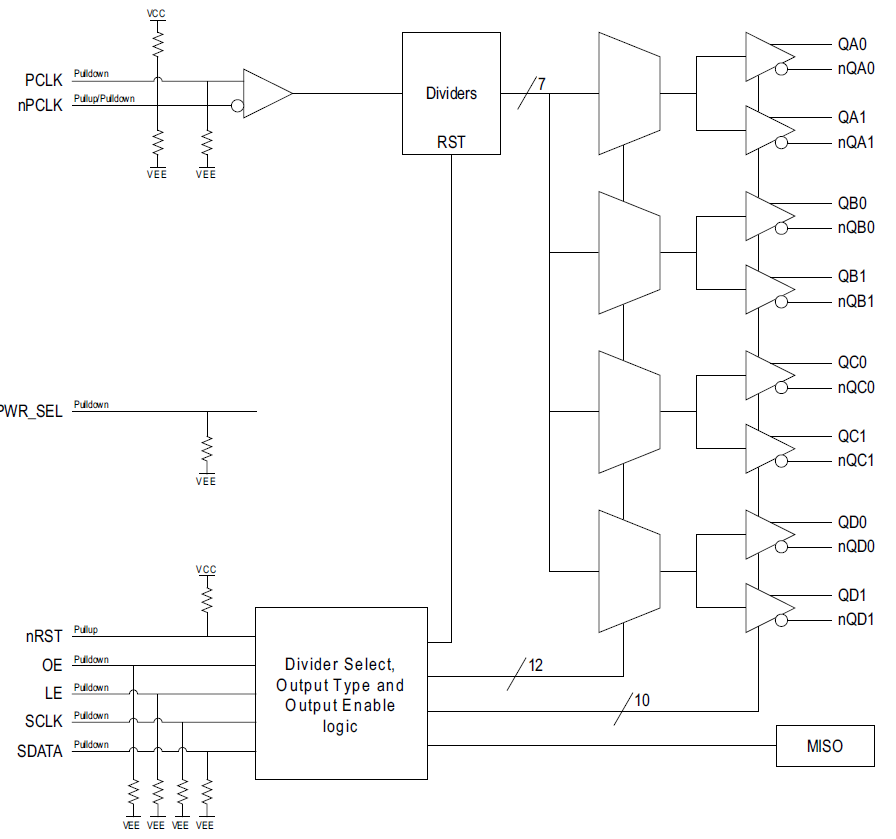
- Four banks of two low-skew outputs
- Selectable bank output divider values: ÷1 through ÷6 and ÷8
- One differential PCLK, nPCLK input
- PCLK, nPCLK input pair can accept the following differential input levels: LVPECL, LVDS, or CML
- Maximum input frequency: 1.5GHz
- LVCMOS control inputs
- QXx ÷1 edge aligned to QXx ÷n edge
- Individual output divider control via serial interface
- Individual output enable/disable control via serial interface
- Individual output type control, LVDS or LVPECL, via serial interface
- 2.375V to 3.465V supply voltage operation
- -40 °C to 85 °C ambient operating temperature
- Lead-free (RoHS 6) packaging
- Supported by Renesas' Timing Commander™ software
Description
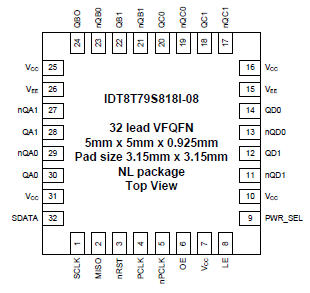
The 8T79S818I-08 is a high-performance, 1-to-8, differential input to universal output clock divider and fanout buffer. The device is designed for frequency division and signal fanout of high-frequency clock signals in applications requiring four different output frequencies generated simultaneously. Each bank of two outputs has a selectable divider value of ÷1 through ÷6 and ÷8. The 8T79S818I-08 is optimized for 3.3V and 2.5V supply voltages and a temperature range of -40 °C to 85 °C. The device is packaged in a space-saving 32-lead VFQFN package.
| Part Number | Status | Samples | Stock | Package | Lead Count (#) | Carrier Type | Moisture Sensitivity Level (MSL) | Qty. per Reel (#) | Qty. per Carrier (#) | Pb (Lead) Free | Pb Free Category | Temp. Range (°C) |
|---|---|---|---|---|---|---|---|---|---|---|---|---|
| 8T79S818A-08NLGI | Obsolete | N/A | In Stock | VFQFPN | 32# | Tray | 3 | 0 | 490# | Yes | e3 Sn | -40 to 85°C |
| 8T79S818A-08NLGI8 | Obsolete | N/A | In Stock | VFQFPN | 32# | Reel | 3 | 2500# | 0 | Yes | e3 Sn | -40 to 85°C |
Filters
Applied Filters
- Application NotePDF 348 KB R31AN0040EU0100 Rev.1.00 Mar 10, 2023
- Application NotePDF 170 KB 7WDXRDKU4E7E-5-57318 May 13, 2014
- Application NotePDF 495 KB 7WDXRDKU4E7E-5-57312 May 12, 2014
- Application NotePDF 442 KB 7WDXRDKU4E7E-5-57298 May 08, 2014
- Application NotePDF 120 KB 7WDXRDKU4E7E-5-57289 May 06, 2014
- Application NotePDF 160 KB 7WDXRDKU4E7E-5-57287 May 06, 2014
- Application NotePDF 180 KB 7WDXRDKU4E7E-5-57283 May 06, 2014
- End Of Life NoticePDF 606 KB 7WDXRDKU4E7E-5-62524 Nov 29, 2017
Recommended Documents (1)
Datasheets (1)
No Results Found.
Make sure all keywords are spelled correctly.
Try fewer, different, or more general terms to vary your search.
If you have filters applied, consider deselecting some to broaden your results.
- Search our extensive knowledgebase, designed to help customers with their FAQs.
- Get help from our expert Renesas technical staff and community on our support forums.
- Application NotePDF 348 KB R31AN0040EU0100 Rev.1.00 Mar 10, 2023
- Application NotePDF 1.99 MB 7WDXRDKU4E7E-5-57242 Mar 01, 2022
Application Notes & White Papers (13)
- End Of Life NoticePDF 606 KB 7WDXRDKU4E7E-5-62524 Nov 29, 2017
- End Of Life NoticePDF 599 KB 7WDXRDKU4E7E-5-61808 Aug 24, 2017
- Product Change NoticePDF 583 KB 7WDXRDKU4E7E-5-61343 Dec 20, 2016
- Product Change NoticePDF 596 KB 7WDXRDKU4E7E-5-59884 Jan 28, 2016
- Product Change NoticePDF 544 KB 7WDXRDKU4E7E-5-59710 Nov 13, 2015
Product Notices (PCN, EOL, etc) (5)
No Results Found.
Make sure all keywords are spelled correctly.
Try fewer, different, or more general terms to vary your search.
If you have filters applied, consider deselecting some to broaden your results.
- Search our extensive knowledgebase, designed to help customers with their FAQs.
- Get help from our expert Renesas technical staff and community on our support forums.
No Results Found.
Make sure all keywords are spelled correctly.
Try fewer, different, or more general terms to vary your search.
If you have filters applied, consider deselecting some to broaden your results.
- Search our extensive knowledgebase, designed to help customers with their FAQs.
- Get help from our expert Renesas technical staff and community on our support forums.
- Engineering
Schematics & Design Files (1)
No Results Found.
Make sure all keywords are spelled correctly.
Try fewer, different, or more general terms to vary your search.
If you have filters applied, consider deselecting some to broaden your results.
- Search our extensive knowledgebase, designed to help customers with their FAQs.
- Get help from our expert Renesas technical staff and community on our support forums.
No Results Found.
Make sure all keywords are spelled correctly.
Try fewer, different, or more general terms to vary your search.
If you have filters applied, consider deselecting some to broaden your results.
- Search our extensive knowledgebase, designed to help customers with their FAQs.
- Get help from our expert Renesas technical staff and community on our support forums.
No Results Found.
Make sure all keywords are spelled correctly.
Try fewer, different, or more general terms to vary your search.
If you have filters applied, consider deselecting some to broaden your results.
- Search our extensive knowledgebase, designed to help customers with their FAQs.
- Get help from our expert Renesas technical staff and community on our support forums.
- Product BriefPDF 378 KB 7WDXRDKU4E7E-6-1169 Aug 14, 2012
Marketing Collateral (3)
No Results Found.
Make sure all keywords are spelled correctly.
Try fewer, different, or more general terms to vary your search.
If you have filters applied, consider deselecting some to broaden your results.
- Search our extensive knowledgebase, designed to help customers with their FAQs.
- Get help from our expert Renesas technical staff and community on our support forums.
No Results Found.
Make sure all keywords are spelled correctly.
Try fewer, different, or more general terms to vary your search.
If you have filters applied, consider deselecting some to broaden your results.
- Search our extensive knowledgebase, designed to help customers with their FAQs.
- Get help from our expert Renesas technical staff and community on our support forums.
Filters
Applied Filters
Software & Tools
Filter by Type
Filter by Provider
Sample Code
Filter by Application
Filter by Function
Filter by Compiler
Filter by IDE
Simulation Models
Partner Solutions
- Software & Tools - Software
- Code GeneratorTiming Commander™ is an innovative Windows™-based software platform enabling system design engineers to configure, program, and monitor sophisticated timing devices with an intuitive and flexible graphical user interface (GUI).
No Results Found.
Make sure all keywords are spelled correctly.
Try fewer, different, or more general terms to vary your search.
If you have filters applied, consider deselecting some to broaden your results.
- Search our extensive knowledgebase, designed to help customers with their FAQs.
- Get help from our expert Renesas technical staff and community on our support forums.
- Software & Tools - Software
- Code GeneratorTiming Commander™ is an innovative Windows™-based software platform enabling system design engineers to configure, program, and monitor sophisticated timing devices with an intuitive and flexible graphical user interface (GUI).
Software & Tools (2)
No Results Found.
Make sure all keywords are spelled correctly.
Try fewer, different, or more general terms to vary your search.
If you have filters applied, consider deselecting some to broaden your results.
- Search our extensive knowledgebase, designed to help customers with their FAQs.
- Get help from our expert Renesas technical staff and community on our support forums.
Simulation Models (1)
No Results Found.
Make sure all keywords are spelled correctly.
Try fewer, different, or more general terms to vary your search.
If you have filters applied, consider deselecting some to broaden your results.
- Search our extensive knowledgebase, designed to help customers with their FAQs.
- Get help from our expert Renesas technical staff and community on our support forums.
Description
IDT's innovative support tool, Timing Commander™, expedites development cycles by empowering customers to program sophisticated timing devices with an intuitive and flexible Graphical User Interface. IDT's Timing Commander is a Windows™-based platform designed to serve user-friendly configuration interfaces, known as personalities, for various IDT products and product families. With a few simple clicks, the user is presented with a comprehensive, interactive block diagram offering the ability to modify desired input values, output values, and other configuration settings. The software automatically makes calculations, reports status monitors, and prepares register settings without the need to reference a datasheet. The tool also automatically loads the configuration settings over USB to an IDT evaluation board for immediate application in the circuit. Once the device has been configured and tuned for optimal system performance, the configuration file can be saved for factory-level programming before shipment. For more information about Timing Commander, visit our Timing Commander page.
Resources

Support Communities


