
Overview
Description
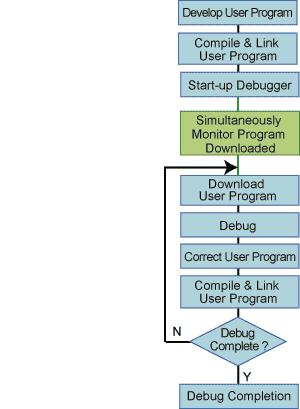
After the Monitor Program is written to the MCU and the Monitor Program communicates with the Debugger, the user program can be debugged.
Features
- Software for on-chip debugging on High-performance Embedded Workshop or KD3x.
- The Monitor Program is automatically written to the MCU when the Debugger is started up. Therefore, there is no need to write the Monitor Program to the MCU using a flash programmer.
- You can debug by the same pin handling as Standard Serial I/O Mode 2 for the flash programmer.
- Initialize (erase) the user program area using a flash programmer before using the Monitor Program.
- Use RS-232C for communication between the Debugger and the Monitor Program.
- Learn More
Target Devices
Downloads
|
|
|
|
|---|---|---|
| Type | Title | Date |
| Upgrade - IDE | High-performance Embedded Workshop V.4.09.01 Differential Update(From V.4.09.00)
|
|
| Upgrade - IDE | High-performance Embedded Workshop V.4.09.01 Full Update
|
|
| Upgrade - Debugger | M16C R8C FoUSB/UART Debugger Update Program for R8C/1x, R8C/2x, R8C/3x, R8C/Lx and R8C/Mx
|
|
| Upgrade - Debugger | M16C R8C FoUSB/UART Emulator Debugger V.1.03 Release 00 Upgrade
|
|
| Upgrade - Debugger | Debugger KD30 Ver.4.10 Release1 Upgrade
|
|
5 items
|
||
Documentation
|
|
|
|
|---|---|---|
| Type | Title | Date |
| Manual - Development Tools | PDF 1.65 MB 日本語 | |
| Manual - Development Tools | PDF 1.54 MB 日本語 | |
| Guide | PDF 1.12 MB 日本語 | |
| Guide | PDF 1.11 MB 日本語 | |
| Manual - Development Tools | PDF 1.14 MB 日本語 | |
| Manual - Development Tools | PDF 1.15 MB 日本語 | |
| Manual - Hardware | PDF 1.15 MB 日本語 | |
| Manual - Development Tools | PDF 1.23 MB 日本語 | |
| Release Note | PDF 202 KB 日本語 | |
| Manual - Development Tools | PDF 1.18 MB 日本語 | |
| Manual - Development Tools | PDF 1.18 MB 日本語 | |
| Manual - Development Tools | PDF 1.18 MB 日本語 | |
| Guide | PDF 1.26 MB 日本語 | |
| Manual - Development Tools | PDF 1.23 MB 日本語 | |
14 items
|
||
Additional Details
System Configuration
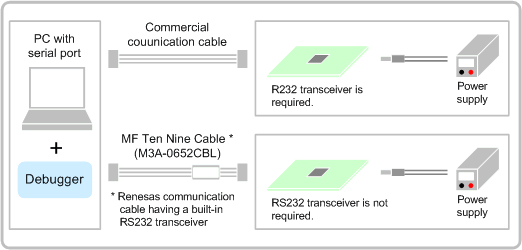
Preparations
- PC with Serial Port
- Communication Cable
- Target Board, Power Supply
- Debugger
* You can download the Debugger from "Documentation & Downloads".
Process flow
Operating Environment
The operating environment depends on your debugger.
M16C R8C FoUSB/UART debugger (High-performance Embedded Workshop Version)
| Item | Description |
|---|---|
| PC | IBM PC/AT or compatible PC with Intel Pentium III 600MHz or higher |
| OS | Windows XP, Windows 2000, Windows ME, Windows 98 SE (98) |
| Memory | 128MB or higher |
| Interface | 9-pin D-SUB Serial Interface |
M16C R8C FoUSB/UART debugger (KD30 Version)
| Item | Description |
|---|---|
| PC | IBM PC/AT or compatible PC with Intel DX4 100MHz/Pentium II 75MHz or higher |
| OS | Windows XP, Windows 2000, Windows ME, Windows 98 SE (98), Windows 95 |
| Memory | 16MB or higher |
| Interface | 9-pin D-SUB Serial Interface |
Note
ID Check Function
The ID check function, which provides protection against accidentally erasing the user program, is supported except in R8C/10 and R8C/11 Groups with Boot Program Version 0.90. This function checks the addresses in which the ID code is stored when the Debugger is started up, and executes the debugging program (erase internal ROM and download Monitor Program) only when the ID code is "all FFh".
When the ID code is not "all FFh", the Debugger displays a time-out error and KD30 will not operate (internal ROM will not be erased and Monitor Program will not be downloaded).
ID Code at Debug Completion
[R8C/10 and R8C/11 Groups Boot Program Ver.0.90]
The Monitor Program sets ID3, ID4, and ID6 to "00h". All other codes are set according to the ID code of the user program. For example, if the user program ID code is set to "all FFh", the codes will be as follows.
Therefore, we recommend setting the user program ID code to "all 00h" .
| ID1: FFh (address 0FFDFh) ID2: FFh (address 0FFE3h) ID3: 00h (address 0FFEBh) ID4: 00h (address 0FFEFh) ID5: FFh (address 0FFF3h) ID6: 00h (address 0FFF7h) ID7: FFh (address 0FFFBh) |
[R8C/10 and R8C/11 Groups Boot Program Ver.1.00 or later and Other Groups of R8C Family]
The Monitor Program sets ID1 through ID7 to "all FFh". Therefore, regardless of what the ID code is set to in the user program, this will not be reflected in the final outcome. Accordingly, after debug is completed, the ID code will always be "all FFh".
Upgrade Information
Debugger (High-performance Embedded Workshop version / KD version)
<<KD debugger does not have a plan to revise any more.>>
* Target product : M32C M16C UART Monitor Program | R8C UART Monitor Program
High-performance Embedded Workshop version
[Latest Version]
- Released Date : 1. July, 2007
- Software name :
- M16C R8C FoUSB/UART Debugger
- M32C FoUSB/UART Debugger
- Version : V.1.03 Release 00
- New feature(s)
- Comes with High-performance Embedded Workshop V.4.03.00
- [Disconnect] function
- Representational function of instruction format specifier in disassembly language
- Assignment function to bit-field members
- Some more improvements
[How to upgrade to the latest version]
Download free updates from the "Documentation & Downloads". Upgradable from any previous versions.
[How to install]
Each emulator and monitor debugger is not bundled with High-performance Embedded Workshop. Please download from the "Documentation & Downloads" on this page. Installing this emulator debugger add High-performance Embedded Workshop environment a debugging function.
KD version
[Latest Version]
| Released Date | Software name | Version |
|---|---|---|
| 9. June, 2004 | KD30 (M16C R8C FoUSB/UART Debugger) | Ver.4.10 Release 1 |
| 25. August, 2004 | KD3083 (M32C FoUSB/UART Debugger) | Ver.3.30 Release 1 |
| 28. May, 1999 | KD308* (M32C UART Debugger) | Ver.1.00 Release 1 |
* : KD308 is a M16C/80 Group debugger for "M32C M16C UART Monitor Program". This product has no plan to support High-performance Embedded Workshop in the future.
[How to upgrade to the latest version]
Download free updates from the "Documentation & Downloads".
Target Devices
M16C R8C FoUSB/UART debugger (High-performance Embedded Workshop Version)
The debugger depends on your MCU. In addition, the High-performance Embedded Workshop version of the debugger is the successor debugger of the KD30/KD3083 version. The High-performance Embedded Workshop version is only scheduled for release in the future.
| Family | Series | Group | Part No. | ||
|---|---|---|---|---|---|
| R8C | R8C/1x | R8C/10 | R5F21102 | R5F21103 | R5F21104 |
| R8C/11 | R5F21112 | R5F21113 | R5F21114 | ||
| R8C/12 | R5F21122 | R5F21123 | R5F21124 | ||
| R8C/13 | R5F21132 | R5F21133 | R5F21134 | ||
| R8C/14 | R5F21142 | R5F21143 | R5F21144 | ||
| R8C/15 | R5F21152 | R5F21153 | R5F21154 | ||
| R8C/16 | R5F21162 | R5F21163 | R5F21164 | ||
| R8C/17 | R5F21172 | R5F21173 | R5F21174 | ||
| R8C/18 | R5F21181 | R5F21182 | R5F21183 | ||
| R5F21184 | - | - | |||
| R8C/19 | R5F21191 | R5F21192 | R5F21193 | ||
| R5F21194 | - | - | |||
| R8C/1A | R5F211A1 | R5F211A2 | R5F211A3 | ||
| R5F211A4 | - | - | |||
| R8C/1B | R5F211B1 | R5F211B2 | R5F211B3 | ||
| R5F211B4 | - | - | |||
| R8C/2x | R8C/20 | R5F21206 | R5F21207 | R5F21208 | |
| R8C/21 | R5F21216 | R5F21217 | R5F21218 | ||
| R8C/22 | R5F21226 | R5F21227 | R5F21228 | ||
| R8C/23 | R5F21236 | R5F21237 | R5F21238 | ||
| R8C/24 | R5F21244 | R5F21246 | R5F21247 | ||
| R5F21248 | - | - | |||
| R8C/25 | R5F21254 | R5F21256 | R5F21257 | ||
| R5F21258 | - | - | |||
| R8C/26 | R5F21262 | R5F21264 | R5F21265 | ||
| R5F21266 | - | - | |||
| R8C/27 | R5F21272 | R5F21274 | R5F21275 | ||
| R5F21276 | - | - | |||
| R8C/28 | R5F21282 | R5F21284 | R5F21286 | ||
| R8C/29 | R5F21292 | R5F21294 | R5F21296 | ||
| R8C/2A | R5F212A7 | R5F212A8 | R5F212AA | ||
| R5F212AC | - | - | |||
| R8C/2B | R5F212B7 | R5F212B8 | R5F212BA | ||
| R5F212BC | - | - | |||
| R8C/2C | R5F212C7 | R5F212C8 | R5F212CA | ||
| R5F212CC | - | - | |||
| R8C/2D | R5F212D7 | R5F212D8 | R5F212DA | ||
| R5F212DC | - | - | |||
| R8C/2E | R5F212E2 | R5F212E4 | - | ||
| R8C/2F | R5F212F2 | R5F212F4 | - | ||
| R8C/2G | R5F212G4 | R5F212G5 | R5F212G6 | ||
| R8C/2H | R5F212H1 | R5F212H2 | - | ||
| R8C/2J | R5F212J0 | R5F212J1 | - | ||
| R8C/2K | R5F212K2 | R5F212K4 | - | ||
| R8C/2L | R5F212L2 | R5F212L4 | - | ||
| R8C/3x | R8C/32C | R5F21321C | R5F21322C | R5F21324C | |
| R8C/33C | R5F21331C | R5F21332C | R5F21334C | ||
| R5F21335C | R5F21336C | - | |||
| R8C/34C | R5F21344C | R5F21345C | R5F21346C | ||
| R8C/35C | R5F21354C | R5F21355C | R5F21356C | ||
| R5F21357C | R5F21358C | R5F2135AC | |||
| R5F2135CC | - | - | |||
| R8C/36C | R5F21364C | R5F21365C | R5F21366C | ||
| R5F21367C | R5F21368C | R5F2136AC | |||
| R5F2136CC | - | - | |||
| R8C/38C | R5F21386C | R5F21387C | R5F21388C | ||
| R5F2138AC | R5F2138CC | - | |||
| R8C/32D | R5F21321D | R5F21322D | R5F21324D | ||
| R8C/33D | R5F21331D | R5F21332D | R5F21334D | ||
| R5F21335D | R5F21336D | - | |||
| R8C/35D | R5F21354D | R5F21355D | R5F21356D | ||
| R8C/33T | R5F21334T | R5F21335T | R5F21336T | ||
| R8C/32M | R5F21321M | R5F21322M | R5F21324M | ||
| R8C/33M | R5F21331M | R5F21332M | R5F21334M | ||
| R5F21335M | R5F21336M | - | |||
| R8C/34M | R5F21344M | R5F21345M | R5F21346M | ||
| R8C/35M | R5F21354M | R5F21355M | R5F21356M | ||
| R5F21357M | R5F21358M | R5F2135AM | |||
| R5F2135CM | - | - | |||
| R8C/Lx | R8C/L35C | R5F2L357C | R5F2L358C | R5F2L35AC | |
| R5F2L35CC | - | - | |||
| R8C/L36C | R5F2L367C | R5F2L368C | R5F2L36AC | ||
| R5F2L36CC | - | - | |||
| R8C/L38C | R5F2L387C | R5F2L388C | R5F2L38AC | ||
| R5F2L38CC | - | - | |||
| R8C/L3AC | R5F2L3A7C | R5F2L3A8C | R5F2L3AAC | ||
| R5F2L3ACC | - | - | |||
| R8C/Mx | R8C/M11A | R5F2M111A | R5F2M112A | - | |
| R8C/M12A | R5F2M121A | R5F2M122A | - | ||
M16C R8C FoUSB/UART debugger (KD30 Version)
| Family | Series | Group | Part No. |
|---|---|---|---|
| R8C | R8C/1x | R8C/10 | R5F21102 |
| R8C/11 | R5F21112 | ||
| R8C/12 | R5F21122 | ||
| R8C/13 | R5F21132 | ||
| R8C/14 | R5F21142 | ||
| R8C/15 | R5F21152 | ||
| R8C/16 | R5F21162 | ||
| R8C/17 | R5F21172 |
Support
Support Communities
- R8C/15 R5F21154 how to write via UART.
Hey! I have an MCU R8C/15 R5F21154, and I am faced with a problem, I do not know what program can be used to write via UART to my MCU? I have looked at a lot of information on the Internet, but I haven’t found what I ...
Apr 24, 2021 - R8C/27(Programming through UART)
... programming by using UART.. so i used HEW IDE (M16C R8C FoUSB/UART tool) in that when i am selecting MCU file --->.Refer----->McuFIles---->R8C Tiny series in this folder i am not getting R5F21276UART.MCU ..so how to programming through UART.. steps 1. create new project workshop 2 ...
Aug 27, 2013 - R8C, UART1 receive interrupt stops firing.
R8C/R5F2L3ACC When stress testing serial communications, receive interrupt eventually stops firing after a random amount of time. Interrupt won't restart until I set re_u1c1 off and then back on. Communications works for thousands of send/receives. Anyone have an idea of why is this happening ...
Apr 24, 2015

Support Communities


